Chapter 20
VPC Service Controls
Scope. This chapter is the book's single explanation of VPC Service Controls: the exfiltration threat model, service perimeters, restricted services, access levels, ingress and egress rules, bridges, dry-run mode, testing, running CI/CD inside a perimeter, and the multi-perimeter design an enterprise estate needs. Chapters 5, 11, and 12 defer here for the data perimeter. Edge protection — Cloud Armor, WAF, DDoS — is Chapter 19. Prerequisites. Chapter 1 (§1.9 service endpoints), Chapter 3 (§3.9 roles), Chapter 5 (§5.17 Private Google Access), Chapter 11 (§11.8 bucket IAM). Verified against. Google Cloud console and API surface as of 2026-09, Cloud SDK 583.0.0,
hashicorp/googleprovider 8.x; see sources at end.
Everything else in this book assumes that IAM is correct. VPC Service Controls is the control that survives IAM being wrong. Google states the case directly: a service perimeter provides "an extra layer of security by denying access from unauthorized networks, even if the data is exposed by misconfigured IAM policies", and it "helps protect against accidental or targeted action by external entities or insider entities".
The mechanism is worth stating precisely, because it is unlike anything else in the platform. A service perimeter is a boundary around a set of projects, enforced by the Google API front end, that restricts named services so that a request crossing the boundary is denied regardless of the caller's IAM permissions. A user with full administrative rights on a bucket inside the perimeter, calling from a laptop outside it, is denied. A service account whose key has leaked is denied. A gsutil cp to a bucket in an attacker's own project is denied — not because the copy is unauthorized, but because the destination is outside.
That inversion is the whole value and also the whole difficulty. Every control elsewhere in this book fails closed against an unauthorized principal; a perimeter fails closed against an authorized one who is in the wrong place. Which means that when you enforce a perimeter, the things that break are all legitimate: the analyst's notebook, the CI pipeline, the vendor integration, the backup job somebody wrote in 2023. Dry-run mode (§20.8) is not a nicety; it is the only defensible way to deploy this, and a team that enforces a perimeter without first reading a month of dry-run violations will take production down.
20.1 Data Exfiltration Threats §
Data exfiltration is the movement of data from a place you control to a place you do not, by a principal who is permitted to read it.
IAM cannot express this problem. A permission is a verb on a resource — read this object, list this dataset. Nothing in an IAM policy says where the result may go. A principal with roles/storage.objectViewer on a bucket may read every object and write it anywhere their client can reach, and the audit log records a legitimate read.
Four paths account for nearly all real exfiltration in Google Cloud:
| Path | What happens | What stops it |
|---|---|---|
| Credential theft | A leaked key or token is used from outside the estate | The perimeter denies the network origin (§20.4) |
| Insider copy | An authorized user copies data to a personal project | The perimeter denies the destination (§20.6) |
| Compromised workload | Code inside a VM or container reads and posts data out | Egress rules plus §5.13 egress firewalling |
| Misconfigured share | A bucket or dataset made readable too broadly | The perimeter denies access from outside regardless of IAM |
The perimeter is the only one of these that does not depend on getting IAM right. That is why it appears after twelve chapters of IAM and data controls rather than instead of them: it is the assumption-failure backstop, and it is worth deploying precisely because the other controls will eventually be misconfigured.
Judgment. Scope the perimeter by data, not by team. The projects that hold regulated or customer data belong inside; the projects that hold build artifacts, dashboards, and sandboxes belong outside. A perimeter drawn around an organizational chart will be redrawn every reorganization.
Pitfall. A perimeter protects the API surface, not the data plane. Google is explicit that "VPC Service Controls doesn't cover dataplane paths such as Network File System (NFS) and Server Message Block (SMB) reads and writes", and that "Service perimeters protect only the AlloyDB for PostgreSQL Admin API. They don't protect IP-based data access to underlying databases."
20.2 Service Perimeters §
A service perimeter is a named object inside an access policy, listing a set of resources and a set of restricted services. Requests to those services, for those resources, are allowed only from inside the perimeter or through an explicit exception.
The access policy is the container and there is essentially one of it. Google's quota page states the organization limit plainly: "Organization-level access policy: 1", plus "Folder and project-scoped access policies: 50". Within that policy, "Service perimeters: 10,000" and "Protected resources: 40,000" are the ceilings, and one service perimeter carries up to "Attributes: 6,000".
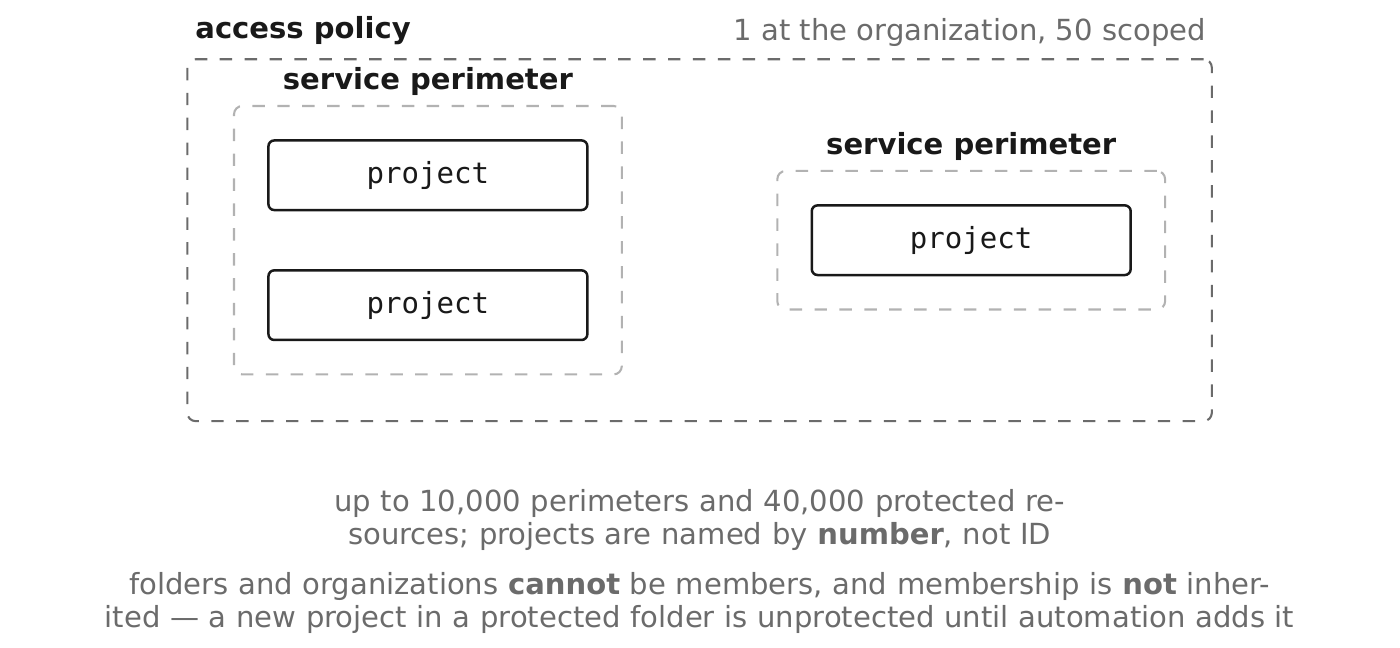
A project belongs to at most one regular perimeter. Google's own wording for the regular type: "Allows resources within this service perimeter to import and export data amongst themselves. A project may belong to at most one regular service perimeter."
gcloud access-context-manager policies create \
  --organization=123456789012 \
  --title="rc-saas organization access policy"

gcloud access-context-manager perimeters create sp-prod-data \
  --policy=POLICY_ID \
  --title="Production data perimeter" \
  --resources=projects/PROJECT_NUMBER \
  --restricted-services=storage.googleapis.com,bigquery.googleapis.com \
  --perimeter-type=regular
Resources are named by project number, not project ID. This trips up every first attempt, and it also means a perimeter's membership list is unreadable without a lookup — keep the mapping in Terraform where the number comes from a resource reference rather than a literal.
Folders and organizations cannot be perimeter members. Google states: "VPC Service Controls doesn't support adding folder-level or organization-level resources into a service perimeter." Membership is per project, so a new project in a protected folder is not automatically protected — automation must add it.
Pitfall. Because membership is per project and not inherited, the perimeter silently develops holes as the estate grows. Make perimeter membership a property of the project factory (§2.9), so a project created with data-class=restricted is added to the perimeter in the same Terraform apply that creates it.
20.3 Restricted Services §
The --restricted-services list names the Google APIs the perimeter enforces. A service not on the list is entirely unaffected by the perimeter.
Enumerate the supported set from the CLI, not from memory:
gcloud access-context-manager supported-services list \
  --format="table(name, serviceSupportStage)"

gcloud access-context-manager supported-services describe \
  storage.googleapis.com
Restrict everything the perimeter's projects use, not just the storage services. The instinct is to restrict storage.googleapis.com and bigquery.googleapis.com and stop. But a principal inside the perimeter with roles/compute.instanceAdmin can create a VM, mount the data, and copy it out — so compute.googleapis.com belongs on the list too, as do cloudkms.googleapis.com, secretmanager.googleapis.com, and logging.googleapis.com for a perimeter that means it.
VPC accessible services is the complementary control. --enable-vpc-accessible-services with --vpc-allowed-services restricts which services can be reached from the networks inside the perimeter, which closes the reverse path: a compromised VM inside the perimeter cannot call an unrelated Google API to stage data.
| Control | Direction | Answers |
|---|---|---|
--restricted-services | Into the perimeter's resources | Who may call this API against my projects? |
--vpc-allowed-services | Out of the perimeter's networks | Which APIs may my VMs call at all? |
Judgment. Set --restricted-services broadly and --vpc-allowed-services narrowly. Both lists are easier to widen after a dry-run violation than to narrow after an incident.
Pitfall. Adding a service to --restricted-services takes effect for every project in the perimeter at once. A service used by one project's batch job and by nobody else still breaks that job. This is what dry-run mode is for, and adding a restricted service is exactly as significant a change as adding a project.
20.4 Access Levels §
An access level is a named condition on the caller — network, identity, device, or geography — that a perimeter can accept as a reason to allow a request from outside.
Two kinds exist. A basic level is a YAML list of conditions combined with and or or; a custom level is a single CEL expression. Google's help for the combine function: "For a basic level, determines how conditions are combined. COMBINE_FUNCTION must be one of: and, or."
A basic level's condition fields, from the schema:
| Field | Matches on |
|---|---|
ipSubnetworks | Caller IP ranges, IPv4 or IPv6 |
members | Specific principals (user:, serviceAccount:) |
regions | Caller region codes |
devicePolicy | Screen lock, disk encryption, management level, OS version, corp ownership |
requiredAccessLevels | Another level that must also be satisfied |
vpcNetworkSources | A named VPC network and its subnetworks |
negate | Inverts the condition |
- ipSubnetworks:
    - 203.0.113.0/24
  members:
    - group:gcp-data-analysts@rickcollette.domain
  devicePolicy:
    requireScreenLock: true
    allowedEncryptionStatuses:
      - ENCRYPTED
gcloud access-context-manager levels create al-corp-network \
  --policy=POLICY_ID \
  --title="Corporate network, managed and encrypted devices" \
  --basic-level-spec=al-corp-network.yaml \
  --combine-function=and
Access levels are exceptions, and every exception widens the perimeter. A level attached with --access-levels applies to all restricted services for all resources in the perimeter. It is the blunt instrument; ingress rules (§20.5) are the precise one, and they can reference an access level as a source.
Pitfall. An access level built only from ipSubnetworks is defeated by anything that can source traffic from that range — a VPN, a jump host, a compromised office machine. Combine the network condition with members and a device policy using and, or the level is an IP allow-list wearing a zero-trust costume.
20.5 Ingress Policies §
An ingress policy is a rule permitting a specific caller to make a specific call into the perimeter. It is the mechanism for every legitimate outside integration.
The rule has two halves, and both must match. ingressFrom describes who and from where; ingressTo describes what they may do:
- title: ci-pipeline-writes-artifacts
  ingressFrom:
    identities:
      - serviceAccount:sa-build-billing@rc-saas-shared-cicd-01.iam.gserviceaccount.com
    sources:
      - accessLevel: accessPolicies/POLICY_ID/accessLevels/al-corp-network
  ingressTo:
    resources:
      - "*"
    operations:
      - serviceName: storage.googleapis.com
        methodSelectors:
          - method: "google.storage.objects.create"
identityType is the coarse alternative to identities, taking ANY_IDENTITY, ANY_USER_ACCOUNT, or ANY_SERVICE_ACCOUNT. Use the explicit identities list wherever the caller population is knowable; ANY_IDENTITY on an ingress rule reduces the perimeter to the access level attached to it.
methodSelectors accepts either a method or a permission, and both accept *. A rule scoped to method: "*" on one serviceName is the common middle ground; a rule with serviceName: "*" and method: "*" is a hole with a title.
Ingress rules are the right answer to almost every "the perimeter broke X" ticket. The wrong answers, in order of how often they are chosen, are: attaching a broad access level, removing the service from --restricted-services, and removing the project from the perimeter. Each of those weakens the perimeter for everything; an ingress rule weakens it for one caller doing one thing.
Pitfall. Ingress and egress rules are replaced wholesale, not merged: --set-ingress-policies overwrites the entire list from the file. Keep the file in version control as the single source of truth, because a gcloud run with a stale file silently deletes every rule added since.
20.6 Egress Policies §
An egress policy permits a caller inside the perimeter to reach a resource outside it. Without one, no outbound call to a restricted service succeeds — which is exactly the exfiltration control.
The shape mirrors ingress, with egressFrom describing the inside caller and egressTo the outside target:
- title: analytics-reads-vendor-dataset
  egressFrom:
    identities:
      - serviceAccount:sa-analytics@rc-saas-prod-data-01.iam.gserviceaccount.com
  egressTo:
    resources:
      - projects/VENDOR_PROJECT_NUMBER
    operations:
      - serviceName: bigquery.googleapis.com
        methodSelectors:
          - method: "*"
Two fields have no ingress equivalent. externalResources names a resource outside Google Cloud, and sourceRestriction — SOURCE_RESTRICTION_ENABLED or SOURCE_RESTRICTION_DISABLED — controls whether the sources list in egressFrom is enforced, which is what lets an egress rule be scoped to callers arriving from a particular network or access level.
Name the destination project number, never *. An egress rule with resources: ["*"] permits the named identity to send data to any project in the world, which is the exfiltration path you built the perimeter to close. If a vendor cannot tell you their project number, the integration is not ready.
Egress rules are the ones to review on a schedule. An ingress rule that has rotted lets a dead integration in and does nothing; an egress rule that has rotted is a standing permission to move data out. Review them quarterly, with the business owner named in the rule's title.
Pitfall. Egress from the perimeter to another perimeter in the same policy still needs a rule, or a bridge (§20.7). Two protected perimeters do not trust each other by virtue of both being protected.
20.7 Perimeter Bridges §
A bridge is a second kind of perimeter whose only purpose is to let projects in different regular perimeters exchange data.
Google's definition states both the capability and the constraints: a bridge "Allows resources in different regular service perimeters to import and export data between each other. A project may belong to multiple bridge service perimeters (only if it also belongs to a regular service perimeter). Both restricted and unrestricted service lists, as well as access level lists, must be empty."
Three consequences follow directly from that:
- A bridge has no restricted services and no access levels — it is membership and nothing else.
- A project may be in many bridges but exactly one regular perimeter.
- A bridge grants access for every restricted service the member perimeters share. It is not scoped to a service or a method.
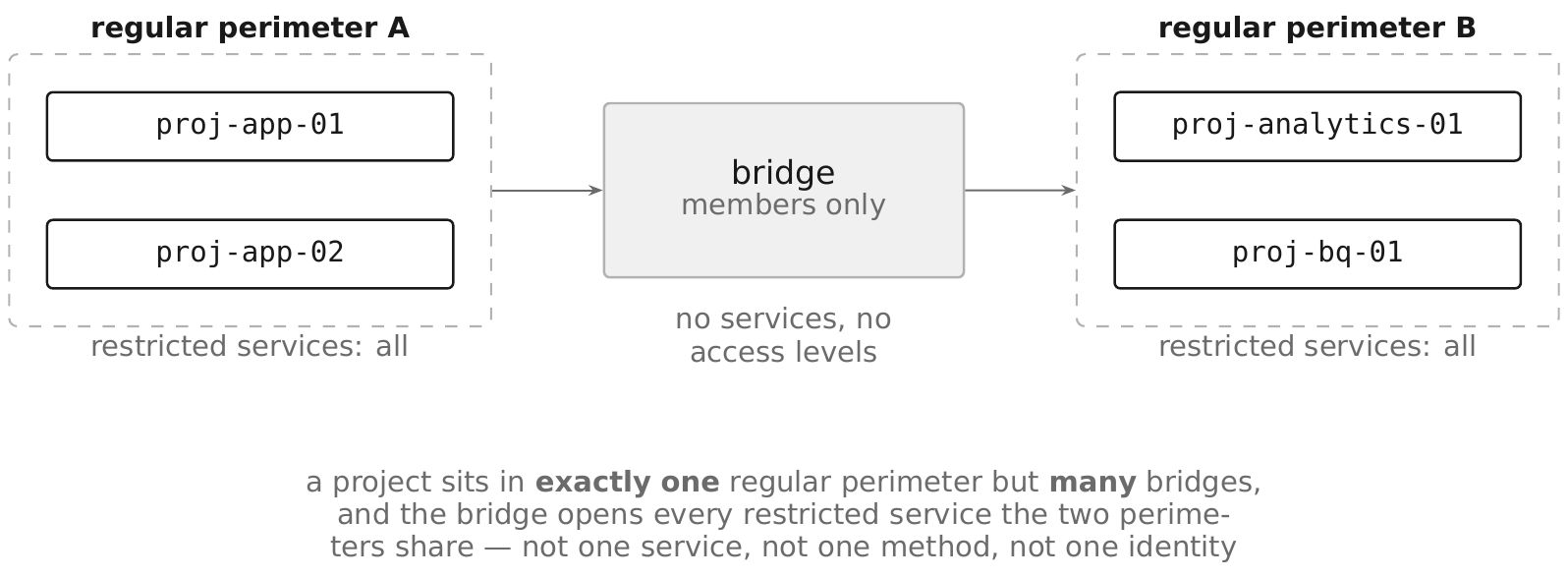
Which makes a bridge the coarsest tool available, and usually the wrong one. Two projects in different perimeters that need one dataset shared between them should have an ingress rule and an egress rule naming that service and that identity. A bridge is defensible when two perimeters are operationally one estate and the pairwise rule set would be unmaintainable.
gcloud access-context-manager perimeters create bridge-prod-analytics \
  --policy=POLICY_ID \
  --title="Bridge: production data and analytics" \
  --perimeter-type=bridge \
  --resources=projects/PROD_NUMBER,projects/ANALYTICS_NUMBER
Pitfall. A bridge is transitive in effect if not in definition: adding a third project to an existing bridge grants it the same access to every other member. Bridges accumulate members the way security groups do, and nobody notices until the membership list is reviewed.
20.8 Dry-Run Mode §
Dry-run mode evaluates a perimeter configuration and logs what it would have denied without denying anything. Google's description: it "logs requests that violate the perimeter policy" and "Requests that violate the perimeter policy are not denied, only logged."
Every perimeter has two configurations. The enforced one and the dry-run one, managed by a separate command subtree:
| Command | What it does |
|---|---|
perimeters dry-run create | Create a dry-run configuration, for a new or an existing perimeter |
perimeters dry-run update | Change the dry-run configuration |
perimeters dry-run describe | Show it |
perimeters dry-run drop | Discard the dry-run configuration without enforcing |
perimeters dry-run enforce | Promote the dry-run configuration to enforced |
perimeters dry-run enforce-all | Promote every dry-run configuration in the policy |
gcloud access-context-manager perimeters dry-run create sp-prod-data \
  --policy=POLICY_ID \
  --perimeter-title="Production data perimeter" \
  --perimeter-resources=projects/PROJECT_NUMBER \
  --perimeter-restricted-services=storage.googleapis.com \
  --perimeter-type=regular
Violations appear in Policy Denied audit logs (§17.5), marked so you can tell them from real denials: "the metadata.dryRun field's value in the audit log is set to True". That single field is the entire feedback loop — a query over it, grouped by principal and service, is the work list.
Terraform models both configurations on one resource. status is the enforced configuration and spec is the dry-run one, with use_explicit_dry_run_spec telling the provider you are managing them separately. Without that flag the two are kept identical, which defeats the purpose.
Pitfall. dry-run drop discards the dry-run configuration; dry-run enforce promotes it. The names are close and the outcomes are opposite, and the command takes effect immediately with no confirmation. Wrap both in a pipeline that requires a review, never a terminal.
20.9 Testing Service Perimeters §
Testing a perimeter means proving two things: that legitimate work still functions, and that the exfiltration paths are actually closed.
A four-stage rollout, each stage gated on evidence:
- Dry-run with the intended configuration, for at least one full business cycle — a month, if a month-end process exists. Anything shorter misses the quarterly job nobody remembered.
- Triage every violation by principal. Each is one of: a legitimate caller needing an ingress or egress rule, a legitimate caller that should move inside the perimeter, or something that should never have been happening. The third category is the return on the whole project.
- Add rules and re-observe until the dry-run violation stream contains only the third category.
- Enforce, then keep watching. New violations after enforcement are either a new integration or an attack, and both need a human.
Prove the closure, do not assume it. After enforcement, attempt the exfiltration explicitly: from a project outside the perimeter, with a principal that holds full IAM rights on the data, try to read it. A denial with a VPC Service Controls violation in the audit log is the evidence; an untested perimeter is a configuration, not a control.
Keep a permanent dry-run configuration ahead of the enforced one. Every proposed change — a new project, a new restricted service, a removed rule — goes into the dry-run configuration first and is observed before promotion. This makes perimeter change management routine rather than exceptional.
Pitfall. roles/accesscontextmanager.vpcScTroubleshooterViewer exists because diagnosing a perimeter denial from a raw audit log is hard: the error the caller sees is generic and deliberately uninformative. Grant it to the on-call engineers before enforcement, not during the first outage.
20.10 CI/CD Inside Service Perimeters §
A build pipeline is the integration most likely to break when a perimeter is enforced, because it legitimately touches storage, registries, and state from outside.
Four things need explicit provision:
| What breaks | Why | Provision |
|---|---|---|
| Build workers reaching protected services | Default workers run on Google-managed networks outside the perimeter | Private pools inside the perimeter's network (§23.5) |
| Artifact push and pull | Artifact Registry is a restricted service like any other | Ingress rule naming the build service account and the registry service |
| Terraform state in Cloud Storage | The state bucket is inside; the runner is outside | Ingress rule for the runner's identity, or move the runner inside |
| Deployment to protected projects | The deploy identity calls restricted APIs | Ingress rule naming sa-deploy-<env> and the target services |
The exception Google documents explicitly: "VPC Service Controls protection does not apply to the build phase when Cloud Run functions are built using Cloud Build." A build step therefore is not automatically inside the perimeter merely because the project is, which is both a compatibility relief and a gap to account for in your threat model.
Prefer moving the runner inside over widening the perimeter. A private pool (§23.5) attached to a VPC inside the perimeter needs no ingress rule at all, and it removes the standing exception that an ingress rule creates. Where the CI system is external and cannot move — a hosted runner, a vendor SaaS — an ingress rule naming its federated identity (§4.13) is the correct fallback.
Pitfall. An ingress rule for a build service account with method: "*" on storage.googleapis.com grants that identity read access to every bucket in the perimeter, not just the state bucket. Scope by resources to the specific project, and by method where the pipeline's actual calls are known.
20.11 Enterprise Data Perimeters §
A large estate does not have one perimeter; it has a small set of them, chosen so that the common data flows are inside a perimeter and the rare ones cross a rule.
Three shapes, and the trade-off between them is real:
| Shape | Strength | Cost |
|---|---|---|
| One perimeter around all regulated projects | Simplest to reason about; most flows are internal | A single blast radius; one bad rule affects everything |
| One perimeter per data domain | Blast radius matches the data | Many cross-perimeter rules, or bridges (§20.7) |
| Perimeter per environment | Aligns with existing project structure | Production-to-analytics flows all become exceptions |
This book's enterprise estate uses per-domain perimeters — sp-prod-data, sp-analytics, sp-secrets — because the enterprise estate already has a business-unit folder layer (§2.8) and a domain boundary is the one that survives reorganization. The SaaS estate uses a single sp-prod-data, because it has one product.
Scoped access policies are how you delegate without fragmenting. The organization gets its one organization-level policy; folder- and project-scoped policies — up to 50 of them — let a business unit manage perimeters over its own folder without holding roles/accesscontextmanager.policyAdmin at the organization.
The security project is always inside a perimeter, and usually its own. rc-saas-shared-sec-01 holds keys, secrets, and SCC configuration (§2.21). A perimeter around it with a short, reviewed list of ingress rules is the highest-value single perimeter in the estate, because the data it protects is the data that unlocks everything else.
Pitfall. Perimeters interact with services in ways that are not obvious. Google notes that "Hierarchical firewalls are not affected by service perimeters", that "VPC Peering operations do not enforce VPC service perimeter restrictions", that "SSH-in-browser is not supported within the perimeter", and that "You cannot create or update public DNS zones within projects inside the VPC Service Controls perimeter." Read the supported-products page for every service you restrict, before you enforce.
Chapter Summary §
- A service perimeter denies access from unauthorized networks even when IAM is misconfigured; it is the backstop for every other control in this book.
- IAM cannot express destination, so it cannot stop an authorized principal copying data somewhere else. The perimeter can.
- One organization-level access policy per organization, plus up to 50 folder- and project-scoped policies.
- A project belongs to at most one regular perimeter, and folders and organizations cannot be perimeter members — membership is per project and is not inherited.
- Restrict every service the perimeter's projects use, not just the storage ones; a VM admin inside the perimeter is an exfiltration path.
--restricted-servicescontrols calls into the perimeter's resources;--vpc-allowed-servicescontrols which APIs the perimeter's networks may call at all.- An access level is a coarse, perimeter-wide exception; an ingress rule is the precise one, and it can reference an access level as a source.
- Ingress and egress rule files are replaced wholesale — a stale file silently deletes every rule added since.
- An egress rule with
resources: ["*"]re-opens the exfiltration path the perimeter was built to close. - A bridge has no restricted services and no access levels, and grants access for every service the member perimeters share — it is the coarsest tool available.
- Dry-run violations appear in Policy Denied audit logs with
metadata.dryRunset toTrue; that field is the entire feedback loop. dry-run dropdiscards anddry-run enforcepromotes; the names are close and the outcomes are opposite.- Run dry-run for at least one full business cycle, triage every violation by principal, and prove the closure by attempting the exfiltration after enforcement.
- Prefer moving the CI runner inside the perimeter over adding an ingress rule for it.
- VPC Service Controls does not cover NFS and SMB data paths, does not protect IP-based database access, does not affect hierarchical firewalls, and does not enforce on VPC Peering operations.
Security Checklist §
| Control | Why it matters | How to verify (CLI + Console) |
|---|---|---|
| A perimeter exists around every project holding regulated data | IAM alone cannot stop an authorized copy out | gcloud access-context-manager perimeters list --policy=POLICY_ID |
| Perimeter membership is created by the project factory | Membership is per project and is never inherited | Terraform: the project module adds the project number to the perimeter |
| Restricted services include compute, KMS, and Secret Manager | Restricting only storage leaves a VM-mediated path open | gcloud access-context-manager perimeters describe sp-prod-data --policy=POLICY_ID |
--vpc-allowed-services set and narrow | Closes the reverse path from a compromised workload | Perimeter vpcAccessibleServices block |
No egress rule names resources: ["*"] | That is an unrestricted exfiltration permission | Review the egress policy file in version control |
| Ingress and egress rule files are the source of truth in Git | --set-*-policies replaces the entire list | Repository contains the YAML; no manual gcloud runs |
| A dry-run configuration is maintained ahead of the enforced one | Makes perimeter change routine rather than exceptional | gcloud access-context-manager perimeters dry-run describe sp-prod-data --policy=POLICY_ID |
| Dry-run violations are queried and triaged | metadata.dryRun=True is the only feedback available | Log query on Policy Denied entries (§17.5) |
| Exfiltration attempt tested after enforcement | An untested perimeter is a configuration, not a control | Documented test result with the denial's audit entry |
| Troubleshooter role granted to on-call before enforcement | Perimeter denials are deliberately uninformative to the caller | roles/accesscontextmanager.vpcScTroubleshooterViewer binding exists |
| Bridge membership reviewed quarterly | A bridge grants access for every shared restricted service | Perimeter list filtered to perimeterType bridge |
Sources §
- https://cloud.google.com/vpc-service-controls/docs/overview — threat model and the IAM-independence claim (last validated 2026-09-03)
- https://cloud.google.com/vpc-service-controls/docs/ingress-egress-rules — ingress and egress rule schema and identity types (last validated 2026-09-03)
- https://cloud.google.com/vpc-service-controls/docs/dry-run-mode — dry-run behavior and the
metadata.dryRunaudit field (last validated 2026-09-03) - https://cloud.google.com/vpc-service-controls/docs/service-perimeters — perimeter configuration detail (last validated 2026-09-03)
- https://cloud.google.com/vpc-service-controls/quotas — access policy, perimeter, and organization limits (last validated 2026-09-03)
- https://cloud.google.com/vpc-service-controls/docs/supported-products — supported services and documented limitations (last validated 2026-09-03)
- https://cloud.google.com/access-context-manager/docs/reference/rest/v1/accessPolicies.accessLevels — access level resource reference (last validated 2026-09-03)
- https://cloud.google.com/access-context-manager/docs/reference/rest/v1/accessPolicies.servicePerimeters — service perimeter resource reference (last validated 2026-09-03)