Chapter 7
Edge, Load Balancing, and Application Delivery
Scope. This chapter covers everything between a client and a backend: the load balancer family and how to choose among them, backend services and health checks, URL maps, TLS termination and certificate management, Cloud CDN, Cloud Armor for WAF, rate limiting and DDoS defense, IAP as an application front door, API gateways, and the two end-to-end patterns — secure internet-facing and private-only delivery. IAP as a zero-trust access control is §4.16; VPC internals are Chapter 5. Prerequisites. Chapter 5, particularly §5.4 (proxy-only subnets), §5.13–§5.16 (firewall policy and targets), §5.19 (Private Service Connect); Chapter 4 §4.16 (IAP). Verified against. Google Cloud console and API surface as of 2026-09, Cloud SDK 583.0.0; see sources at end.
The load balancer is the most exposed component in the architecture and the one with the most levers. It terminates TLS, so it holds a private key. It is where WAF rules run, where rate limits are enforced, and where DDoS absorption happens. It decides which backend sees a request, which means it is also an authorization point. And in the global external form it is Google's edge — a request reaching it has already been accepted at a point of presence near the client, absorbed L3/L4 volumetric attacks, and traversed the backbone.
Two things make this chapter harder than it should be. The first is naming. Google renamed the entire load balancing family: what documentation and blog posts from a few years ago call an "HTTP(S) Load Balancer" is now a global external Application Load Balancer, and "TCP/UDP Network Load Balancer" split into proxy and passthrough Network Load Balancers with different capabilities. The load_balancing_scheme value is the reliable discriminator, and this chapter uses the current names with the scheme stated.
The second is that the security controls are spread across four objects that must all be configured for the whole to work: the forwarding rule (address and port), the target proxy (TLS policy and certificates), the URL map (routing), and the backend service (Cloud Armor policy, IAP, CDN, logging). A Cloud Armor policy attached to the wrong backend service protects nothing, and a load balancer whose backends are also reachable directly is a load balancer in name only.
7.1 GCP Load Balancing Architecture §
Every Google Cloud load balancer is assembled from the same set of resources, and understanding the assembly is what makes the family navigable.
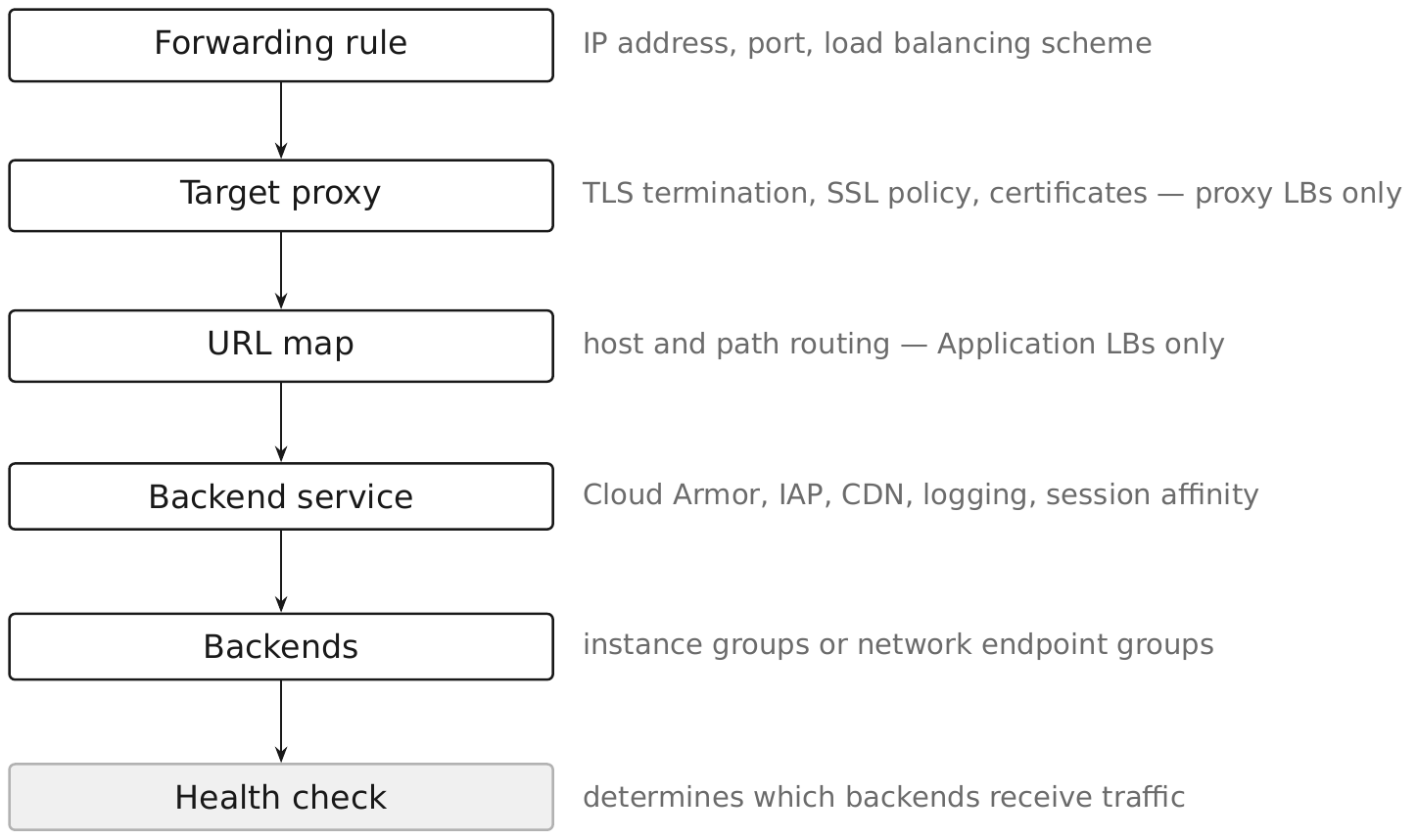
Two implementation substrates:
- Google Front End (GFE) — Google's globally distributed edge, used by global external load balancers. A request is accepted at a PoP near the client, and the connection to the backend is a separate one over Google's backbone.
- Envoy — open-source proxies Google runs in your region, used by regional and internal managed load balancers. These need a proxy-only subnet in each region (§5.4).
Passthrough load balancers use neither. They do not proxy: they use direct server return, so the backend sees the client's original source address and replies directly to the client rather than through the load balancer. That has three consequences: no TLS termination, no WAF at the load balancer, and firewall rules on the backend must permit the client's address rather than the load balancer's.
The security consequence of the proxy/passthrough split is the most important idea in the chapter. A proxy load balancer is a security control point: it terminates the connection, so Cloud Armor, IAP, TLS policy, and header manipulation all become possible. A passthrough load balancer is a distribution mechanism with no security function at all. Choosing passthrough for a public-facing HTTP service discards every control in this chapter.
7.2 Global vs. Regional Load Balancers §
The current product family, with the load_balancing_scheme that identifies each:
| Product | Scheme | Substrate | Proxy? |
|---|---|---|---|
| Global external Application Load Balancer | EXTERNAL_MANAGED | GFE | yes |
| Regional external Application Load Balancer | EXTERNAL_MANAGED | Envoy | yes |
| Cross-region internal Application Load Balancer | INTERNAL_MANAGED | Envoy | yes |
| Regional internal Application Load Balancer | INTERNAL_MANAGED | Envoy | yes |
| Global external proxy Network Load Balancer | EXTERNAL_MANAGED | GFE | yes |
| Regional external proxy Network Load Balancer | EXTERNAL_MANAGED | Envoy | yes |
| Cross-region internal proxy Network Load Balancer | INTERNAL_MANAGED | Envoy | yes |
| Regional internal proxy Network Load Balancer | INTERNAL_MANAGED | Envoy | yes |
| Regional external passthrough Network Load Balancer | EXTERNAL | — | no |
| Internal passthrough Network Load Balancer | INTERNAL | — | no |
| Global external passthrough Network Load Balancer | EXTERNAL_PASSTHROUGH | — | no, and Preview |
Global versus regional is a real architectural difference, not a scope label:
- Global gets a single anycast IP announced worldwide, connection termination at the nearest PoP, cross-region failover without DNS changes, and Cloud CDN.
- Regional gets a regional IP, Envoy proxies you can place in a specific region for data-residency reasons, and per-region independence.
Choose regional when data residency requires that traffic terminate in a specific region, or when you deliberately want regional failure isolation. Choose global otherwise, which is most of the time.
Pitfall. The global external passthrough Network Load Balancer is Preview (observed 2026-09) and must not be a production dependency. Where you need global and passthrough semantics, the answer today is a regional passthrough per region with DNS-based steering, accepting its failover characteristics.
7.3 External Application Load Balancers §
The global external Application Load Balancer is the default front door for anything public in this book. It is HTTP/HTTPS aware, terminates TLS at the edge, supports HTTP/2 and HTTP/3, and is the only load balancer that supports the full set of Cloud CDN, Cloud Armor, and IAP together.
The assembly, with the security-relevant flags:
gcloud compute health-checks create http hc-api-http \
  --project=rc-saas-prod-app-01 \
  --global \
  --port=8080 \
  --request-path=/healthz \
  --check-interval=10s \
  --timeout=5s \
  --healthy-threshold=2 \
  --unhealthy-threshold=3
gcloud compute backend-services create bes-api \
  --project=rc-saas-prod-app-01 \
  --global \
  --load-balancing-scheme=EXTERNAL_MANAGED \
  --protocol=HTTPS \
  --health-checks=hc-api-http \
  --global-health-checks \
  --enable-logging \
  --logging-sample-rate=1.0 \
  --connection-draining-timeout=60s
gcloud compute url-maps create urlmap-api \
  --project=rc-saas-prod-app-01 \
  --global \
  --default-service=bes-api

gcloud compute target-https-proxies create proxy-api \
  --project=rc-saas-prod-app-01 \
  --global \
  --url-map=urlmap-api \
  --certificate-map=certmap-api \
  --ssl-policy=sslpol-modern \
  --tls-early-data=DISABLED
gcloud compute forwarding-rules create fr-api-https \
  --project=rc-saas-prod-app-01 \
  --global \
  --load-balancing-scheme=EXTERNAL_MANAGED \
  --address=addr-api-global \
  --ports=443 \
  --target-https-proxy=proxy-api
--enable-logging with a meaningful sample rate is not optional. Load balancer logs are the record of what reached your application, what Cloud Armor did about it, and what status the backend returned. At --logging-sample-rate=1.0 you get every request; sample lower on high-volume services, but never zero on an internet-facing one.
Security posture. The load balancer is not a boundary if the backends are also directly reachable. Backends must have no external IPs, and the firewall must permit ingress only from Google's health check and load balancer ranges — 130.211.0.0/22 and 35.191.0.0/16 for GFE-based load balancers (§7.7).
Pitfall. --tls-early-data (TLS 1.3 0-RTT) reduces latency and permits replay of early data. Leave it disabled unless the application is verified to handle idempotency correctly for early-data requests.
7.4 Internal Application Load Balancers §
Internal Application Load Balancers use scheme INTERNAL_MANAGED, run on Envoy proxies in your VPC, and serve clients inside the network — service-to-service calls, internal tools, and applications published through IAP or reached over hybrid connectivity.
The proxy-only subnet is mandatory. Each region running a regional internal ALB needs a subnet with purpose REGIONAL_MANAGED_PROXY; cross-region internal Application Load Balancers and cross-region internal proxy Network Load Balancers use GLOBAL_MANAGED_PROXY instead. The Envoy proxies get addresses from that subnet, and that range — not the client's address — is what your backend firewall rules must permit.
gcloud compute networks subnets create snet-prod-usc1-proxy \
  --project=rc-saas-shared-net-01 \
  --network=vpc-prod-global \
  --region=us-central1 \
  --range=10.170.0.0/24 \
  --purpose=REGIONAL_MANAGED_PROXY \
  --role=ACTIVE
gcloud compute firewall-rules create fw-allow-proxy-to-app \
  --project=rc-saas-shared-net-01 \
  --network=vpc-prod-global \
  --direction=INGRESS \
  --action=ALLOW \
  --rules=tcp:8080 \
  --source-ranges=10.170.0.0/24 \
  --target-service-accounts=sa-app-api-runtime@rc-saas-prod-app-01.iam.gserviceaccount.com \
  --priority=1000 \
  --enable-logging
Cross-region internal ALB extends this across regions with a single internal address, giving internal services the failover behavior that previously required external load balancing or client-side logic. It uses GLOBAL_MANAGED_PROXY subnets rather than the regional ones.
Security value. An internal ALB is a control point inside the network: it terminates TLS, so you get mTLS between services with a server TLS policy, per-service certificates, and centralized logging of internal traffic. Combined with a deny-default east-west firewall policy (§5.31), it means service-to-service calls traverse a proxy you control rather than a flat network.
Pitfall. In a given VPC network and region you may have only one active and one backup REGIONAL_MANAGED_PROXY subnet, and every Envoy-based load balancer in that region shares it. Size it for all of them: the minimum is 64 addresses (/26), and Google recommends starting at /23. Promoting the BACKUP subnet to ACTIVE is the documented way to expand the range, and doing so automatically demotes the previous one to BACKUP.
7.5 Network Load Balancers §
Network Load Balancers operate at L4 and come in two fundamentally different kinds.
Proxy Network Load Balancers (EXTERNAL_MANAGED, INTERNAL_MANAGED) terminate the TCP connection and open a new one to the backend. They support TLS termination through a target SSL proxy, and Cloud Armor attaches to the global and classic external forms. Use them for non-HTTP TCP protocols that still need a control point — a database proxy, a message broker front end.
Passthrough Network Load Balancers (EXTERNAL, INTERNAL) do not proxy. Packets are forwarded with the original source address and the backend replies directly to the client. This gives you:
- The client's real source IP at the backend, with no
X-Forwarded-Forinvolved. - Support for any IP protocol, including UDP, ESP, and ICMP.
- Very high throughput with no proxy in the path.
and costs you:
- No TLS termination, no WAF, no IAP, no CDN.
- Firewall rules must permit the client's address range, not the load balancer's.
- Health check traffic still arrives from
130.211.0.0/22and35.191.0.0/16and must be permitted separately.
The internal passthrough NLB has a second job: it is the only load balancer valid as a --next-hop-ilb target for a custom route — an internal Application Load Balancer is not — which is how appliance-based inspection paths are built (§5.11, §5.36).
Pitfall. Choosing a passthrough NLB for a public HTTP service because it is cheaper. The backends then need firewall rules permitting 0.0.0.0/0, there is no place to attach Cloud Armor, and the application must implement TLS, rate limiting, and header validation itself. Use a proxy load balancer for anything speaking HTTP to the internet.
7.6 Backend Services §
The backend service is where most security configuration lives. It holds the Cloud Armor policy, the IAP configuration, CDN settings, logging, session affinity, timeouts, and the list of backends.
Backend types:
| Backend | Use |
|---|---|
| Managed instance group | VM workloads with autohealing |
Zonal NEG (GCE_VM_IP_PORT) | individual VM endpoints |
| Serverless NEG | Cloud Run, Cloud Functions, App Engine |
| Internet NEG | an external origin, by FQDN or IP |
| Hybrid connectivity NEG | on-premises endpoints reached over Interconnect or VPN |
| Private Service Connect NEG | a published service (§5.19) |
Security-relevant settings and why each matters:
gcloud compute backend-services update bes-api \
  --project=rc-saas-prod-app-01 \
  --global \
  --security-policy=armor-api-prod \
  --enable-logging \
  --logging-sample-rate=1.0 \
  --custom-request-header="X-Client-Geo:{client_region}" \
  --connection-draining-timeout=60s
--security-policyattaches the Cloud Armor policy. A policy that exists but is not attached protects nothing — this is the single most common Cloud Armor misconfiguration.--enable-loggingand a sample rate produce the request record.--custom-request-headerinjects load-balancer-derived values the backend can trust only because the backend is unreachable except through the load balancer.--connection-draining-timeoutlets in-flight requests finish when a backend is removed, which is what makes rolling replacement (§1.15) non-disruptive.--iapenables Identity-Aware Proxy on this backend service (§7.17).
Pitfall. Custom request headers are trustworthy only if the backend cannot be reached directly. If a client can bypass the load balancer, it can set X-Client-Geo itself. The header is a convenience built on the network control, not a substitute for it.
7.7 Health Checks §
Health checks determine which backends receive traffic. They are also the reason an otherwise correct load balancer configuration serves 502s.
gcloud compute health-checks create http hc-api-http \
  --project=rc-saas-prod-app-01 \
  --global \
  --port=8080 \
  --request-path=/healthz \
  --check-interval=10s \
  --timeout=5s \
  --healthy-threshold=2 \
  --unhealthy-threshold=3 \
  --enable-logging
Health check probes originate from Google-owned ranges, and firewall rules must permit them:
| Range | Used by |
|---|---|
130.211.0.0/22 | GFE-based and legacy health checks |
35.191.0.0/16 | Envoy-based and centralized health checks |
These ranges belong in the organization-level hierarchical firewall policy (§5.14) so that no project can accidentally break health checking, and so that no project needs to rediscover them.
Design the endpoint deliberately:
/healthzmust not require authentication — the prober has no credentials — which means it must also expose nothing. No version strings, no dependency status, no internal hostnames. It returns 200 or it does not.- Distinguish liveness from readiness. A backend that is up but cannot reach its database should fail readiness so the load balancer stops sending it traffic, while liveness governs whether the orchestrator restarts it. Conflating them turns a database blip into a full restart cascade.
--enable-loggingon the health check records state transitions, which is what tells you a backend was flapping before the outage.
Pitfall. /healthz reachable from the internet because the firewall permits the health check ranges to a port that also serves application traffic. Use a dedicated health check port where the platform allows, or ensure the health path returns nothing useful. Attackers enumerate /healthz precisely because it is usually unauthenticated.
7.8 URL Maps §
A URL map routes requests by host and path to backend services. It is a routing object, and it is also a security surface, because routing decides which requests reach which code.
gcloud compute url-maps create urlmap-api \
  --project=rc-saas-prod-app-01 \
  --global \
  --default-service=bes-api-public
Host rules, path matchers, and route rules are then added, typically from a YAML import for anything beyond a trivial map.
Security-relevant capabilities:
- Path-based isolation.
/admin/*routed to a backend service with IAP enabled while/api/*goes to a public one gives you two authorization regimes behind one hostname (§7.17). - Header and query-based routing for canary and A/B, which must not be used as an access control — a client controls its own headers.
- Redirects and rewrites, including a URL redirect action that can return a 301 without touching a backend.
- The default service is a catch-all. Everything not matched goes there, so it should be the most restricted backend, not the most permissive. A default service pointing at an admin backend is a serious misconfiguration.
Pitfall — path normalization. Different components normalize URLs differently, and an authorization decision made on a path string can be bypassed by encoding (/admin versus /%61dmin versus /api/../admin). Do not treat URL map path matching as an authorization boundary on its own; pair it with authentication at the backend or with IAP, which authenticates rather than pattern-matches.
7.9 Managed Certificates §
Certificate Manager is the current service for TLS certificates on Google Cloud, superseding classic Compute Engine SSL certificates for anything at scale.
Google-managed certificates are issued and renewed automatically, with no private key for you to hold or lose. Self-managed certificates are ones you obtain and upload.
Two domain authorization methods:
- DNS authorization — you prove control with a DNS record. It supports up to 100 domains in the SAN list, works before the load balancer exists, and supports wildcards.
- Load balancer authorization — validation through the serving load balancer. Limited to 5 domains, and not supported for
ALL_REGIONS-scoped certificates.
gcloud certificate-manager dns-authorizations create dnsauth-api \
  --project=rc-saas-prod-app-01 \
  --domain="api.rickcollette.domain"

gcloud certificate-manager certificates create cert-api \
  --project=rc-saas-prod-app-01 \
  --domains="api.rickcollette.domain,www.rickcollette.domain" \
  --dns-authorizations=dnsauth-api
Certificate maps decouple certificates from proxies and let one load balancer serve many hostnames with per-hostname certificates:
gcloud certificate-manager maps create certmap-api \
  --project=rc-saas-prod-app-01

gcloud certificate-manager maps entries create entry-api \
  --project=rc-saas-prod-app-01 \
  --map=certmap-api \
  --certificates=cert-api \
  --hostname="api.rickcollette.domain"
Security posture. Certificate issuance follows DNS control (§5.25), so roles/dns.admin on the public zone is effectively certificate-issuance authority. Publish CAA records naming the CAs permitted to issue for your domain, monitor Certificate Transparency logs for certificates you did not request, and alert on TXT record changes in the zones used for DNS authorization.
Pitfall. A Google-managed certificate stays in a provisioning state indefinitely if the DNS authorization record is missing or wrong, and the load balancer serves a mismatched certificate meanwhile. Check the certificate's state explicitly after creation rather than assuming issuance succeeded.
7.10 TLS Configuration §
An SSL policy controls which TLS versions and cipher suites the load balancer will negotiate. Without one, the load balancer uses the COMPATIBLE profile, which accepts older clients and older ciphers.
gcloud compute ssl-policies create sslpol-modern \
  --project=rc-saas-prod-app-01 \
  --global \
  --profile=MODERN \
  --min-tls-version=1.2
The available profiles (observed 2026-09) are COMPATIBLE, MODERN, RESTRICTED, FIPS_202205, and CUSTOM (which takes --custom-features).
| Profile | Use |
|---|---|
COMPATIBLE | broadest client support; the default, and rarely the right choice |
MODERN | current clients; the default for this book |
RESTRICTED | strong ciphers only; check client compatibility first |
FIPS_202205 | FIPS-conformant cipher set for regulated workloads |
CUSTOM | an explicit list via --custom-features |
Attach the policy to the target HTTPS proxy (--ssl-policy), and set --min-tls-version=1.2 at minimum.
Post-quantum key exchange is available on SSL policies via --post-quantum-key-exchange. Enable it where the client population supports it; harvest-now-decrypt-later is a real threat model for long-lived confidentiality.
Backend encryption is a separate decision. TLS to the load balancer does not encrypt the load balancer to the backend. Set the backend service --protocol=HTTPS (or HTTP/2) so that leg is encrypted too; between GFE and a backend inside Google's network the traffic is already encrypted at the infrastructure layer, but explicit TLS gives you application-layer certainty and is required for compliance regimes that ask.
Pitfall. An SSL policy created but not attached to the proxy changes nothing, and gcloud compute ssl-policies describe will happily show your strong settings. Verify from the proxy's perspective, and confirm externally with a TLS scan.
7.11 HTTPS Everywhere §
"HTTPS everywhere" is four separate configurations, and estates routinely implement two of them.
1. Redirect HTTP to HTTPS. A URL map with a redirect action on the HTTP forwarding rule, returning a 301 to the HTTPS URL, with no backend involved.
2. HSTS. A Strict-Transport-Security response header instructs browsers never to use HTTP for the domain again. Add it with --custom-response-header on the backend service, or from the application:
gcloud compute backend-services update bes-api \
  --project=rc-saas-prod-app-01 \
  --global \
  --custom-response-header="Strict-Transport-Security:max-age=31536000; includeSubDomains; preload"
Start with a short max-age, confirm every subdomain serves HTTPS, then raise it. includeSubDomains with a long max-age on a domain with an HTTP-only subdomain is an outage you cannot roll back quickly, because browsers cache the directive.
3. Encrypt the backend leg. --protocol=HTTPS on the backend service (§7.10).
4. Internal traffic too. Service-to-service calls inside the VPC get TLS through internal Application Load Balancers with server TLS policies (§7.4). "Internal so it does not need TLS" is precisely the assumption zero trust rejects (§4.14).
Verification, not assertion:
gcloud compute target-https-proxies describe proxy-api \
  --project=rc-saas-prod-app-01 \
  --global \
  --format="value(sslPolicy,certificateMap,quicOverride)"
Pitfall. HSTS preload submission is effectively irreversible on a useful timescale. Do not submit a domain to the preload list until every host under it, including ones other teams own, serves HTTPS.
7.12 Cloud CDN §
Cloud CDN caches content at Google's edge, enabled on a backend service of a global external Application Load Balancer.
gcloud compute backend-services update bes-static \
  --project=rc-saas-prod-app-01 \
  --global \
  --enable-cdn \
  --cache-mode=CACHE_ALL_STATIC \
  --default-ttl=3600 \
  --max-ttl=86400 \
  --client-ttl=3600 \
  --negative-caching
Cache modes, and the security implication of each:
| Mode | Behavior | Risk |
|---|---|---|
USE_ORIGIN_HEADERS | respects Cache-Control from the backend | safest; the application decides |
CACHE_ALL_STATIC | caches static content types plus origin-cacheable responses | moderate |
FORCE_CACHE_ALL | caches everything regardless of headers | dangerous — will cache authenticated responses |
FORCE_CACHE_ALL on a backend serving per-user content is a data breach mechanism: one user's response is served to the next. Use it only for a backend that serves exclusively public, identical content, and preferably use a separate backend service for static assets so the mode cannot leak onto dynamic paths.
Cache key configuration is the other exposure. By default the cache key includes protocol, host, and query string. If a response varies by a header or a cookie that is not in the cache key, responses cross users. Use --cache-key-include-named-cookie for a session-varying cache, or better, do not cache anything that varies by session.
Signed URLs and signed cookies provide time-limited access to cached private content without a per-request origin call, which is the right pattern for downloadable customer artifacts.
Pitfall. Cache invalidation is asynchronous and rate-limited. A secret accidentally served and cached is at the edge until invalidation completes. Treat cache invalidation as a mitigation with a delay, not as a remediation.
7.13 Cloud Armor §
Cloud Armor is Google's WAF and DDoS service, applied at the edge — "as close as possible to the source of incoming traffic" — so malicious requests are dropped before they enter your VPC or consume backend capacity.
Where it attaches: external Application Load Balancers (including classic), the regional internal Application Load Balancer, global and classic proxy Network Load Balancers, and the regional external passthrough Network Load Balancer.
gcloud compute security-policies create armor-api-prod \
  --project=rc-saas-prod-app-01 \
  --global \
  --description="Production API edge policy."

gcloud compute security-policies rules create 1000 \
  --project=rc-saas-prod-app-01 \
  --security-policy=armor-api-prod \
  --action=deny-403 \
  --expression="origin.region_code == 'XX'" \
  --description="Block traffic from an embargoed region."

gcloud compute backend-services update bes-api \
  --project=rc-saas-prod-app-01 \
  --global \
  --security-policy=armor-api-prod
Tiers. Cloud Armor Standard is pay-as-you-go and already includes always-on L3/L4 volumetric and network-protocol DDoS protection; Cloud Armor Enterprise adds Layer 7 Adaptive Protection, which analyzes traffic patterns to your backend services, alerts on suspected attacks, and generates suggested WAF rules, plus DDoS bill protection and DDoS response support. Adaptive Protection in Standard is alerting only. Chapter 19 owns the tier comparison and every Cloud Armor control in depth (§19.1, §19.7, §19.8); this section covers only its place in the delivery path.
Rule ordering. Rules evaluate by priority, lowest first, and the first match wins. Every policy has a default rule at priority 2147483647; set it to allow for a public service or deny for an allowlist posture, and be explicit about which you chose.
Always use --preview first. A rule in preview mode logs what it would have done without doing it. Deploy every new rule in preview, examine the load balancer logs for what it would have blocked, then enforce. A WAF rule enforced without a preview period will block legitimate traffic.
Pitfall. A security policy that exists but is not attached to a backend service does nothing, and nothing warns you. Verify attachment from the backend service, not from the policy.
7.14 Web Application Firewalling §
Cloud Armor's preconfigured WAF rules implement signatures compiled from the OWASP ModSecurity Core Rule Set, version 4.22 (observed 2026-09), covering the OWASP Top 10 categories: SQL injection, cross-site scripting, local and remote file inclusion, remote code execution, protocol attacks, scanner detection, and session fixation.
gcloud compute security-policies rules create 2000 \
  --project=rc-saas-prod-app-01 \
  --security-policy=armor-api-prod \
  --action=deny-403 \
  --expression="evaluatePreconfiguredWaf('sqli-v33-stable', {'sensitivity': 1})" \
  --preview \
  --description="OWASP CRS SQL injection signatures, sensitivity 1, preview."
Sensitivity levels run 0 to 4, where higher includes more signatures and more false positives. Start at sensitivity 1 in preview mode. Sensitivity 3 or 4 on a real application without tuning will block legitimate traffic — a request body containing SQL keywords is common in perfectly ordinary applications.
Tuning is the work. Individual noisy signatures are excluded with the opt_out_rule_ids argument to evaluatePreconfiguredWaf, and exclusions can be scoped to specific request fields so that a rule is disabled for one parameter rather than globally.
The rollout sequence that works:
- Deploy every WAF rule with
--preview. - Run for a full business cycle, including month-end and any batch processes.
- Query load balancer logs for previewed matches, grouped by rule and by request path.
- Opt out the signatures that only ever matched legitimate traffic, scoped as narrowly as possible.
- Remove
--previewone rule at a time, with a defined rollback.
Pitfall. A WAF is a compensating control, not a fix. A signature blocking SQL injection attempts does not make the injectable query safe — it makes it harder to reach. Treat WAF findings as evidence of a bug to fix in the application, not as the remediation.
7.15 Rate Limiting §
Cloud Armor rate limiting has two actions with different semantics.
throttle allows requests up to a rate and drops or redirects the excess. rate_based_ban blocks a client entirely for a period once it crosses the threshold.
gcloud compute security-policies rules create 3000 \
  --project=rc-saas-prod-app-01 \
  --security-policy=armor-api-prod \
  --action=rate-based-ban \
  --src-ip-ranges="*" \
  --rate-limit-threshold-count=100 \
  --rate-limit-threshold-interval-sec=60 \
  --ban-duration-sec=600 \
  --conform-action=allow \
  --exceed-action=deny-429 \
  --enforce-on-key=IP \
  --description="Ban a source IP for 10 minutes after 100 requests per minute."
--enforce-on-key options (observed 2026-09): ALL, IP, HTTP_HEADER, XFF_IP, HTTP_COOKIE, HTTP_PATH, SNI, REGION_CODE, TLS_JA3_FINGERPRINT, TLS_JA4_FINGERPRINT, USER_IP, and ASN. Up to three keys can be combined, including multiple header or cookie keys.
Thresholds and intervals. Throttle accepts rate_limit_threshold_count from 1 to 1,000,000; rate-based ban from 1 to 10,000. The interval must be one of 10, 30, 60, 120, 180, 240, 300, 600, 900, 1200, 1800, 2700, or 3600 seconds. ban_duration_sec runs from 60 to 3600 and applies in addition to the threshold interval. ban_threshold_count sets a separate, higher bar for banning so an occasional overage throttles without a ban.
Two facts Google states explicitly and that change how you use this:
- Enforced rate limits are approximate. Do not use rate limiting for quota or licensing enforcement.
- Thresholds apply per backend, so a multi-region deployment can see aggregate traffic above the configured limit.
Choosing a key. IP is the default and is defeated by distributed sources and shared by NAT'd corporate networks. For authenticated APIs, keying on a header carrying the API key or tenant ID is far more precise. TLS_JA3_FINGERPRINT and TLS_JA4_FINGERPRINT identify client software and are effective against tooling that rotates addresses but not its TLS stack.
Pitfall. Rate limiting keyed on IP in front of a service used from a large corporate NAT bans an entire office on one user's behavior. Key on something identifying the client, and use XFF_IP or USER_IP where a legitimate proxy sits in front.
7.16 DDoS Protection §
DDoS defense on Google Cloud is layered, and most of the bottom layer is not something you configure.
| Layer | Defense | Configuration |
|---|---|---|
| L3/L4 volumetric | Google's edge absorbs it | always on for GFE-based load balancers |
| L3/L4 protocol | Cloud Armor Standard always-on protection | included, no subscription |
| L7 application | Cloud Armor WAF and rate limiting (§7.14, §7.15) | your rules |
| Adaptive | Cloud Armor Adaptive Protection | Enterprise; detects anomalies and suggests rules |
| Architectural | global anycast, autoscaling, CDN offload | design |
The architectural layer is underrated. A global external Application Load Balancer terminates connections at hundreds of PoPs, so a volumetric attack is spread across Google's edge rather than concentrated on your region. Cloud CDN serving static content means an attack on your marketing pages never reaches an instance. Autoscaling with a sane maximum absorbs a surge without becoming an unbounded bill.
Adaptive Protection (Enterprise) baselines normal traffic per backend service, alerts on deviations, and generates candidate WAF rules for the specific attack signature. Its value is during an active incident, when writing a precise rule under pressure is exactly what you cannot do. Enable it before you need it, and rehearse applying a suggested rule.
Prepare in advance:
- A pre-written emergency policy with an aggressive rate limit and a geographic or ASN restriction, in preview mode, ready to enforce with one change.
- Alerting on request rate and backend latency, not only on error rate — a successful attack raises latency before it raises errors.
- A decision made ahead of time about what to shed first: which paths are non-essential, and whether an unauthenticated endpoint can be disabled.
Pitfall. Autoscaling turns an availability attack into a cost attack. Set a maximum on every managed instance group and Cloud Run service, and alert on budget (§1.24) — otherwise the successful defense is a five-figure bill.
7.17 Identity-Aware Proxy §
This section owns IAP as an application delivery front door. Its zero-trust access-control model — TCP forwarding, access levels, device trust — is §4.16.
IAP is enabled on a backend service, so every request to that backend must carry an authenticated identity holding roles/iap.httpsResourceAccessor:
gcloud compute backend-services update bes-admin \
  --project=rc-saas-prod-app-01 \
  --global \
  --iap=enabled
gcloud iap web add-iam-policy-binding \
  --resource-type=backend-services \
  --service=bes-admin \
  --project=rc-saas-prod-app-01 \
  --member="group:gcp-app-operators@rickcollette.domain" \
  --role="roles/iap.httpsResourceAccessor"
The pattern this enables. One hostname, one load balancer, one URL map, with /admin/* routed to an IAP-enabled backend and /api/* to a public one (§7.8). Administrative interfaces get authentication and IAM authorization without the application implementing either, and without a separate VPN-reachable hostname.
IAP also works with:
- Cloud Run, directly or through a load balancer backend.
- App Engine, through the serving infrastructure.
- On-premises applications, through the IAP connector, which is how a legacy internal application gets published without a VPN.
The application must verify the signed JWT. IAP adds a signed header identifying the user; the application must validate its signature, issuer, and audience rather than reading it. If the backend is reachable by any path that does not traverse IAP, an unverified header is a complete authentication bypass. That is why the backend must have no external IP and the firewall must permit only the load balancer ranges.
Pitfall. IAP on the backend service but the Cloud Run service's ingress still set to allow all. The load balancer path is protected and the direct run.app URL is not. Set ingress to internal-and-load-balancer, and verify the direct URL returns 403.
7.18 API Front Doors §
An API front door adds authentication, quota, and schema validation between clients and backend services. Google Cloud offers three, with real differences.
| Product | Position | Strengths | Consider when |
|---|---|---|---|
| API Gateway | managed, in front of serverless backends | simple, OpenAPI-driven, API key and JWT auth | Cloud Run / Functions APIs with modest needs |
| Apigee | full API management platform | monetization, developer portal, complex policy, analytics | APIs are a product |
| Cloud Endpoints (ESPv2) | a proxy you deploy alongside the service | fine-grained control, runs where your service runs | you need the proxy inside your own runtime |
What a front door adds that a load balancer does not:
- Per-consumer authentication and quota, keyed on an API key or a JWT claim rather than on a source address.
- Request schema validation from an OpenAPI specification, rejecting malformed requests before they reach code.
- Per-method authorization, so
GET /ordersandDELETE /orders/{id}can require different scopes. - Consumer-level analytics, which is what makes abuse visible.
The layering that works: Cloud Armor at the load balancer for volumetric and signature defense (§7.13), the API front door for per-consumer authentication and quota, and the service itself for business authorization. Each layer answers a question the others cannot.
Pitfall. API keys are identifiers, not credentials — they identify a project for quota and are frequently embedded in clients where anyone can read them. Never treat an API key as authentication for anything that matters; use OIDC tokens, and use the key only for quota attribution.
7.19 Secure Internet-Facing Architecture §
The complete reference pattern for a public service, assembling the chapter:
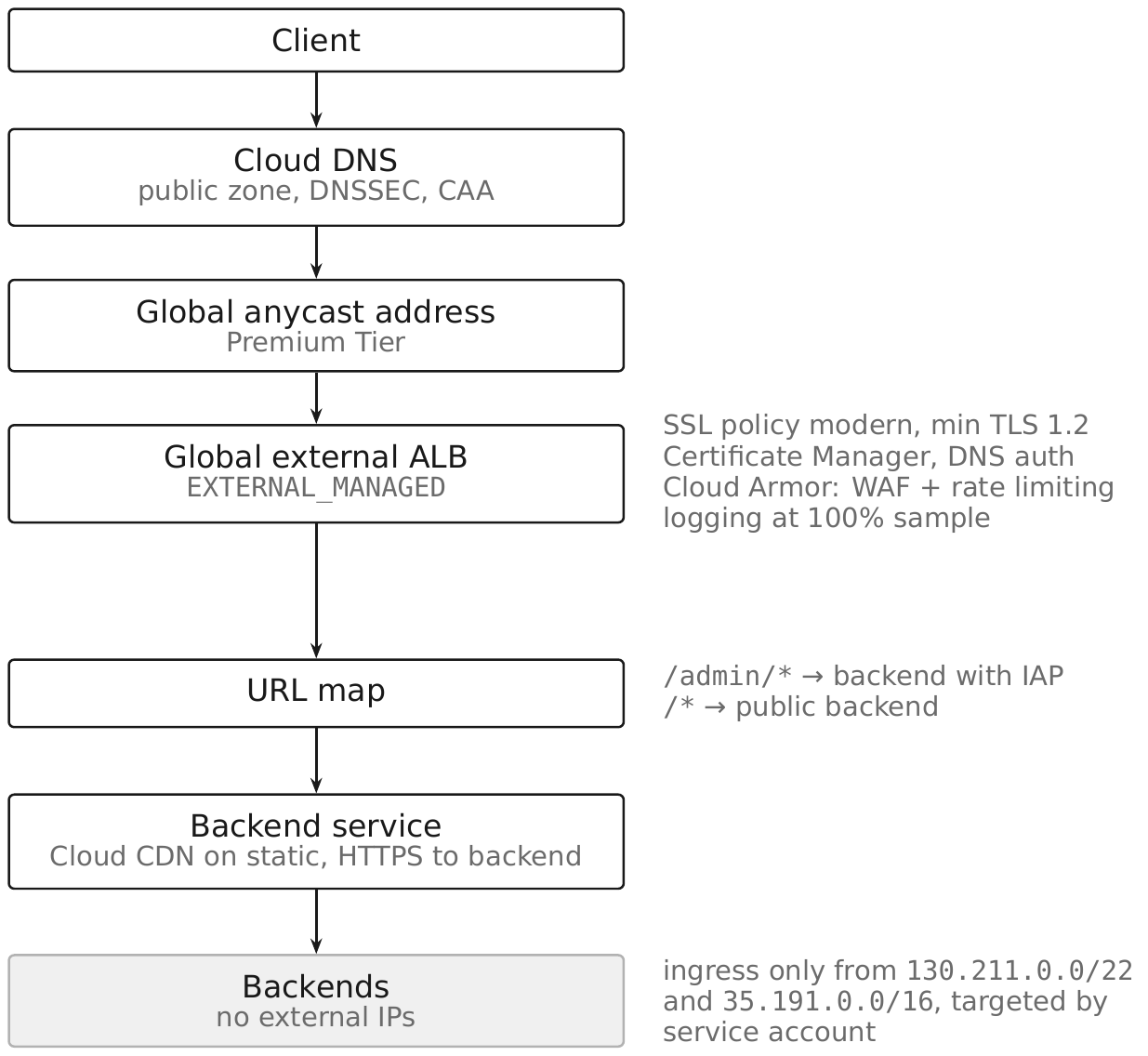
The invariants that make it a boundary rather than a suggestion:
- Backends are unreachable except through the load balancer. No external IPs, enforced by
constraints/compute.managed.vmExternalIpAccess; ingress permitted only from the health check and load balancer ranges, targeted by service account. - Cloud Armor is attached to the backend service, verified from the backend service.
- TLS is configured, not defaulted — an SSL policy attached to the proxy.
- Every request is logged at the load balancer, and the logs reach the central logging project (§2.22).
- The admin path authenticates, through IAP, with the application verifying the signed JWT.
- Autoscaling has a maximum and a budget alert behind it (§7.16).
Verify it externally. A configuration review confirms what you built; a scan from outside confirms what is exposed. Check that the backend's address is not directly reachable, that the TLS parameters match the policy, and that /healthz returns nothing useful.
Pitfall. A serverless backend with its own default URL. Cloud Run's *.run.app and Cloud Functions' default endpoint bypass the load balancer entirely unless ingress is restricted. Set ingress to internal-and-load-balancer and test the default URL directly.
7.20 Private Application Delivery §
Some applications should have no internet path at all. The pattern for internal-only delivery:
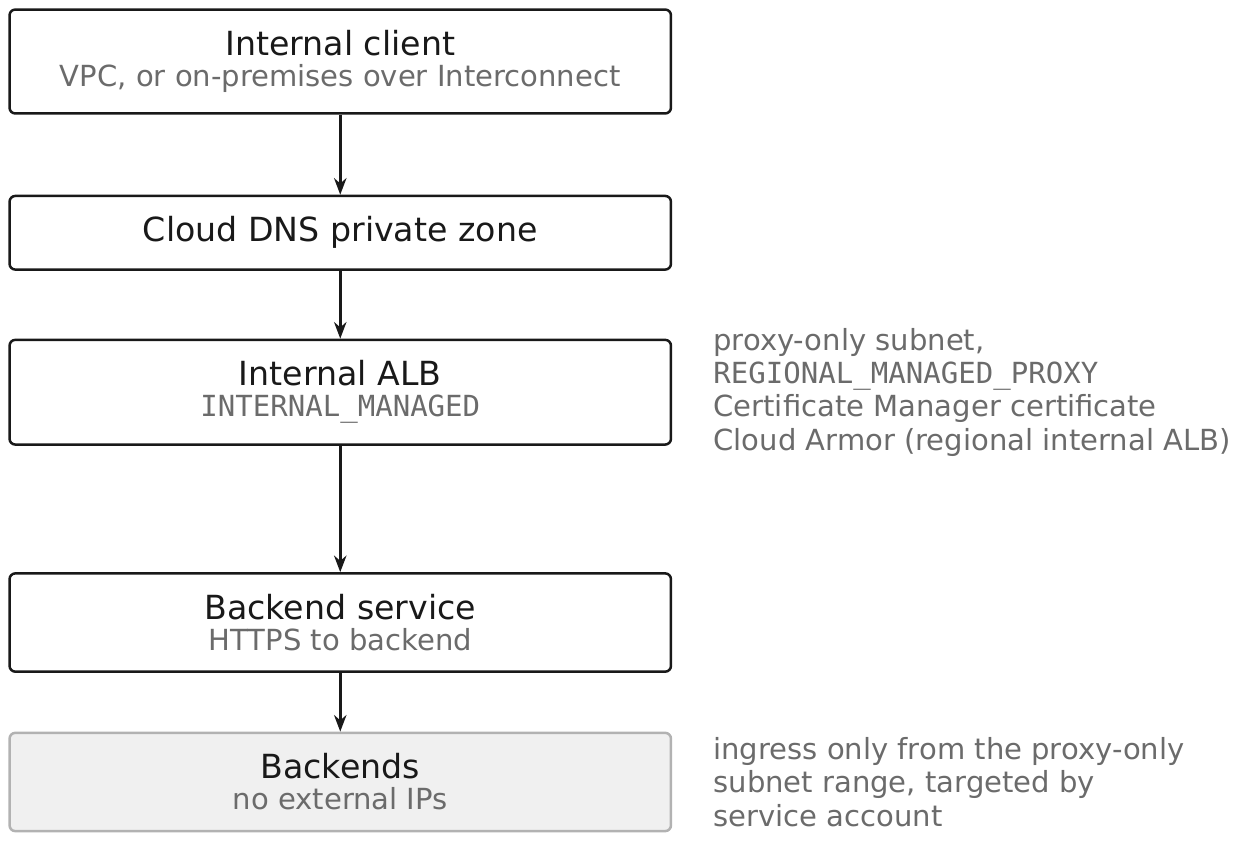
Reaching it from outside the VPC, in order of preference:
- IAP TCP forwarding for administrative access to a specific host and port (§4.16).
- An IAP-protected external load balancer for a web application that remote users need — publishing the application rather than granting network access (§7.17).
- Private Service Connect for another VPC or another organization consuming it as a service (§5.19).
- Hybrid connectivity for on-premises clients that must reach it by network path (Chapter 6).
Cross-region internal Application Load Balancer gives an internal service a single internal address with failover across regions, which is what internal platform services should use rather than per-region names in application configuration.
Security posture. "Internal" is not a security control on its own — everything on the VPC can reach the internal load balancer unless firewall policy says otherwise (§5.31). Private delivery means: deny-default east-west policy, the internal ALB as the only path to the backends, TLS on both legs, and authentication at the application or through an internal IAP-equivalent. The absence of an internet path removes one attacker population, not the rest.
Pitfall. Assuming an internal load balancer needs no WAF or rate limiting. A compromised workload inside the VPC is exactly the client an internal service is least prepared for, and the regional internal Application Load Balancer supports Cloud Armor for precisely this reason.
Chapter Summary §
- Every Google Cloud load balancer assembles the same objects: forwarding rule → target proxy → URL map → backend service → backends → health check, and the security configuration is spread across all of them.
- Proxy load balancers terminate connections and can therefore carry Cloud Armor, IAP, TLS policy, and header injection; passthrough load balancers use direct server return and have no security function.
- The
load_balancing_schemevalue identifies the product:EXTERNAL_MANAGED,INTERNAL_MANAGED(proxy),EXTERNAL,INTERNAL(passthrough), andEXTERNAL_PASSTHROUGH(Preview — not for production). - Global external load balancers run on Google Front Ends; regional and internal managed ones run on Envoy and require a proxy-only subnet —
REGIONAL_MANAGED_PROXYfor regional load balancers,GLOBAL_MANAGED_PROXYfor cross-region internal ones — with only one active and one backup per region per network, minimum/26and recommended/23. - Health check probes come from
130.211.0.0/22and35.191.0.0/16; put those allows in the organization-level hierarchical firewall policy so no project has to rediscover them. - A health endpoint is unauthenticated by construction and must therefore expose nothing; separate liveness from readiness.
- A URL map's default service is a catch-all and should be the most restricted backend, not the most permissive; path matching is not an authorization boundary because of URL normalization differences.
- Certificate Manager DNS authorization supports up to 100 SAN domains; load balancer authorization supports 5 and is unavailable for
ALL_REGIONS-scoped certificates. - DNS control is certificate-issuance control: publish CAA records and monitor Certificate Transparency.
- SSL policies default to
COMPATIBLE; useMODERNwith--min-tls-version=1.2, and note that a policy not attached to the proxy changes nothing. - Cloud CDN's
FORCE_CACHE_ALLwill cache authenticated responses and serve one user's data to another; cache keys that omit a varying header or cookie do the same. - Cloud Armor attaches to a backend service; a policy that exists but is unattached protects nothing, and nothing warns you.
- Cloud Armor's preconfigured WAF rules derive from OWASP CRS 4.22; start at sensitivity 1 in
--preview, tune with scoped opt-outs, then enforce one rule at a time. - Rate limiting offers
throttleandrate_based_ban, with up to threeenforce_on_keyvalues from a documented set; limits are approximate and per backend, so they are for abuse mitigation, not quota enforcement. - Rate limiting keyed on
IPbans whole corporate NATs; key on an identifying header,XFF_IP,USER_IP, or a TLS fingerprint. - Always-on L3/L4 volumetric and protocol DDoS protection is included in Cloud Armor Standard. Cloud Armor Enterprise adds Layer 7 Adaptive Protection, which generates candidate rules during an attack, plus DDoS bill protection and response support — enable it before you need it.
- Autoscaling turns an availability attack into a cost attack; cap every managed instance group and Cloud Run service and alert on budget.
- IAP on a backend service gives an admin path authentication and IAM authorization without application changes, but the application must verify the signed JWT and the backend must be unreachable except through the load balancer.
- Serverless backends keep their own default URLs; restrict ingress to internal-and-load-balancer or the load balancer's controls are bypassed.
- API front doors add per-consumer authentication, quota, and schema validation that a load balancer cannot; API keys identify a project for quota and are never authentication.
- "Internal" is not a security control: an internal Application Load Balancer still needs deny-default east-west policy, TLS on both legs, and — because a compromised in-VPC workload is the client it is least ready for — Cloud Armor.
Security Checklist §
| Control | Why it matters | How to verify (CLI + Console) |
|---|---|---|
| Backends have no external IPs | An external IP bypasses every load balancer control | gcloud compute instances list --filter="networkInterfaces[].accessConfigs[].natIP:*"; org policy constraints/compute.managed.vmExternalIpAccess |
Backend ingress permits only 130.211.0.0/22 and 35.191.0.0/16 (or the proxy-only subnet) | Anything wider is a direct path around the load balancer | gcloud compute firewall-rules list --format="table(name,sourceRanges.list(),targetServiceAccounts.list())" |
| Cloud Armor policy attached to every internet-facing backend service | An unattached policy protects nothing and warns no one | gcloud compute backend-services describe BES --global --format="value(securityPolicy)"; Console → Network Security → Cloud Armor |
WAF rules were run in --preview before enforcement | Enforcing untuned CRS signatures blocks legitimate traffic | gcloud compute security-policies describe POLICY --format="value(rules[].preview)" |
Rate limiting keyed on something more precise than raw IP where clients are NAT'd | Otherwise one user bans an entire office | gcloud compute security-policies describe POLICY --format=json and inspect rateLimitOptions.enforceOnKey |
| SSL policy attached to every target HTTPS proxy, minimum TLS 1.2 | Without one the load balancer negotiates the COMPATIBLE profile | gcloud compute target-https-proxies describe PROXY --global --format="value(sslPolicy)" |
| Backend service protocol is HTTPS or HTTP/2 | TLS to the load balancer does not encrypt the backend leg | gcloud compute backend-services describe BES --global --format="value(protocol)" |
| Load balancer logging enabled with a non-zero sample rate | The only record of what reached the application and what Armor did | gcloud compute backend-services describe BES --global --format="value(logConfig.enable,logConfig.sampleRate)" |
CDN cache mode is not FORCE_CACHE_ALL on any backend serving per-user content | It will serve one user's response to another | gcloud compute backend-services describe BES --global --format="value(cdnPolicy.cacheMode)" |
| Certificates are issued and not stuck provisioning | A pending certificate means the load balancer serves the wrong one | gcloud certificate-manager certificates describe CERT --format="value(managed.state)" |
| CAA records published and Certificate Transparency monitored | DNS control is certificate-issuance control | gcloud dns record-sets list --zone=ZONE --type=CAA |
| Admin paths routed to an IAP-enabled backend service | Puts authentication and IAM authorization in front of admin interfaces | gcloud compute backend-services describe BES --global --format="value(iap.enabled)" |
| IAP-protected applications verify the signed JWT | An alternate path would otherwise accept a forged identity | code review of issuer and audience validation |
| Serverless backends restrict ingress to internal-and-load-balancer | *.run.app bypasses the load balancer entirely | gcloud run services describe SERVICE --region=REGION --format="value(spec.template.metadata.annotations)"; test the default URL |
| URL map default service is the most restricted backend | The catch-all receives everything unmatched | gcloud compute url-maps describe URLMAP --global --format="value(defaultService)" |
| Health endpoints expose no version or dependency detail | They are unauthenticated by construction | request /healthz from outside and read the body |
| Every managed instance group and Cloud Run service has a maximum | Autoscaling converts an availability attack into a cost attack | gcloud compute instance-groups managed describe MIG --region=REGION --format="value(autoscaler)" |
| An emergency Cloud Armor policy exists in preview, ready to enforce | Writing a precise rule under attack is exactly what you cannot do | gcloud compute security-policies list --format="table(name,description)" |
Sources §
- Cloud Load Balancing overview — https://cloud.google.com/load-balancing/docs/load-balancing-overview (last validated 2026-09-03)
- Cloud Armor overview — https://cloud.google.com/armor/docs/cloud-armor-overview (last validated 2026-09-03)
- Cloud Armor rate limiting overview — https://cloud.google.com/armor/docs/rate-limiting-overview (last validated 2026-09-03)
- Certificate Manager overview — https://cloud.google.com/certificate-manager/docs/overview (last validated 2026-09-03)
- Proxy-only subnets for Envoy-based load balancers — https://cloud.google.com/load-balancing/docs/proxy-only-subnets (last validated 2026-09-03)
- Identity-Aware Proxy overview — https://cloud.google.com/iap/docs/concepts-overview (last validated 2026-09-03)
- VPC networks overview — https://cloud.google.com/vpc/docs/vpc (last validated 2026-09-03)
- Cloud SDK command surface resolved offline against Google Cloud SDK 583.0.0 (core 2026.08.31), 2026-09-03