Chapter 8
Compute Engine
Scope. This chapter covers the virtual machine as a primitive on Google Cloud: machine families, images, instance templates, managed instance groups, disks and snapshots, and the platform hardening layer — Shielded VM, Confidential VM, OS Login, VM Manager, and the instance service account. It owns this material for the whole book; Chapter 9 (Google Kubernetes Engine) and Chapter 10 (Cloud Run and Serverless Containers) cite it rather than re-deriving node or runtime hardening. It defers the network path to the VM (Chapter 5), load balancing (Chapter 7), and Cloud KMS internals (Chapter 14). Prerequisites. Chapter 2 (§2.9 projects, §2.30–§2.31 organization policy), Chapter 3 (§3.9 IAM roles), Chapter 4 (§4.16 Identity-Aware Proxy), Chapter 5 (§5.13–§5.14 firewalls). Verified against. Google Cloud console and API surface as of 2026-09, Cloud SDK 583.0.0,
hashicorp/googleprovider 8.x; see sources at end.
Compute Engine is the substrate everything else in this book eventually stands on: a GKE node, a Cloud Build worker, and a self-managed database server are all, underneath, a Compute Engine instance with a boot disk and a service account. Getting the VM primitive right once — image provenance, boot integrity, identity, and network exposure — pays off in every chapter that builds on it.
The security shape of a VM is decided almost entirely before it boots. The image it boots from, the service account it carries, the firewall rules that reach it, and whether it has an external IP are all set at creation and are awkward or impossible to change safely afterward. This chapter treats the instance template, not the running instance, as the unit of change: you do not patch a fleet of VMs in place, you build a new template and roll a managed instance group onto it. That posture — immutable infrastructure, golden images promoted through image families, no interactive SSH into production — is the throughline from §8.11 through §8.35, and it is what lets Chapters 9 and 10 treat "how do we harden a node" as a solved problem they can cite instead of re-solving.
The chapter also draws three boundaries deliberately. It shows how a VM authenticates to Google APIs and how disks get encrypted, but it does not re-explain organization policy evaluation (§2.30–§2.31), IAP's zero-trust model (§4.16), or Cloud KMS key management (§14.8) — each of those is owned elsewhere and cited here.
8.1 Compute Engine Architecture §
A Compute Engine instance is a virtual machine running on Google's Borg-derived infrastructure, composed of a machine type (vCPU and memory shape), a boot disk built from an image, zero or more additional disks, network interfaces attached to VPC subnets, an attached service account, and metadata (key/value configuration and startup scripts read by the guest at boot and periodically thereafter).
Instances live in a zone (e.g. us-central1-a); the resources that compose one span
different scopes. Disks are zonal or regional; images, snapshots, and instance templates are
global; machine images capture an entire instance (disks, metadata, and machine
configuration together) as one regional or multi-regional resource, which is why a machine
image is the more complete artifact for disaster-recovery cloning while a custom image is
the right artifact for a golden-image pipeline (§8.33).
Everything that makes a VM fleet secure or insecure is set at one of three points: build time (what goes into the image), launch time (which template, which service account, which network, which disk encryption), or run time (what patches it, what accesses it, what it can reach). This chapter is organized along that sequence: §8.2–§8.9 cover build-time material (machine families and images), §8.10–§8.15 cover launch-time material (templates, groups, startup configuration), §8.16–§8.22 cover the identity and access hardening applied at launch, §8.23–§8.27 cover storage, and §8.28–§8.35 cover run-time governance.
The organizing principle the rest of the chapter assumes: a VM is disposable, its template is the reviewed artifact, and its disks (not the instance itself) hold anything that must survive a replacement. A managed instance group (§8.11) enforces that a fleet always matches its template rather than drifting instance by instance.
IAM. Reading and creating any Compute Engine resource requires compute.googleapis.com
enabled on the project and, for humans, a role such as roles/compute.viewer (read-only) or
roles/compute.instanceAdmin.v1 (full instance lifecycle, but not firewall or network
changes — those need roles/compute.networkAdmin or roles/compute.securityAdmin,
kept separate so a fleet operator cannot silently open a network path).
8.2 Machine Families §
A machine family groups machine types that share a processor lineage and an optimization target. Google's four families, with the series in each as of 2026-09:
| Family | Series | Optimized for |
|---|---|---|
| General-purpose | N4, N4A, N4D, N2, N2D, N1, C4, C4A, C4D, C3, C3D, E2, T2D, T2A | Best price-performance across ordinary workloads |
| Compute-optimized | H4D, H3, C2, C2D | Highest sustained performance per core |
| Memory-optimized | X4, M4, M4N, M3, M2, M1 | High memory-to-vCPU ratio |
| Accelerator-optimized | A4X Max, A4X, A4, A3, A2, G4, G2 | GPU-attached ML and graphics |
Read that table before trusting a series letter. C3, C3D, C4, and C4D begin with "C" and are general-purpose, not compute-optimized. A capacity plan that reads the letter instead of the family sizes and prices the fleet against the wrong tier, and a security review that infers Confidential VM support from the letter infers it wrongly.
The security-relevant differentiator between families is not performance — it is Confidential VM support (§8.17). That capability is tied to specific machine types and their underlying CPU generation, not to a family as a whole, so a workload that must run confidentially is sized on a supporting type before any other capacity question is settled. Confirm the current mapping per machine type against the machine-resource documentation rather than inferring it; the mapping changes as generations ship.
Naming is <series>-<type>-<vCPU count> — n2-standard-4, c4-highcpu-8. Custom types
(n2-custom-<vCPU>-<memory MB>) exist for the general-purpose series and let you right-size
rather than round up to a predefined shape. That is a cost control with a security side
effect: fewer idle, over-provisioned VMs to inventory, patch, and defend.
Pitfall. Machine type availability is per zone, not per region, and the newest series reach zones unevenly. An instance template pinned to a type that does not exist in a zone fails only when the managed instance group tries to scale into that zone — which is during an incident, not during the review. Check before you pin:
gcloud compute machine-types list \
  --filter="zone:(us-central1-a us-central1-b us-central1-c) AND name=n2-standard-4" \
  --format="table(name,zone,guestCpus,memoryMb)"
8.3 General-Purpose Instances §
The default choice for application servers, small databases, and anything without a specialized profile. Within the family the split that matters is cost tier against capability:
- E2 is the cost-optimized tier. It does not support Confidential VM, nested virtualization, or GPUs, and its vCPUs are not tied to a fixed CPU platform.
- N2, N2D, N4 are the general workhorses, supporting Confidential VM on AMD SEV and the broader disk and networking feature set.
- C3, C3D, C4, C4D sit in the same family but target consistently high performance, with Titanium-offloaded networking and storage on the current generation.
Choose the tier for the capability, not the price, when the workload is regulated. If a service will ever need Confidential VM, the full Shielded VM feature set, or a high network bandwidth tier, start on N2/N4 rather than E2. Migrating a fleet off E2 later means a new image, a new template, and a rolling replacement of every instance (§8.34) — the discovery usually happens during a compliance review, at the worst possible time.
8.4 Compute-Optimized Instances §
H4D, H3, C2, and C2D — the highest sustained per-core performance Google offers, for tightly coupled HPC, simulation, and CPU-bound media or trading workloads. This is a small family, and nothing in it is a general-purpose substitute.
Two properties decide whether it is usable for a regulated workload, and both must be confirmed per machine type rather than assumed for the family:
- Confidential VM support (§8.17), which varies by series and generation.
- Live migration versus terminate-on-maintenance. A type restricted to terminate-on-maintenance turns every host maintenance event into an instance restart, which changes the availability design (§8.1) and means the workload must tolerate being killed.
gcloud compute machine-types list \
  --filter="zone:us-central1-a AND name~'^h3-'" \
  --format="table(name,guestCpus,memoryMb)"
Pitfall. Tightly coupled HPC workloads are often placed with a compact placement policy for latency, which concentrates them onto adjacent hardware. That is the right performance decision and the wrong blast-radius decision: a placement policy narrows the physical diversity that zonal redundancy was buying you. Decide it deliberately.
8.5 Memory-Optimized Instances §
X4, M4, M4N, M3, M2, and M1 — a high memory-to-vCPU ratio for in-memory databases (SAP HANA is the canonical case), large caches, and analytics that hold the working set in RAM. The X4 and larger M-series types run to multiple terabytes of memory, and some require a reservation or an allowlist before they can be provisioned at all, so treat availability as a procurement question, not a flag.
The security consequence of this family is concentration. A single instance may hold an entire sensitive dataset in RAM, which makes it simultaneously the highest-value target in the fleet and the strongest case for Confidential VM (§8.17), whose whole purpose is protecting data in use. Confirm Confidential VM support for the exact machine type before standardizing on it; its absence on a type chosen for a regulated in-memory workload is a design finding, not a footnote.
Pitfall. A terabyte of RAM becomes a terabyte on disk the moment the guest takes a crash dump or the kernel writes a hibernation image, and that disk is very unlikely to be covered by whatever control protects the database. Disable crash dumps in the golden image (§8.33) or ensure the dump target is CMEK-encrypted and lifecycle-expired.
8.6 ARM and Alternative Architectures §
Tau T2A and Axion C4A run Arm-based processors rather than x86, both within the general-purpose family. The security posture is equivalent to their x86 peers of the same generation — Shielded VM applies uniformly, and Confidential VM support depends on the specific type and must be checked rather than inferred.
The real cost is in the supply chain, not the platform. Every container image and
compiled binary in the fleet needs an arm64/aarch64 build, so a golden-image pipeline
(§8.33) covering both architectures produces two outputs per source and must scan, sign, and
promote both. A single-architecture pipeline that quietly serves an x86 image to an Arm
instance family produces instances that fail at boot, not at deploy.
Pitfall. Image families (§8.7) are architecture-specific in practice but not in name.
Publishing golden-app-linux for x86 and Arm under one family means --image-family
resolves to whichever was published most recently, and half the fleet gets an image it cannot
run. Use distinct families — golden-app-linux-x86 and golden-app-linux-arm64.
8.7 Images §
An image is the read-only template a boot disk is created from — a public OS image maintained by Google or a partner, or a private image built and stored in your own project (§8.8). Every instance and instance template references an image (or an existing disk or snapshot) at creation; after that the running disk is entirely independent of the image it came from, which is why patching an image does nothing for instances already running on it (§8.30).
An image family is a mutable pointer, and that is the whole promotion mechanism. A family
such as golden-app-linux resolves to the most recently published, non-deprecated image in
it. An instance template referencing --image-family therefore picks up the new image the
next time it creates an instance, with no template change. Publishing a new image into a
family is the promotion; deprecating one is the rollback.
Security posture. By default an instance can boot from any public image project, which is
fine for OS families and not fine for arbitrary marketplace images of unknown provenance.
constraints/compute.trustedImageProjects (§2.30) restricts creation to an allowlist of
image projects — your own and Google's — and it is what makes golden-image promotion
mandatory rather than merely recommended (§8.33). Without it, a developer can bypass the
entire pipeline by booting a third-party image directly.
gcloud compute images list \
  --project=rc-saas-shared-art-01 \
  --filter="family:golden-*" \
  --format="table(name,family,status,deprecated.state)"
Pitfall. gcloud compute images list hides deprecated images by default, so an inventory
built from it will under-report what instances are actually running. Add
--show-deprecated when auditing, and read deprecated.state rather than assuming a listed
image is current.
8.8 Custom Images §
A custom image is built from an existing disk, a snapshot, another image, or a file in Cloud Storage, and is the artifact a golden-image pipeline (§8.33) publishes. Custom images support customer-managed encryption; the flags below wire the key without describing key management, which is owned by §14.8.
IMAGE_CMEK=projects/rc-saas-shared-sec-01/locations/us/keyRings/kr-us-image/cryptoKeys/k-image-cmek
gcloud compute images create golden-app-linux-2026-09-03 \
  --project=rc-saas-shared-art-01 \
  --source-disk=build-app-linux-hardened \
  --source-disk-zone=us-central1-a \
  --family=golden-app-linux \
  --storage-location=us \
  --kms-key="${IMAGE_CMEK}" \
  --guest-os-features=UEFI_COMPATIBLE,VIRTIO_SCSI_MULTIQUEUE,GVNIC
The Compute Engine service agent needs roles/cloudkms.cryptoKeyEncrypterDecrypter on that
key (§14.8); this section shows only that wiring. --guest-os-features must match what the
source OS actually supports — declaring UEFI_COMPATIBLE on an image that cannot boot UEFI
produces an instance that fails to start, not a warning at creation time.
Pitfall. Custom images are global and consume storage indefinitely until deleted or
deprecated (§8.33); an org without an image lifecycle accumulates hundreds of stale images
that constraints/compute.trustedImageProjects does nothing to clean up — that constraint
governs which projects may be image sources, not how long an image lives.
8.9 Machine Images §
A machine image captures an entire instance — every attached disk, its metadata, machine type, network interface configuration, and service account reference — as one regionally or multi-regionally stored resource.
Choosing between the three capture artifacts is the point of this section:
| Artifact | Captures | Use it for |
|---|---|---|
| Snapshot (§8.26) | One disk, incrementally | Routine backup and restore of data volumes |
| Custom image (§8.8) | One boot disk, as a reusable template | The golden-image pipeline (§8.33) |
| Machine image | The whole instance, including config | Disaster-recovery cloning of a specific configured VM |
A machine image is a recovery artifact, not a deployment artifact. It reproduces one instance as it was, including any drift that instance had accumulated — which is exactly what you want when recovering a legacy singleton and exactly what you do not want as the basis of a fleet. A fleet is built from a custom image plus a reviewed instance template (§8.10).
IMAGE_CMEK=projects/rc-saas-shared-sec-01/locations/us/keyRings/kr-us-image/cryptoKeys/k-image-cmek
gcloud compute machine-images create dr-clone-app-prod-01-20260903 \
  --project=rc-saas-prod-app-01 \
  --source-instance=app-prod-01 \
  --source-instance-zone=us-central1-a \
  --storage-location=us \
  --guest-flush \
  --kms-key="${IMAGE_CMEK}"
--guest-flush requests a filesystem-consistent capture through the guest agent rather
than a crash-consistent one. Use it for anything with an active database and accept the brief
I/O pause; a crash-consistent image of a running database restores to a state the database
must recover from, which may or may not succeed.
Pitfall. A machine image preserves the reference to a service account, not the account itself or its IAM bindings. Restoring one into a different project produces an instance pointing at a service account that may not exist there, and it will boot with no working identity — failing at the application layer, well after the restore appears to have succeeded.
8.10 Instance Templates §
An instance template is an immutable, versioned specification for creating instances: machine type, image, disks, network interfaces, service account, metadata, and every hardening flag in §8.16–§8.22. It cannot be edited after creation — a configuration change means creating a new template and rolling it out through the managed instance group (§8.11), which is the mechanism that turns "immutable infrastructure" from a slogan into an enforced practice.
COMPUTE_CMEK="projects/rc-saas-shared-sec-01/locations/us-central1"
COMPUTE_CMEK="${COMPUTE_CMEK}/keyRings/kr-us-central1-compute/cryptoKeys/k-compute-boot"
gcloud compute instance-templates create app-prod-v42 \
  --project=rc-saas-prod-app-01 \
  --machine-type=n2-standard-4 \
  --image-family=golden-app-linux \
  --image-project=rc-saas-shared-art-01 \
  --boot-disk-type=pd-balanced \
  --boot-disk-kms-key="${COMPUTE_CMEK}" \
  --no-address \
  --shielded-secure-boot \
  --shielded-vtpm \
  --shielded-integrity-monitoring \
  --service-account=sa-app-prod@rc-saas-prod-app-01.iam.gserviceaccount.com \
  --scopes=cloud-platform
Note --service-account naming sa-app-prod, never the Compute Engine default service
account (§8.29), and --scopes=cloud-platform paired with a narrowly scoped IAM role on that
service account — access scopes are a legacy coarse control; IAM on the attached identity is
the actual boundary.
terraform {
  required_providers {
    google = {
      source  = "hashicorp/google"
      version = "~> 8.0"
    }
  }
}

locals {
  boot_disk_key = join("/", [
    "projects/rc-saas-shared-sec-01/locations/us-central1",
    "keyRings/kr-us-central1-compute/cryptoKeys/k-compute-boot",
  ])
  golden_image = join("/", [
    "projects/rc-saas-shared-art-01/global",
    "images/family/golden-app-linux",
  ])
}

resource "google_compute_instance_template" "app_prod" {
  name_prefix  = "app-prod-"
  project      = "rc-saas-prod-app-01"
  machine_type = "n2-standard-4"
  region       = "us-central1"

  disk {
    source_image = local.golden_image
    boot         = true

    disk_encryption_key {
      kms_key_self_link = local.boot_disk_key
    }
  }

  network_interface {
    subnetwork = "projects/rc-saas-shared-net-01/regions/us-central1/subnetworks/app-us-central1"
  }

  shielded_instance_config {
    enable_secure_boot          = true
    enable_vtpm                 = true
    enable_integrity_monitoring = true
  }

  service_account {
    email  = "sa-app-prod@rc-saas-prod-app-01.iam.gserviceaccount.com"
    scopes = ["cloud-platform"]
  }

  lifecycle {
    create_before_destroy = true
  }
}
Pitfall. Terraform must set create_before_destroy (or use name_prefix) because
instance templates cannot be updated in place; the API rejects an update and Terraform
without this lifecycle block will try to destroy the template that a running managed
instance group still references, and fail.
8.11 Managed Instance Groups §
A managed instance group (MIG) is a set of instances created from one instance template and kept conformant to it. This is the section Chapters 9 and 10 cite for node-fleet lifecycle mechanics, so it earns the fuller treatment here.
Regional vs. zonal. A regional MIG spreads instances across zones in a region automatically and is the default choice for anything production; a zonal MIG is scoped to one zone and used mainly for zone-pinned workloads or cost experiments.
Stateless vs. stateful. A stateless MIG treats every instance as identical and
disposable — the normal case, and a precondition for autoscaling (§8.12): the platform
documentation is explicit that a MIG with stateful configuration cannot use autoscaling,
because a scaled-in stateful instance would take unique per-instance state with it. A
stateful MIG pins specific disks, external IPs, or internal IPs to specific instance names
via --stateful-disk, --stateful-external-ip, and --stateful-internal-ip, and exists for
migrating legacy singleton workloads into managed lifecycle without giving up autohealing.
gcloud compute instance-groups managed create app-prod \
  --project=rc-saas-prod-app-01 \
  --region=us-central1 \
  --template=app-prod-v42 \
  --size=6 \
  --health-check=hc-app-http \
  --initial-delay=120 \
  --instance-redistribution-type=PROACTIVE
Rolling updates. rolling-action start-update replaces instances gradually against a
new template version, controlled by --max-surge, --max-unavailable,
--minimal-action, and --most-disruptive-allowed-action — this is the mechanism §8.34
relies on for zero-SSH production deployment: the deployment unit is the template, and the
rollout is the MIG replacing instances against it, never an in-place change to a running VM.
gcloud compute instance-groups managed rolling-action start-update app-prod \
  --project=rc-saas-prod-app-01 \
  --region=us-central1 \
  --version=template=app-prod-v43 \
  --max-surge=2 \
  --max-unavailable=0 \
  --minimal-action=replace \
  --most-disruptive-allowed-action=replace
--max-unavailable=0 with a positive --max-surge keeps full capacity throughout the
rollout by adding new instances before removing old ones — the standard choice for a
production service without spare headroom to absorb a naive replace.
IAM. roles/compute.instanceAdmin.v1 covers MIG lifecycle; a CI/CD deployer role should
be scoped further with a custom role or conditions limiting it to instanceGroupManagers.*
and instances.* rather than the full instance-admin surface (Chapter 25 covers deployment
identity separation).
8.12 Autoscaling §
Autoscaling adjusts a MIG's size against demand — CPU utilization, load-balancing utilization, a Cloud Monitoring custom metric, or a schedule. A MIG with stateful configuration cannot autoscale (§8.11).
gcloud compute instance-groups managed set-autoscaling app-prod \
  --project=rc-saas-prod-app-01 \
  --region=us-central1 \
  --min-num-replicas=3 \
  --max-num-replicas=12 \
  --target-cpu-utilization=0.6 \
  --cool-down-period=90
--max-num-replicas is a security control, not a capacity setting. It is the only bound
on what an attacker — or a retry storm, or a runaway metric — can spend and can connect to.
An unbounded fleet turns an availability attack into a cost attack, and exhausts the
database connection pool behind it on the way (§12.16). Every MIG in this book has a maximum
chosen deliberately.
Three controls worth setting rather than defaulting:
--scale-in-controlbounds how many instances may be removed inside a stabilization window, so a transient metric dip cannot scale in the whole fleet at once.--cool-down-periodmust exceed the application's real startup time, or the autoscaler measures instances that are still warming up and scales again on bad data.--set-scheduleraises a replica floor for predictable load windows independent of the reactive metric — the right tool for a known nightly batch, rather than tuning the metric until it happens to cope.
Pitfall. Scaling in deletes instances, and on a stateless MIG that deletes their local disks with them. Anything written to a local disk that matters — an unshipped log buffer, an in-flight upload — is gone without notice. Ship logs off the instance continuously (§8.1) and treat local disk as scratch.
8.13 Autohealing §
Autohealing recreates an instance when an application-level health check fails, distinct
from autoscaling: it responds to a single instance being unhealthy, not to aggregate demand.
A MIG's autohealing policy references a health check resource (Chapter 7 owns health-check
and load-balancer configuration in full); --initial-delay on the MIG suppresses false
positives during application startup before the health check is trusted.
gcloud compute instance-groups managed update app-prod \
  --project=rc-saas-prod-app-01 \
  --region=us-central1 \
  --health-check=hc-app-http \
  --initial-delay=180
Pitfall. --force-update-on-repair (default off in most template versions) determines
whether a repaired instance is recreated from the MIG's current template even if the
instance was created from an older one; leaving it off means a fleet that has been
autohealing for a while silently drifts to a mix of template versions, which undermines the
immutable-fleet assumption this chapter builds toward (§8.34).
8.14 Startup Scripts §
A startup script, supplied via the startup-script or startup-script-url metadata key,
runs as root on every boot. It is the mechanism for last-mile configuration that a golden
image should not bake in — environment-specific values, secret retrieval, or agent
registration — but it is not a substitute for image hardening: anything security-relevant
that a startup script depends on (a hardened kernel, a minimal package set, an EDR agent)
belongs in the image (§8.33), because a startup script that runs late in boot cannot
retroactively close a window that was open from PID 1.
gcloud compute instances add-metadata app-prod-01 \
  --project=rc-saas-prod-app-01 \
  --zone=us-central1-a \
  --metadata-from-file=startup-script=./startup.sh
Security posture. A startup script is visible to anyone who can read instance metadata
(compute.instances.get), so it must never embed a secret directly; fetch secrets at
runtime from Secret Manager using the attached service account's identity (§8.29; secret
storage and rotation are owned by Chapter 13).
8.15 Metadata §
Instance metadata is key/value configuration readable from inside the guest at
metadata.google.internal and settable at the project level (project-info add-metadata,
inherited by every instance) or the instance level (overrides the project value for that key,
with SSH keys being a documented exception discussed in §8.20).
gcloud compute project-info add-metadata \
  --project=rc-saas-prod-app-01 \
  --metadata=enable-oslogin=TRUE,enable-osconfig=TRUE
Security posture. Two metadata keys are load-bearing controls rather than plain
configuration: enable-oslogin (§8.19) and block-project-ssh-keys, which forces every
instance to ignore project-level SSH keys and accept only its own instance metadata or OS
Login — set it at the project level as a baseline even where OS Login is also required, since
policy layers should not depend on each other exclusively.
Precedence. Instance metadata wins where it disables the feature: setting
enable-oslogin to FALSE in instance metadata disables OS Login for that VM even where
project metadata sets it to TRUE. A project-level enablement is therefore a default, not a
control — the control is constraints/compute.requireOsLogin (§2.30), which no instance
metadata value can override.
8.16 Shielded VMs §
Shielded VM is three verifiable-boot capabilities, available together on supported machine types and images. Chapters 9 and 10 cite this section for node and runtime-host hardening, so it stands on its own here.
| Capability | What it does | Mutable after creation? |
|---|---|---|
| Secure Boot (§8.18) | Refuses to execute any boot component not signed by a trusted key | No |
| vTPM-enabled Measured Boot | Records a measurement of each boot component into a virtual TPM | No |
| Integrity Monitoring | Compares each boot's measurements against a baseline and reports drift | Baseline can be relearned |
Together they defend against rootkits and bootkits — malware that installs beneath the operating system and is therefore invisible to every agent running inside it. This is the one class of compromise in-guest tooling structurally cannot detect, which is why the control lives in the hypervisor.
Integrity Monitoring is only a control if something acts on it. It reports a mismatch through Cloud Monitoring and stops there. The documented pattern is to route that finding to either a deliberate re-baseline (after a verified change such as a kernel upgrade) or an investigation, and Google documents driving it automatically — a Cloud Run function triggered on the integrity-monitoring event that quarantines the instance by removing it from its backend service. An integrity alert that lands on a dashboard nobody watches is not a detection.
Security posture. Secure Boot and vTPM are set at creation and immutable thereafter, so
this is a template decision (§8.10), not a remediation you can apply to a running fleet. The
org-level control is constraints/compute.requireShieldedVm, which blocks creation of any
instance not requesting all three properties; apply it as the default in every environment
without a documented exception (§2.30).
gcloud compute instances update app-prod-01 \
  --zone=us-central1-a \
  --shielded-learn-integrity-policy
Pitfall. --shielded-learn-integrity-policy re-baselines integrity monitoring against
whatever the instance currently measures — including a rootkit, if one is present. Run it
immediately after a change you made and verified, never as a routine step to clear alerts,
and never as the first response to an unexplained integrity failure. Re-baselining an
unexplained mismatch destroys the only evidence that it happened.
8.17 Confidential VMs §
Confidential VM extends Shielded VM's boot-time guarantee into runtime: guest memory is encrypted with keys generated and held by the CPU itself, unavailable to the hypervisor, to Google, and to any other tenant. Shielded VM protects data at rest and the boot chain; Confidential VM protects data in use, which is the gap that otherwise forces sensitive processing to stay on-premises.
Support is per machine type, not per family, and is tied to the hardware generation — Intel TDX and AMD SEV appear on different series, including GPU-attached accelerator types. Machine-type selection (§8.2) and the Confidential VM requirement must therefore be decided together; choosing the shape first and discovering the capability gap afterward means resizing the entire fleet.
gcloud compute instance-templates create app-confidential-v1 \
  --project=rc-saas-prod-app-01 \
  --machine-type=n2d-standard-4 \
  --confidential-compute-type=SEV \
  --image-family=golden-app-linux \
  --image-project=rc-saas-shared-art-01 \
  --no-address
Live migration support depends on the technology, and it decides the availability
design. Google supports live migration for AMD SEV on N2D and C3D machine types only.
SEV-SNP and Intel TDX do not support it, so on those a host maintenance event terminates
and restarts the instance: set --maintenance-policy=TERMINATE and plan for it. A stateless
MIG absorbs that without noticing (§8.11); a single stateful instance experiences it as an
outage on Google's schedule rather than yours. Confirm the current support matrix for your
chosen machine type before committing to a shape — it has changed as generations shipped.
Pass --confidential-compute-type, not --confidential-compute. The two are mutually
exclusive in the command's synopsis, and the SDK states the bare flag "will soon be
deprecated".
Where an org must mandate rather than merely permit Confidential VM,
constraints/compute.managed.restrictNonConfidentialComputing (§2.30) blocks creation of
non-confidential instances in scope. Chapter 36 owns the threat model and the hardware
attestation story this sits inside; this section covers only turning it on.
Pitfall. Confidential VM encrypts memory, not disks, and not traffic. A confidential instance writing plaintext to an unencrypted disk, or logging sensitive fields to Cloud Logging, has moved the exposure rather than removed it. Pair it with CMEK on every attached disk (§8.23) and with the data-handling controls of Chapter 15.
8.18 Secure Boot §
Secure Boot, one of the three Shielded VM capabilities (§8.16), verifies the digital signature of every boot component — bootloader, kernel, kernel modules, and drivers — against a trusted key database before executing it, refusing to boot anything unsigned or signed by an untrusted key. It is not enabled by default even on a Shielded-VM-capable image; request it explicitly.
gcloud compute instances update app-prod-01 \
  --zone=us-central1-a \
  --shielded-secure-boot
Pitfall. A custom kernel module or unsigned third-party driver that was working before Secure Boot was enabled will fail to load afterward with no obvious error at the application layer — the guest simply refuses the module. Sign custom modules against a key enrolled in the image's key database, or exclude Secure Boot from images that require unsigned modules and compensate with other controls.
8.19 OS Login §
OS Login governs Linux host access through IAM roles instead of managing SSH public keys as instance or project metadata. It maintains a consistent Linux user identity across every instance and project a person is granted access to, and is the mechanism Chapters 9 and 10 cite for host-level SSH access control on GKE nodes and any VM-backed runtime.
Granting roles/compute.osLogin lets a principal log in as a POSIX user with no elevated
privileges; roles/compute.osAdminLogin grants sudo. Both are ordinary IAM roles, so access
is revoked centrally the moment the IAM binding is removed — no per-instance key cleanup, no
stale authorized_keys entry surviving an offboarding.
gcloud compute os-login describe-profile --format="json"
That command, run as the connecting user, shows the POSIX UID/GID OS Login assigned and confirms whether OS Login is active for the caller before attempting SSH.
Security posture. OS Login optionally requires 2-step verification on top of the IAM
grant — Google Authenticator, phone-based verification, phone prompts, or a security key —
which is worth enabling for any project holding production access. The org-level control is
constraints/compute.requireOsLogin, which blocks instance creation or metadata updates
that would disable OS Login; combine it with constraints/compute.disableSerialPortAccess
(§8.20) so serial-console access cannot become a bypass for the same identity boundary.
resource "google_project_iam_member" "app_operators_os_login" {
  project = "rc-saas-prod-app-01"
  role    = "roles/compute.osLogin"
  member  = "group:gcp-app-operators@rickcollette.domain"
}
8.20 SSH Access §
With OS Login enabled, gcloud compute ssh authenticates the caller's IAM identity, mints a
short-lived SSH key pushed to OS Login on the caller's behalf, and connects — no manual key
management on either end.
gcloud compute ssh app-prod-01 \
  --project=rc-saas-prod-app-01 \
  --zone=us-central1-a \
  --ssh-key-expire-after=1h
--ssh-key-expire-after bounds the lifetime of the generated key beyond gcloud's own
default, useful for a break-glass session that should not leave a longer-lived credential
behind than necessary.
Anti-pattern. Metadata-based SSH keys (a public key pasted into project or instance
metadata, matched to a static local username) are the legacy mechanism this book does not
recommend: revocation requires editing metadata on every instance or project individually,
there is no MFA, and there is no central audit trail tying a key back to a Google identity.
constraints/compute.requireOsLogin is the control that forecloses this anti-pattern
org-wide. Where a network boundary also restricts who can reach TCP 22 at all, that is IAP
TCP forwarding (§8.21), not OS Login — the two controls are complementary, not substitutes:
OS Login answers "who is this," IAP TCP forwarding answers "how did their packet get here."
8.21 IAP TCP Forwarding §
IAP TCP forwarding tunnels SSH and RDP through Identity-Aware Proxy instead of exposing TCP
22 or 3389 to any routable source. The client wraps the connection in an authenticated HTTPS
tunnel to Google's edge, and the target VM only ever sees traffic arriving from the fixed IAP
range 35.235.240.0/20 — so the instance needs no external IP at all (§8.22). The access
model behind the tunnel, and how IAP authorizes the request before one is established, is
owned by §4.16; this section covers the VM-side mechanics only.
gcloud compute ssh app-prod-01 \
  --project=rc-saas-prod-app-01 \
  --zone=us-central1-a \
  --tunnel-through-iap
Three things must all be true, and a missing one produces a timeout rather than a useful error:
- Firewall. Ingress allowed from
35.235.240.0/20to TCP 22 or 3389 on the targets. The org baseline of §5.14 already carries this rule for both reference estates, alongside the deny for SSH and RDP from0.0.0.0/0. roles/iap.tunnelResourceAccessoron the project or the specific instance, to open the tunnel.- OS Login access (§8.19) —
roles/compute.osLoginorroles/compute.osAdminLogin— to authenticate once the tunnel exists.
These are separate grants answering separate questions, and both are required: IAP forwarding answers "how did this packet reach the host," OS Login answers "who is this and what may they do there." Granting one without the other is a common source of an access request that appears approved and does not work.
resource "google_project_iam_member" "app_operators_iap_tunnel" {
  project = "rc-saas-prod-app-01"
  role    = "roles/iap.tunnelResourceAccessor"
  member  = "group:gcp-app-operators@rickcollette.domain"
}
Pitfall. roles/iap.tunnelResourceAccessor at the project level opens a tunnel to every
instance in the project, including ones the grantee has no business reaching. Bind it with an
IAM condition on the instance name, or at the individual instance, wherever the project holds
tiers with different sensitivity.
8.22 Disabling External IP Addresses §
--no-address on instance creation (used throughout this chapter's examples) omits the
external IP entirely; the instance reaches the internet only through Cloud NAT (§5.20) and
reaches Google APIs through Private Google Access (§5.17), and nothing on the internet can
route to it directly regardless of firewall configuration.
Security posture. An external IP is not itself a vulnerability, but it removes a whole
class of protection at once: the firewall becomes the only thing standing between the
instance and the internet, with no network-topology backstop. The org-level control is
constraints/compute.vmExternalIpAccess, which can be set to an explicit allowlist of
instances (by name) permitted an external IP, denying it to everything else by default —
apply it at the folder or organization level (§2.30) so a new project inherits "no external
IPs" rather than each project owner deciding independently.
gcloud org-policies set-policy vm-external-ip-policy.yaml
Where vm-external-ip-policy.yaml names
projects/rc-saas-prod-app-01/policies/compute.vmExternalIpAccess and sets it to DENY_ALL;
the resource scope comes from the name: field inside the file, not a command-line flag.
Bastion or NAT-gateway instances that legitimately need an external IP get a narrow allowlist
exception at the project level, never a blanket organization-wide ALLOW.
8.23 Persistent Disk §
Persistent Disk is network-attached block storage decoupled from the instance lifecycle: it survives instance deletion unless auto-delete is set, resizes live, and can attach read-only to several instances at once.
| Type | Positioned for |
|---|---|
pd-standard | Sequential I/O at the lowest cost |
pd-balanced | The general-purpose default |
pd-ssd | Enterprise and database workloads |
pd-extreme | Consistently high random-access throughput |
DISK_CMEK="projects/rc-saas-shared-sec-01/locations/us-central1/keyRings/kr-us-central1-compute"
DISK_CMEK="${DISK_CMEK}/cryptoKeys/k-disk-cmek"
gcloud compute disks create data-app-prod-01 \
  --project=rc-saas-prod-app-01 \
  --zone=us-central1-a \
  --type=pd-balanced \
  --size=200GB \
  --kms-key="${DISK_CMEK}"
Every disk is encrypted at rest by default; --kms-key swaps the Google-managed key for
one you control, which is what makes independent revocation and crypto-shredding possible
(§14.17). The Compute Engine service agent needs
roles/cloudkms.cryptoKeyEncrypterDecrypter on that key. What CMEK is and how the key is
managed is §14.8.
IAM. roles/compute.storageAdmin covers disk and snapshot lifecycle without granting
instance control — the right grant for a backup operator who should never be able to start,
stop, or reconfigure a running VM.
Pitfall. A disk detached from a deleted instance keeps its data and keeps billing, and it is invisible in an instance inventory because no instance references it. Orphaned disks are both a cost leak and a data-retention finding: they frequently outlive the retention policy that was supposed to govern their contents. Audit for unattached disks on a schedule.
8.24 Hyperdisk §
Hyperdisk is the current-generation line, and its defining property is that IOPS and throughput are provisioned independently of capacity — you no longer buy a larger volume to get more performance.
| Type | Positioned for |
|---|---|
| Hyperdisk Balanced | The general-purpose current-generation default |
| Hyperdisk Extreme | Highest-end database workloads |
| Hyperdisk Throughput | Bulk sequential workloads |
| Hyperdisk ML | Read-only attachment to many instances, for serving model weights |
| Hyperdisk Balanced High Availability | Synchronous replication without an application-level HA scheme |
gcloud compute disks create model-weights-01 \
  --project=rc-saas-prod-app-01 \
  --zone=us-central1-a \
  --type=hyperdisk-balanced \
  --size=500GB \
  --provisioned-iops=50000 \
  --provisioned-throughput=1200
Encryption, CMEK wiring, and access modes are identical to Persistent Disk (§8.23); the security model is unchanged. Newer machine series carry the broadest Hyperdisk support, and older ones are narrower — confirm support for the exact machine type before designing around a specific Hyperdisk type, because the disk type and the machine type constrain each other in both directions.
Pitfall. Hyperdisk ML attached read-only to a large fleet is a single object that many instances depend on, which makes it a concentrated integrity target: whoever can write to it between attachments influences every consumer. Treat the write path to a shared ML volume as a supply-chain boundary (Chapter 37), not as ordinary storage administration.
8.25 Local SSD §
Local SSD is NVMe storage physically attached to the instance's host — the highest throughput
and lowest latency available, and the most ephemeral. Contents do not survive a stop, a
host maintenance event, or most terminations, and there is no snapshot mechanism.
--local-ssd-recovery-timeout on qualifying machine types lets an instance attempt to
reattach the same physical device after a brief maintenance restart, but that is a narrow
exception, not a durability guarantee.
Security posture. Local SSD is encrypted, but with an ephemeral key tied to the physical device session rather than a key ring — so it cannot participate in CMEK, key rotation, or crypto-shredding (§14.17), and it cannot carry the same retention or revocation guarantees as Persistent Disk. Use it as scratch or cache behind data that is durably stored elsewhere, never as the sole copy of anything sensitive.
Pitfall. The ephemerality is a genuine security property and teams routinely misread it as one. "It disappears on stop" is not the same as "it is erased on demand": while the instance runs, the data is there and readable by anything with host access. A temporary decryption buffer on Local SSD is still plaintext at rest for the life of the instance.
8.26 Snapshots §
A snapshot is an incremental, differential point-in-time copy of a Persistent Disk or
Hyperdisk, usable as the source for a new disk, a custom image, or another instance.
--snapshot-type=STANDARD (the default) restores fast; --snapshot-type=ARCHIVE trades
restore latency for lower storage cost, which suits long-retention compliance copies that are
rarely read.
gcloud compute disks snapshot data-app-prod-01 \
  --project=rc-saas-prod-app-01 \
  --zone=us-central1-a \
  --snapshot-names=data-app-prod-01-20260903 \
  --storage-location=us \
  --guest-flush
--guest-flush is the difference between a backup and a gamble for anything running a
database: it asks the guest agent to flush filesystem buffers first, producing a consistent
copy rather than a crash-consistent one the database must recover from on restore.
Snapshots inherit the source disk's CMEK, and the Compute Engine service agent needs
roles/cloudkms.cryptoKeyEncrypterDecrypter on the snapshot's key as well as the source
disk's (§14.8).
Pitfall. A snapshot is a full-fidelity copy of the data with its own IAM, and
roles/compute.storageAdmin in a project is enough to create one and then create a disk from
it in another. That is a complete, quiet exfiltration path around every control on the
original instance. Snapshot creation and cross-project restore deserve the same alerting as
an IAM change.
8.27 Backup Strategies §
A snapshot schedule is a resource policy attached to one or more disks, giving a recurring cadence with bounded retention.
gcloud compute resource-policies create snapshot-schedule daily-app-data \
  --project=rc-saas-prod-app-01 \
  --region=us-central1 \
  --daily-schedule \
  --start-time=03:00 \
  --max-retention-days=30 \
  --on-source-disk-delete=keep-auto-snapshots \
  --storage-location=us
--on-source-disk-delete=keep-auto-snapshots is the recovery-oriented setting, and the
reason is ransomware and mistake symmetry alike: deleting a disk — by error or by an attacker
who reached the control plane — must not also destroy its backup history. The alternative
values delete the snapshots with the disk, which is precisely the outcome a backup exists to
prevent.
Attach the policy with disks add-resource-policies. Retention length and storage location
are decisions driven by the compliance framework in scope (Chapter 30), not by storage cost.
Pitfall. A backup nobody has restored is a hypothesis. Schedule a periodic restore of a
real snapshot into an isolated project and boot it, because the failure modes — a missing
CMEK grant in the target project, an image whose --guest-os-features do not match, a
database that was captured crash-consistently — all present as a successful backup and a
failed recovery.
8.28 Compute Engine IAM §
Compute Engine splits its permissions across predefined roles so that four different jobs are four different grants rather than one broad one:
| Job | Role |
|---|---|
| Instance lifecycle | roles/compute.instanceAdmin.v1 |
| Network and firewall administration | roles/compute.networkAdmin, roles/compute.securityAdmin |
| Disk and snapshot lifecycle | roles/compute.storageAdmin |
| Booting from an image | roles/compute.imageUser |
| Host access | roles/compute.osLogin, roles/compute.osAdminLogin |
The most common over-grant is roles/compute.admin given to someone who only creates
instances from an approved template. The right grant for that job is
roles/compute.instanceAdmin.v1 plus roles/iam.serviceAccountUser scoped to the specific
instance service account — enough to attach the identity, not enough to reshape the network
or reuse the identity elsewhere.
gcloud projects add-iam-policy-binding rc-saas-prod-app-01 \
  --member="group:gcp-app-operators@rickcollette.domain" \
  --role="roles/compute.instanceAdmin.v1" \
  --condition=None
Pitfall. roles/compute.instanceAdmin.v1 includes the ability to set instance metadata,
and metadata sets startup scripts, which run as root at boot (§8.14). It is therefore
effectively root on every instance in scope, whatever the in-guest permissions say. Treat it
as an administrative grant, not an operational convenience, and keep
constraints/compute.requireOsLogin in force so it cannot be used to plant SSH keys either.
8.29 Instance Service Accounts §
Every instance's attached service account is the identity its workload uses to call Google
APIs, obtained from the metadata server with no key ever touching disk. This section is the
one Chapters 9 and 10 cite for workload-identity mechanics on VM-backed compute, so the rule
stated here is the fleet-wide rule: never attach the Compute Engine default service
account (PROJECT_NUMBER-compute@developer.gserviceaccount.com) to a production instance.
It is attached automatically to any instance created without --service-account specified,
and historically received broad, automatically applied IAM grants at project creation — a
project-wide credential shared across every VM that omits the flag, with no way to tell
which workload's compromise led to which action.
Google's documented remediation is the
constraints/iam.automaticIamGrantsForDefaultServiceAccounts organization policy constraint,
which stops those automatic grants from being applied in the
first place; organizations created on or after 2024-05-03 enforce it by default, and older
organizations should set it explicitly. This chapter's convention, applied everywhere in this
book, goes further: create a dedicated service account per environment
(sa-app-<env>@PROJECT_ID.iam.gserviceaccount.com), grant it only the roles the workload
needs, and attach that instead of the default.
gcloud iam service-accounts create sa-app-prod \
  --project=rc-saas-prod-app-01 \
  --display-name="app-prod instance service account"

gcloud projects add-iam-policy-binding rc-saas-prod-app-01 \
  --member="serviceAccount:sa-app-prod@rc-saas-prod-app-01.iam.gserviceaccount.com" \
  --role="roles/logging.logWriter"

gcloud projects add-iam-policy-binding rc-saas-prod-app-01 \
  --member="serviceAccount:sa-app-prod@rc-saas-prod-app-01.iam.gserviceaccount.com" \
  --role="roles/monitoring.metricWriter"
resource "google_service_account" "app_prod" {
  project      = "rc-saas-prod-app-01"
  account_id   = "sa-app-prod"
  display_name = "app-prod instance service account"
}

resource "google_project_iam_member" "app_prod_logging" {
  project = "rc-saas-prod-app-01"
  role    = "roles/logging.logWriter"
  member  = "serviceAccount:${google_service_account.app_prod.email}"
}
Attach it at template creation with --service-account (§8.10). The workload never
downloads a key: it reads a short-lived access token from the metadata server, scoped by
whatever IAM roles the service account holds — no key rotation problem, and impersonation of
the account by a human is a separate, auditable, roles/iam.serviceAccountUser grant rather
than a shared secret.
8.30 Patch Management §
Patch management applies OS and package updates to a running fleet on a schedule, distinct
from rebuilding the golden image (§8.33): patching addresses drift between image builds,
image rebuilding addresses everything a patch job cannot reach (kernel-adjacent packages,
base image CVEs, configuration baseline changes). gcloud compute os-config patch-deployments create schedules recurring or one-time patch jobs across instances selected by label or
zone, executed by the OS Config agent (§8.31).
gcloud compute os-config patch-deployments create weekly-app-patch \
  --project=rc-saas-prod-app-01 \
  --file=patch-deployment.yaml
Security posture. Patch management is a compensating control for the gap between golden image rebuilds, not a replacement for them; a fleet that only patches and never rebuilds its base image accumulates configuration drift that patching alone cannot fix, and a fleet that only rebuilds and never patches between builds runs known-vulnerable packages for the length of the rebuild cadence. Run both, and let §8.32's vulnerability findings drive the rebuild cadence when either signal spikes.
8.31 VM Manager §
VM Manager is the umbrella over OS Config's fleet capabilities: OS inventory collection, patch management (§8.30), and OS policy assignments that declare and enforce a configuration baseline — installed packages, running services, file contents — across a fleet.
The OS Config agent must be installed and enabled through the enable-osconfig metadata key
(§8.15). It polls the service roughly every ten minutes, which bounds how quickly a newly
assigned policy or an urgent patch actually reaches an instance. That interval is the floor
on your fleet-wide remediation time; an incident plan that assumes a patch lands immediately
is wrong by at least that much.
gcloud compute os-config os-policy-assignments create baseline-app-linux \
  --project=rc-saas-prod-app-01 \
  --location=us-central1-a \
  --file=os-policy-baseline.yaml
constraints/compute.managed.requireOsConfig (§2.30) mandates the agent on every instance in
scope, which closes the gap where a fleet believes it has patch coverage while a subset of
instances never had the agent at all.
Pitfall. OS policy assignments are zonal, and it is easy to assign a baseline in
us-central1-a and believe it covers a regional MIG whose instances are spread across three
zones. The instances in the other two zones report no policy and no drift, which reads as
compliant. Assign per zone, and verify by counting instances covered against instances
running.
8.32 Vulnerability Management §
OS inventory feeds a per-instance vulnerability report: installed package versions matched against known-vulnerability databases. The findings are queryable per instance and aggregate into Security Command Center (Chapter 16), which owns detection, prioritization, and remediation workflow estate-wide. This section covers only how Compute Engine produces the underlying OS-level signal.
gcloud compute os-config inventories describe app-prod-01 \
  --project=rc-saas-prod-app-01 \
  --location=us-central1-a \
  --view=FULL \
  --format="value(items)"
Coverage is the whole problem. This signal exists only for instances running the OS
Config agent (§8.31), so an instance without the agent is not reported as vulnerable — it is
not reported at all. The two states look identical on a dashboard and are opposites in
practice. That is the concrete reason constraints/compute.managed.requireOsConfig matters
beyond patch delivery: it is what makes fleet coverage complete rather than sampled.
Pitfall. This is package-version matching, not runtime assessment. It cannot see a vulnerable library vendored inside an application artifact, a container image running on the instance, or anything installed outside the package manager. Pair it with artifact scanning in the build pipeline (§9.26, Chapter 37); neither one alone covers the fleet.
8.33 Golden Image Pipelines §
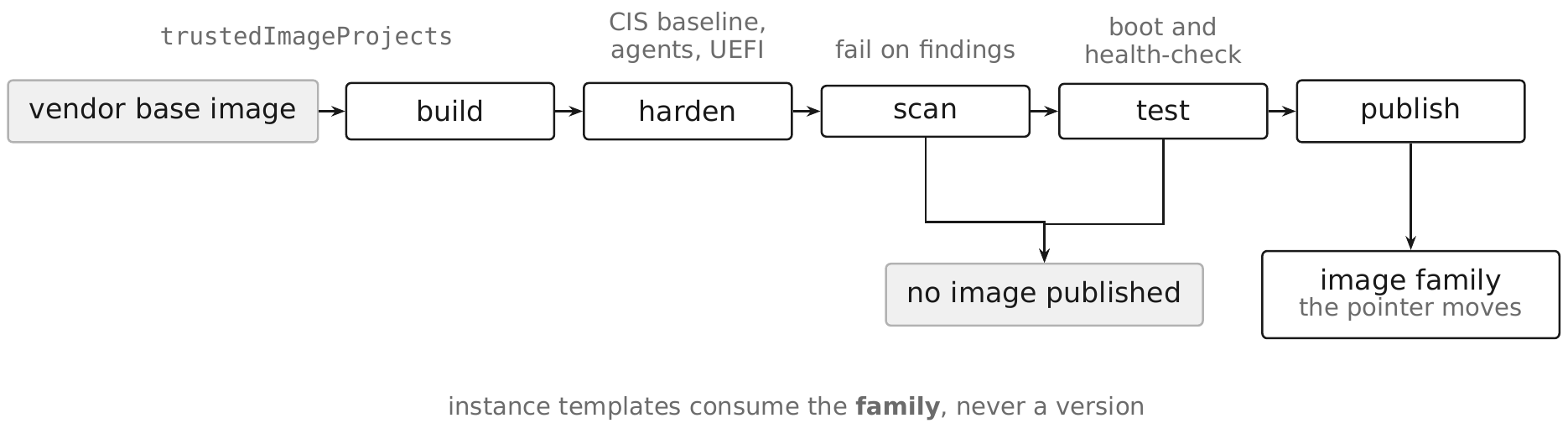
A golden image pipeline turns an OS base image into a hardened, tested, versioned artifact that every instance template in an environment consumes — so hardening happens once per build instead of once per instance, and the hardening is reviewable as an artifact rather than asserted as a runbook.
The loop is build, harden, scan, test, publish:
- Build from a trusted public or vendor base image, constrained by
constraints/compute.trustedImageProjects(§8.7). - Harden — apply the CIS-derived configuration baseline, minimize packages, install the OS Config and logging agents, and set UEFI options compatible with Shielded VM (§8.16).
- Scan the resulting disk for known-vulnerable packages, and fail the build on findings above the threshold rather than reporting them.
- Test by booting an instance from the candidate image and exercising a real health check — an image that passes a scan and does not boot has failed.
- Publish into the image family, which is the promotion.
gcloud compute images create golden-app-linux-2026-09-10 \
  --project=rc-saas-shared-art-01 \
  --source-disk=build-app-linux-hardened \
  --source-disk-zone=us-central1-a \
  --family=golden-app-linux \
  --storage-location=us
The family pointer is the entire promotion mechanism, and that is the design. Every
instance template references --image-family (§8.10), so publishing makes the new image the
default for every future instance with no template edited and no approval resource in
between. A build that passes gets the pointer; one that fails does not. Rollback is
republishing the previous version to the same family — which means rollback is as fast as
release, the property that makes teams willing to release often.
Retirement is two states, not a delete:
| State | Effect |
|---|---|
DEPRECATED | Warns on use; still bootable |
OBSOLETE | Blocks new instance creation; running instances unaffected |
gcloud compute images deprecate golden-app-linux-2026-08-15 \
  --project=rc-saas-shared-art-01 \
  --state=DEPRECATED \
  --replacement=golden-app-linux-2026-09-10
That grace window exists for in-flight builds and long-lived instance groups; deleting an image outright breaks anything still referencing it by name. Chapter 23 owns the build pipeline itself — triggers, workers, build service accounts, and provenance; this section covers the image artifact only.
Pitfall. The pipeline is only mandatory if the platform enforces it.
constraints/compute.trustedImageProjects restricted to rc-saas-shared-art-01 (plus
Google's public image projects if unmodified OS images remain in scope) is what stops a
developer from booting a marketplace image directly and bypassing every step of this section.
Without that constraint, a golden-image pipeline is a convention, and conventions are not
controls.
8.34 Immutable VM Deployment §
Immutable VM deployment is the practice this chapter has been building toward: an instance is never modified in place after boot, deployment means rolling a new instance template through a managed instance group, and interactive SSH into a production instance is treated as an incident-response action, not a routine one.
The instance template (§8.10) is the deployment unit: a build pipeline (Chapter 23) produces
a golden image (§8.33), a new template references it, and rolling-action start-update
(§8.11) replaces the fleet against that template with a surge/unavailable policy tuned to
the service's spare capacity. There is no step in this flow where an operator logs into a
running instance to apply a change — every change is a new template version, so the audit
trail is the sequence of template versions and the pipeline that produced each one, not a
shell history scattered across instances.
No-SSH-in-production follows from that: if deployment never requires SSH, the only
remaining reason to connect is diagnosis or incident response, which should be rare, logged,
and time-boxed. Practically, this means constraints/compute.requireOsLogin and IAP TCP
forwarding (§8.21) stay configured as the access path for the exceptional case, while the
routine path — a health check failing, autohealing (§8.13) replacing the instance — never
involves a human touching the VM at all.
Pitfall. A team that adopts immutable deployment for the happy path but leaves a break-glass runbook that recommends "SSH in and patch it live for now" during an incident quietly reintroduces configuration drift at exactly the moment it is least observed; the correct incident response is to gather diagnostic data over the IAP tunnel, then fix the root cause in the template and roll it out, not to hand-edit the affected instance.
8.35 Compute Engine Hardening §
Pulling the chapter together, the following controls constitute this chapter's default posture for every VM in the reference estates, gathered here so a reviewer can check a fleet against one list without walking every section again.
Both estates apply Shielded VM, OS Login, no external IPs, no default service account, and a trusted-image restriction as the organization-level baseline (§2.30 for constraint evaluation and inheritance):
cat > org-policy-compute-baseline.yaml <<'EOF'
name: organizations/123456789012/policies/compute.requireShieldedVm
spec:
  rules:
  - enforce: true
EOF
gcloud org-policies set-policy org-policy-compute-baseline.yaml
The same pattern applies constraints/compute.requireOsLogin,
constraints/compute.vmExternalIpAccess (set to deny by default, §8.22),
constraints/compute.trustedImageProjects (restricted to rc-saas-shared-art-01, §8.33),
and constraints/compute.disableSerialPortAccess (blocking the interactive serial console,
which — like a metadata SSH key — is an access path that bypasses OS Login's identity
mapping if left open).
Checklist for a single instance or template, each cross-referenced to where it is covered in full:
- Boots from an image published through the golden-image pipeline, in the current image family (§8.7, §8.33), never an unmanaged or marketplace image.
- Shielded VM fully enabled: Secure Boot, vTPM, Integrity Monitoring (§8.16, §8.18).
- Confidential VM enabled where the workload's data-in-use sensitivity and machine type support it (§8.17).
- No external IP; reaches the internet via Cloud NAT and Google APIs via Private Google Access (§5.17, §5.20, §8.22).
- Attached service account is a dedicated
sa-app-<env>identity with least-privilege roles, never the Compute Engine default (§8.29). - Boot and data disks encrypted with a customer-managed key where the data classification requires it (§8.23, §14.8).
- OS Login enabled, with 2-step verification for privileged human access (§8.19); no metadata-based SSH keys; serial port access disabled.
- Reachable for administrative access only through IAP TCP forwarding, never a public 22/3389 (§8.21, §5.13–§5.14).
- Managed by a MIG with autohealing and, where the workload permits, autoscaling (§8.11– §8.13); deployment is a template rollout, never an in-place change (§8.34).
- OS Config agent installed and enrolled in patch management and OS policy enforcement (§8.30–§8.32).
Chapter Summary §
- Compute Engine is the VM primitive for the whole book: everything a template, image, or disk setting establishes here is cited, not repeated, by GKE (Chapter 9) and Cloud Run (Chapter 10) where they build on a VM underneath.
- Machine family choice and Confidential VM eligibility must be decided together — support is tied to specific machine types and hardware generations, not to a family as a whole.
- The instance template, not the running instance, is the unit of change; templates are immutable, and a configuration change is a new template rolled out through a managed instance group.
- Shielded VM (Secure Boot, vTPM Measured Boot, Integrity Monitoring) should be the default on every instance; Confidential VM adds runtime memory encryption on supported hardware.
- OS Login replaces metadata SSH keys with IAM-governed, centrally revocable host access, optionally with 2-step verification; IAP TCP forwarding replaces a public SSH/RDP listener with a tunnel from a fixed source range, and cites §4.16 for the access-control model behind it.
- The Compute Engine default service account is never attached in this book's examples; a
dedicated
sa-app-<env>service account with least-privilege roles is attached instead. - CMEK wiring on disks, snapshots, and images is one flag plus a service-agent grant; key management itself belongs to Chapter 14.
- Organization policy constraints (
constraints/compute.requireShieldedVm,constraints/compute.requireOsLogin,constraints/compute.vmExternalIpAccess,constraints/compute.trustedImageProjects,constraints/compute.disableSerialPortAccess) turn every hardening choice in this chapter into a fleet-wide default rather than a per-instance decision. - A golden image pipeline (build, harden, scan, test, publish) and an image family as the
promotion mechanism are what make
constraints/compute.trustedImageProjectsenforceable without breaking new instance creation. - Immutable VM deployment means the instance template is the deployment artifact, rolling replacement is the deployment mechanism, and interactive SSH into production is an incident-response action rather than a routine one.
- VM Manager's OS inventory is the source of the OS-level vulnerability signal that Security Command Center (Chapter 16) aggregates and prioritizes fleet-wide.
Security Checklist §
| Control | Why it matters | How to verify |
|---|---|---|
constraints/compute.requireShieldedVm enforced | Blocks any instance without Secure Boot, vTPM, and Integrity Monitoring | gcloud org-policies describe constraints/compute.requireShieldedVm --organization=123456789012 |
constraints/compute.requireOsLogin enforced | Prevents metadata SSH keys from bypassing IAM-governed access | gcloud org-policies describe constraints/compute.requireOsLogin --organization=123456789012 |
constraints/compute.vmExternalIpAccess denies by default | Removes the internet as a reachable path to workload VMs | gcloud compute instances list --filter="EXTERNAL_IP:*" returns none unexpected |
constraints/compute.trustedImageProjects restricted | Forces every instance through the golden-image pipeline | gcloud org-policies describe constraints/compute.trustedImageProjects --organization=123456789012 |
constraints/compute.disableSerialPortAccess enforced | Closes the interactive serial console as an OS Login bypass | gcloud org-policies describe constraints/compute.disableSerialPortAccess --organization=123456789012 |
| No instance uses the Compute Engine default service account | A shared, historically over-privileged identity is not on the audit trail for any workload | gcloud compute instances list --format="value(name,serviceAccounts.email)" shows only sa-app-* |
| Boot disks and images use customer-managed keys where required | Meets data-classification requirements without depending on Google-managed key rotation | gcloud compute disks describe DISK --zone=ZONE --format="value(diskEncryptionKey)" |
| Deployment is template rollout, not in-place instance edit | Keeps the fleet auditable and prevents undocumented drift | Compare running instances' template version against the MIG's current template |
| OS Config agent enrolled fleet-wide | Ensures patch management and vulnerability signal cover every instance | gcloud compute os-config inventories list --location=ZONE returns the full fleet |
Sources §
- https://cloud.google.com/compute/docs/machine-resource (last validated 2026-09-03)
- https://cloud.google.com/compute/docs/about-shielded-vm (last validated 2026-09-03)
- https://cloud.google.com/compute/docs/about-confidential-vm (last validated 2026-09-03)
- https://cloud.google.com/compute/docs/oslogin (last validated 2026-09-03)
- https://cloud.google.com/compute/docs/disks/hyperdisks (last validated 2026-09-03)
- https://cloud.google.com/compute/docs/disks/persistent-disks (last validated 2026-09-03)
- https://cloud.google.com/compute/docs/instance-groups/creating-groups-of-managed-instances (last validated 2026-09-03)
- https://cloud.google.com/compute/docs/os-config-management (last validated 2026-09-03)
- https://cloud.google.com/compute/docs/images/create-delete-deprecate-private-images (last validated 2026-09-03)
- https://cloud.google.com/compute/docs/access/service-accounts (last validated 2026-09-03)
- https://cloud.google.com/iap/docs/using-tcp-forwarding (last validated 2026-09-03)