Chapter 3
Identity and Access Management
Scope. This chapter is the complete IAM model: what a principal is, how roles and permissions compose, how allow policies, deny policies, and principal access boundary policies interact, how conditions narrow a grant, and how privilege is elevated temporarily rather than held permanently. It also fixes the role assignments the rest of the book uses for pipelines, developers, operators, and security teams. Federation configuration — turning an external identity into a GCP principal — is Chapter 4. Hierarchy mechanics are Chapter 2. Prerequisites. Chapter 1 (§1.7 inheritance, §1.10 service accounts, §1.22 least privilege) and Chapter 2 (§2.30 organization policy, §2.31 inheritance rules). Verified against. Google Cloud console and API surface as of 2026-09, Cloud SDK 583.0.0,
hashicorp/googleprovider 8.x; see sources at end.
IAM is the control that decides every other control's value. A perfect network design, faultless encryption, and a hardened supply chain are all defeated by one principal holding a role it should not have, because that principal can simply ask the API to change the network, rotate the key, or approve the artifact. Every real Google Cloud incident this book is written to prevent has an IAM sentence in the middle of it.
What makes GCP IAM different from its equivalents elsewhere is that the allow model is strictly additive. There is no "deny" statement inside an allow policy, no way to write a role binding that removes something, and no way for a project to narrow what the organization granted. Subtraction is a separate system — deny policies, and now principal access boundary policies — with its own attachment points and its own evaluation order. Engineers who model GCP IAM as "AWS policies with different nouns" get this wrong and build guardrails that do not hold.
The second structural fact is that permissions attach to roles and roles attach to principals at a resource, and the resource is any node in the hierarchy. A single binding at a folder is the same operation as a binding on one bucket, with a blast radius five orders of magnitude apart. Almost all IAM design work is choosing the attachment point correctly, and almost all IAM debt comes from choosing it too high.
The third is that identity is temporal. A role held for a year is a standing risk; the same role held for forty minutes with a justification is an auditable event. Google Cloud now has first-class machinery for this — service account impersonation, IAM conditions with time bounds, and Privileged Access Manager — and this chapter treats standing privilege as something to be designed out rather than documented.
3.1 GCP IAM Architecture §
An access decision in Google Cloud combines four inputs:
- The principal — the authenticated identity making the call.
- The permission — a
service.resource.verbstring such asstorage.objects.get, derived from the API method being invoked. - The resource — the target, and by extension its entire ancestry up to the organization.
- The policies — deny policies, principal access boundary policies, and allow policies attached anywhere in that ancestry.
Evaluation order. IAM checks deny policies first. If any deny rule matches the principal, the permission, and its condition, the request fails and no allow policy can rescue it. Only if nothing denies does IAM evaluate the union of allow policies from the resource up to the organization; if any binding in that union grants a role containing the permission, and its condition evaluates true, the request succeeds. Principal access boundary policies constrain, independently, which resources a principal is eligible to access at all.
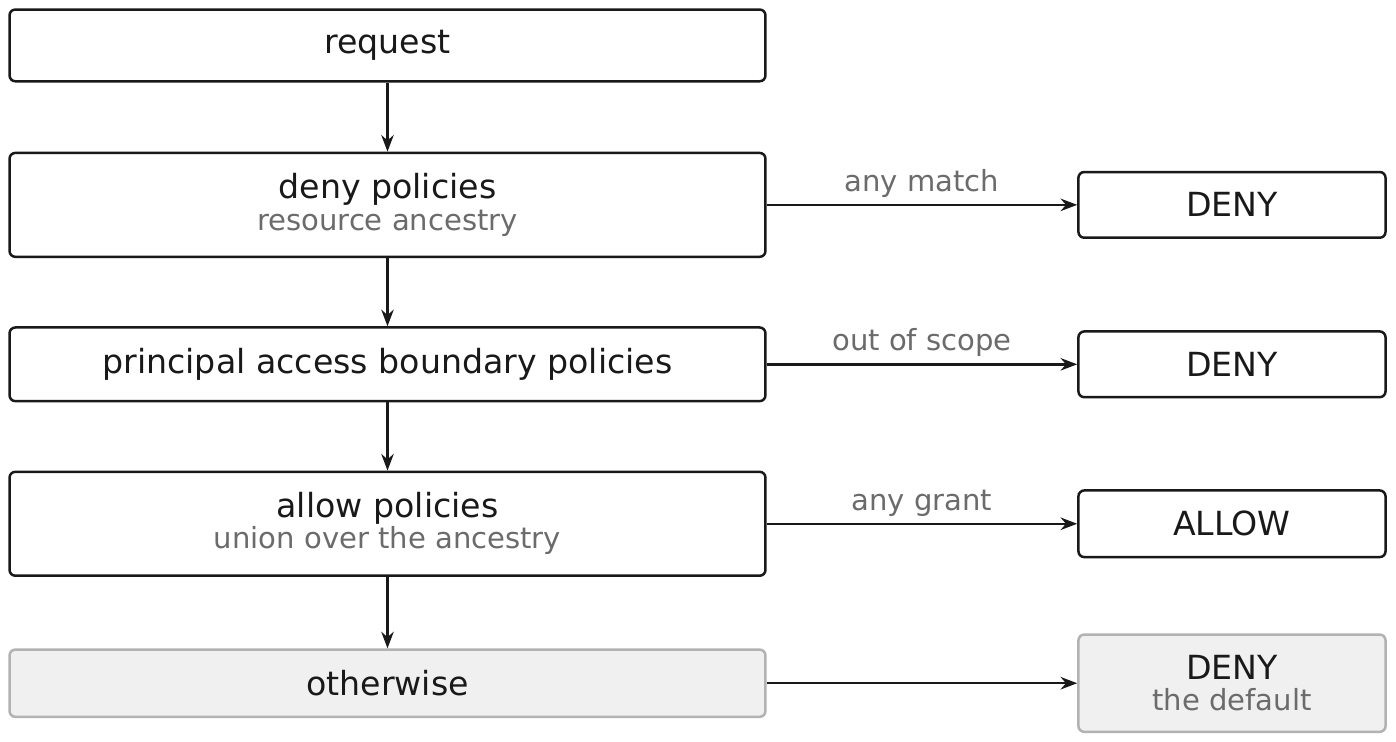
Three properties follow, and they are the ones to internalize:
- Default is deny. An absent binding is a denial. You never need a rule to prevent something nobody was granted.
- Allow is additive and forward-dated. A binding at a folder applies to projects created under it years later. There is no "except" clause.
- Only deny subtracts, and deny is unconditional in the sense that matters — it cannot be overridden lower down, only carved out by
exceptionPrincipalsandexceptionPermissionsin the deny rule itself.
Console path. Console → IAM & Admin → IAM shows bindings set at the current resource; the Include Google-provided role grants toggle reveals service agents, and the inherited column shows what comes from ancestors. IAM & Admin → Deny holds deny policies. IAM & Admin → Policy Analyzer answers hierarchy-wide questions that the IAM page cannot.
3.2 Principals §
A principal is an identity that IAM can name in a policy. The identifier prefix determines both the identity type and how it is governed.
| Identifier | Meaning |
|---|---|
user:USERNAME@rickcollette.domain | A single Google account |
group:GROUP@rickcollette.domain | A Google group; membership managed in Cloud Identity |
serviceAccount:NAME@PROJECT_ID.iam.gserviceaccount.com | A workload identity |
domain:rickcollette.domain | Every account in a Workspace/Cloud Identity domain |
principal://iam.googleapis.com/locations/global/workforcePools/POOL_ID/subject/SUBJECT | A single federated workforce user (§4.2) |
principal://iam.googleapis.com/projects/PROJECT_NUMBER/locations/global/workloadIdentityPools/POOL_ID/subject/SUBJECT | A single federated workload (§4.3) |
principalSet://... | A set of federated identities matched by an attribute |
deleted:... | A binding left behind by a deleted principal, retained for audit |
allAuthenticatedUsers | Anyone with any Google account, including outside your org |
allUsers | Anyone on the internet, unauthenticated |
Security posture. allUsers and allAuthenticatedUsers are the two identifiers that turn a resource public. allAuthenticatedUsers is the more dangerous of the two because it looks authenticated: it includes every consumer Gmail account in existence. Neither can carry an IAM condition, so there is no way to narrow them. Block both organization-wide with constraints/iam.allowedPolicyMemberDomains (§2.30) and permit exceptions only in the sections of this book explicitly about public access.
Pitfall. deleted: bindings are not cosmetic. If a service account is deleted and recreated with the same name, it gets a new unique ID, and the old binding does not transfer — but the stale deleted: entry remains in the policy and clutters every audit. Clean them out as part of IAM recertification (§3.33).
3.3 Users §
A user principal is a single Google account. In a well-run organization it appears in almost no IAM policies.
The reason is lifecycle. A user binding is created by whoever needed it, at whatever node was convenient, and there is no process that reliably removes it when the person changes teams. A group binding, by contrast, is removed by removing group membership — an action the joiner-mover-leaver process already performs.
The rule this book applies: bind roles to group: principals. Direct user: bindings are permitted in exactly three cases:
- Break-glass identities, deliberately outside group management so that a compromised directory cannot revoke them, held by named individuals, and alerted on at every use.
- Sandbox projects, where the project itself is the person's (§2.25).
- Transient grants issued by Privileged Access Manager, which manages its own expiry (§3.27).
Detection. Find direct user bindings across the hierarchy and treat each as a finding:
gcloud asset search-all-iam-policies \
  --scope="organizations/123456789012" \
  --query="policy:\"user:\"" \
  --format="table(resource,policy.bindings.role)"
Pitfall. A user who leaves the organization has their account suspended, but IAM bindings survive; the binding becomes a deleted: principal only once the account is fully deleted. Suspension alone does not clean the policy.
3.4 Groups §
Google groups are the correct unit of human access grant. A group is a principal, membership lives in Cloud Identity, and nesting works — a group can contain another group.
Design pattern: role groups, not team groups. Name groups after what they can do, not who they are:
| Group | Bound to | At |
|---|---|---|
gcp-org-admins@rickcollette.domain | roles/resourcemanager.organizationAdmin | organization |
gcp-security-viewers@rickcollette.domain | roles/iam.securityReviewer, roles/logging.viewer | organization |
gcp-network-admins@rickcollette.domain | roles/compute.networkAdmin, roles/compute.securityAdmin | host project |
gcp-prod-viewers@rickcollette.domain | roles/logging.viewer, roles/monitoring.viewer, per-service viewer roles | production folder |
gcp-billing-viewers@rickcollette.domain | roles/billing.viewer | billing account |
Team membership then maps to role groups in the directory, where HR-driven automation can maintain it. The IAM policy stops changing.
Security posture. Group membership becomes a privilege escalation path: whoever can add members to gcp-org-admins is effectively an Organization Administrator. Restrict group ownership in the Admin console, require that privileged groups be managed only by automation or by a small directory-admin team, and audit membership changes from Workspace audit logs, which are not GCP audit logs and must be exported separately.
Pitfall. Group membership changes are eventually consistent for IAM, and nested groups add propagation time. A newly added member may not have access for some minutes — do not build a break-glass path that depends on adding someone to a group during an incident.
3.5 Service Accounts §
A service account is both a principal (it appears in policies) and a resource (it has its own IAM policy governing who may use it). That duality is the source of most service account confusion and most service account privilege escalation.
Creating and granting:
gcloud iam service-accounts create sa-app-api-runtime \
  --project=rc-saas-prod-app-01 \
  --display-name="Runtime identity for the API service" \
  --description="Attached to Cloud Run; reads secrets and writes to Pub/Sub."

gcloud projects add-iam-policy-binding rc-saas-prod-app-01 \
  --member="serviceAccount:sa-app-api-runtime@rc-saas-prod-app-01.iam.gserviceaccount.com" \
  --role="roles/pubsub.publisher"
resource "google_service_account" "api_runtime" {
  account_id   = "sa-app-api-runtime"
  project      = var.project_id
  display_name = "Runtime identity for the API service"
}

resource "google_project_iam_member" "api_runtime_publisher" {
  project = var.project_id
  role    = "roles/pubsub.publisher"
  member  = "serviceAccount:${google_service_account.api_runtime.email}"
}
The two policies to keep straight:
- The policy on the service account controls who can impersonate it or attach it (
roles/iam.serviceAccountTokenCreator,roles/iam.serviceAccountUser,roles/iam.workloadIdentityUser). - The policies naming the service account grant it access to other resources.
Someone with roles/iam.serviceAccountUser on a highly privileged service account has, in practice, that account's privileges — they can deploy a workload that runs as it. Treat iam.serviceAccounts.actAs as equivalent to the target account's full permission set.
Design rules. One service account per workload, never one per team. Name it after the workload (sa-<function>-<purpose>, §2.10). Never reuse a service account across environments — a single account with bindings in both staging and production erases the boundary.
Pitfall. Deleting a service account does not remove its bindings elsewhere, and recreating it with the same email produces a different unique ID that inherits nothing. Undelete within the recovery window rather than recreating.
3.6 Workload Identities §
A workload identity is the principal a running piece of code authenticates as. Google Cloud offers three mechanisms, in descending order of preference:
- Attached service account — the workload runs on a GCP resource (VM, Cloud Run service, Cloud Function, Cloud Build step) with a service account attached. The metadata server issues short-lived access tokens on request; there is no credential on disk and nothing to rotate. Application Default Credentials finds it automatically.
- Workload Identity Federation — the workload runs outside Google Cloud (GitHub Actions, AWS, Azure, on-premises) and exchanges its native identity token for a short-lived Google credential. Configuration is §4.3.
- Kubernetes Workload Identity — a GKE pod's Kubernetes service account is federated to a Google service account, so the pod gets tokens without a node-level credential. Configuration is §4.12.
What none of them require: a key file. That is the point of the list.
Security posture. An attached service account is reachable by anything running on the instance, including a compromised sidecar or a process an attacker starts. The isolation boundary is the instance, so instance granularity must match identity granularity: two workloads that need different permissions need different instances or different pods, not one instance with the union of both.
Verifying what a resource runs as:
gcloud compute instances describe INSTANCE_NAME \
  --zone=us-central1-a \
  --format="value(serviceAccounts[].email,serviceAccounts[].scopes)"
Pitfall. Legacy access scopes on Compute Engine still exist and still restrict what an attached account can do, independently of IAM. A VM with a correctly scoped service account but the default devstorage.read_only scope will fail writes with a confusing error. Set scopes to cloud-platform and control access with IAM, which is the documented guidance — scopes are coarse and predate IAM.
3.7 Workforce Identities §
A workforce identity is a human who authenticates against an external identity provider — Okta, Entra ID, Ping — and is admitted to Google Cloud through Workforce Identity Federation without a Cloud Identity account being provisioned for them.
The principal forms are pool-scoped:
principal://iam.googleapis.com/locations/global/workforcePools/POOL_ID/subject/SUBJECT
principalSet://iam.googleapis.com/locations/global/workforcePools/POOL_ID/group/GROUP_ID
principalSet://iam.googleapis.com/locations/global/workforcePools/POOL_ID/attribute.ATTRIBUTE/VALUE
When to use it instead of Cloud Identity accounts. Workforce Identity Federation suits contractors, partner organizations, and enterprises that refuse to duplicate their directory into Google. Cloud Identity accounts remain better for permanent staff, because the account can be an owner of resources and can use the full console and Workspace surface.
Security posture. The principalSet:// group and attribute forms are what makes this manageable — bind roles to a mapped IdP group rather than to individual subjects, so the external directory keeps driving access. The mapping is only as good as the attribute mapping and attribute condition on the provider (§4.2), which is where the security work actually is.
Pitfall. Workforce pool principals are not Cloud Identity users, so they do not appear in the Admin console, cannot own resources, and are not covered by Workspace-side controls such as session length policy unless you configure the pool's own session duration. Set --session-duration on the pool deliberately rather than accepting the default.
3.8 Google-Managed Service Accounts §
Two categories of account exist that you did not create.
Service agents are created and managed by Google so a service can act on your behalf — the Cloud Build service agent, the GKE service agent, the Compute Engine service agent, the Cloud Storage service agent that encrypts with your CMEK. They have emails of the form service-PROJECT_NUMBER@gcp-sa-SERVICE.iam.gserviceaccount.com, they hold a Google-granted role on your project, and you cannot create keys for them.
Default service accounts are user-managed accounts auto-created when certain services are enabled — the Compute Engine default (PROJECT_NUMBER-compute@developer.gserviceaccount.com) and the App Engine default. Historically they were granted the basic Editor role at creation. Suppress that with constraints/iam.automaticIamGrantsForDefaultServiceAccounts, which is enforced by default on organizations created on or after 2024-05-03 (§2.30).
Security posture.
- Never attach a default service account to a workload. Create a purpose-built one.
- Do grant service agents what they legitimately need — a common failure is removing a service agent's role and breaking CMEK or Cloud Build in a way that is hard to diagnose. In the console, service agents are hidden until you enable Include Google-provided role grants.
- Cross-project work often requires granting a foreign project's service agent a role on your resource (for example, a Cloud Build service agent in the CI/CD project deploying into a workload project). Scope that grant to the resource, not the project.
gcloud projects get-iam-policy rc-saas-prod-app-01 \
  --flatten="bindings[].members" \
  --filter="bindings.members ~ gcp-sa-" \
  --format="table(bindings.role,bindings.members)"
3.9 IAM Roles §
A role is a named collection of permissions. Permissions are never granted directly; they are granted by granting a role that contains them.
Permission strings follow SERVICE.RESOURCE.VERB: compute.instances.delete, iam.serviceAccounts.getAccessToken, storage.objects.list. The verb tells you the operation class, and the mapping to API methods is close but not exact — storage.objects.list backs both objects.list and parts of objects.get in some flows, which is why the permission reference rather than intuition is the authority.
Three role types, covered in §3.10–§3.12:
| Type | Managed by | Where usable |
|---|---|---|
| Basic | any resource; avoid | |
| Predefined | Google, kept current as APIs change | any resource |
| Custom | you | resources under the org or project where defined |
Inspecting a role before granting it is a habit worth building. The number of permissions in a role is the best single predictor of how much you will regret it:
gcloud iam roles describe roles/compute.instanceAdmin.v1 \
  --format="value(includedPermissions)"
gcloud iam roles list --filter="name:roles/artifactregistry" \
  --format="table(name,title)"
Pitfall. Predefined roles change: Google adds permissions to them as services gain features. A role that was narrow when you granted it can widen without any change on your side. That is a reason to prefer narrow predefined roles over broad ones, and to re-examine grants during recertification (§3.33) — not a reason to build custom roles for everything (§3.12).
3.10 Basic Roles §
Basic roles are the coarse, project-wide roles that predate predefined roles. The legacy trio is Owner, Editor, and Viewer. Google has since added Admin (roles/admin), Writer (roles/writer), and Reader (roles/reader), which are Preview at the time of writing and must not be a production dependency; they also cannot be granted from the console, only through the API or the gcloud CLI. Google's documentation states plainly that you should not grant basic roles unless there is no alternative.
What is actually wrong with them:
- Unbounded scope. Editor grants write access to essentially every service in the project, including ones enabled after the grant.
- They cannot carry conditions. IAM conditions are not supported on the legacy Owner, Editor, and Viewer roles, so you cannot narrow one by resource or time.
- Owner is a self-perpetuating grant. It includes
setIamPolicy, so an Owner can re-grant Owner. Removing it is not sufficient if the holder noticed. - They defeat recommendation tooling. IAM Recommender's most useful output is a narrower replacement, and a basic role produces a large, low-confidence diff.
Where a basic role is acceptable: a personal sandbox project with a hard budget, no connectivity, and no real data (§2.25). Nowhere else in this book.
Detection. Legacy basic role grants outside the sandbox folder are a standing finding:
for R in owner editor viewer; do
  gcloud asset search-all-iam-policies \
    --scope="organizations/123456789012" \
    --query="policy:roles/${R}" \
    --format="table(resource,policy.bindings.members)"
done
The roles: and policy.role.permissions: query fields are available too; policy.role.permissions:resourcemanager.projects.setIamPolicy is the broader question — every role, basic or not, that lets its holder re-grant itself anything on the project.
The legacy Owner role also cannot be granted at the organization level through the console in the normal flow, and Privileged Access Manager explicitly refuses to issue Owner, Editor, or Viewer (§3.27).
3.11 Predefined Roles §
Predefined roles are Google-maintained, per-service, and the default choice for almost every grant in this book. They are kept current as services add methods, which is a real operational advantage over hand-maintained custom roles.
Choosing one well:
- Prefer the narrowest role that names your verb.
roles/storage.objectVieweroverroles/storage.objectUseroverroles/storage.admin. - Read the permission list, not the title.
roles/compute.networkViewersounds harmless;roles/compute.networkAdminincludes the ability to create routes that redirect traffic. - Watch for
setIamPolicy. Any role containingRESOURCE.setIamPolicylets the holder grant themselves anything else on that resource. Roles ending in.adminusually contain it. - Note the
.v1suffix on some Compute roles (roles/compute.instanceAdmin.v1); the unsuffixed variant is a different, narrower role.
The reference grants used throughout this book:
| Purpose | Role |
|---|---|
| Read-only security review across services | roles/iam.securityReviewer |
| Read logs | roles/logging.viewer, roles/logging.privateLogViewer for Data Access |
| Deploy container images | roles/artifactregistry.writer (push), roles/artifactregistry.reader (pull) |
| Use one KMS key | roles/cloudkms.cryptoKeyEncrypterDecrypter |
| Read one secret | roles/secretmanager.secretAccessor |
| Attach to a subnet in a Shared VPC | roles/compute.networkUser on the subnet |
| Impersonate a service account | roles/iam.serviceAccountTokenCreator on the account |
Pitfall. Granting a predefined role at the project when the resource-level grant exists. roles/secretmanager.secretAccessor at the project grants access to every secret in it, including secrets created next year. Grant on the secret.
3.12 Custom Roles §
A custom role contains exactly the permissions you list. Use them when no predefined role fits and the gap is material — not as a reflex.
Constraints that shape the design (observed 2026-09):
- Custom roles can be created at the organization or at a project only — not at a folder.
- 300 custom roles per organization and 300 per project.
- Role IDs are up to 64 bytes of alphanumerics, underscores, and periods; they cannot be reused within the same org or project and cannot be changed after creation.
- Each permission carries a support level:
SUPPORTED,TESTING, orNOT_SUPPORTED. Only supported permissions belong in a role you rely on. - Project-level custom roles cannot contain organization- or folder-scoped permissions.
- Launch stages (
ALPHA,BETA,GA,DEPRECATED,DISABLED) are informational, exceptDISABLED, which makes the role inactive while leaving it visible in policies.
# role-deploy-releaser.yaml
title: "Deploy Releaser"
description: "Promote an already-attested release; cannot build or alter policy."
stage: GA
includedPermissions:
  - clouddeploy.releases.get
  - clouddeploy.releases.list
  - clouddeploy.rollouts.create
  - clouddeploy.rollouts.get
  - clouddeploy.deliveryPipelines.get
gcloud iam roles create rc.deployReleaser \
  --organization=123456789012 \
  --file=role-deploy-releaser.yaml
Where custom roles earn their cost: separation of duties. The pattern above splits "may build an artifact" from "may promote it to production," which no predefined role does, and which is the control that makes Binary Authorization meaningful.
Maintenance burden. A custom role does not gain permissions when a service adds a method, so a feature the team starts using silently fails until someone updates the role. Define custom roles at the organization so there is one copy, keep them in Terraform, and review them when the underlying service has a major release.
Anti-pattern. Building a custom role by copying a predefined role and removing three permissions. You now own the maintenance of a hundred permissions to control three. Grant the narrow predefined role and add a second one instead.
3.13 IAM Policies §
An IAM allow policy is a list of bindings, each pairing a role with a set of members and an optional condition, plus an etag for optimistic concurrency.
{
  "bindings": [
    {
      "role": "roles/storage.objectViewer",
      "members": ["group:gcp-prod-viewers@rickcollette.domain"]
    },
    {
      "role": "roles/secretmanager.secretAccessor",
      "members": ["serviceAccount:sa-app-api-runtime@rc-saas-prod-app-01.iam.gserviceaccount.com"],
      "condition": {
        "title": "api-secrets-only",
        "expression": "resource.name.startsWith(\"projects/123456789012/secrets/api-\")"
      }
    }
  ],
  "etag": "BwYh...",
  "version": 3
}
Policy version matters. Conditions require version: 3. A tool that reads a policy as version 1, modifies it, and writes it back silently drops conditional bindings. Always request the full policy and preserve the version.
Read-modify-write is a race. The etag protects you: a setIamPolicy with a stale etag fails rather than clobbering a concurrent change. Never build automation that ignores the etag, and prefer add-iam-policy-binding / google_project_iam_member (which patch a single binding) over set-iam-policy / google_project_iam_policy (which replace the whole document).
gcloud projects get-iam-policy rc-saas-prod-app-01 --format=json > policy.json
Terraform's three resource shapes, in decreasing safety:
| Resource | Manages | Risk |
|---|---|---|
google_project_iam_member | one (role, member) pair | lowest — coexists with other managers |
google_project_iam_binding | all members of one role | removes members added elsewhere |
google_project_iam_policy | the entire policy | removes everything not in your config, including service agents |
Use _member unless you have a specific reason not to. google_project_iam_policy applied to a project with service agents will break the project.
3.14 Resource-Level Permissions §
Many services carry their own IAM policy on individual resources: a Cloud Storage bucket, a Pub/Sub topic or subscription, a Secret Manager secret, a KMS key or key ring, a BigQuery dataset or table, an Artifact Registry repository, a Cloud Run service.
That is where grants belong. The difference is not stylistic:
# Broad: every secret in the project, now and in future
gcloud projects add-iam-policy-binding rc-saas-prod-app-01 \
  --member="serviceAccount:sa-app-api-runtime@rc-saas-prod-app-01.iam.gserviceaccount.com" \
  --role="roles/secretmanager.secretAccessor"

# Narrow: one secret
gcloud secrets add-iam-policy-binding api-signing-key \
  --project=rc-saas-prod-app-01 \
  --member="serviceAccount:sa-app-api-runtime@rc-saas-prod-app-01.iam.gserviceaccount.com" \
  --role="roles/secretmanager.secretAccessor"
Not every service supports resource-level IAM. Compute Engine instances, for example, are governed at the project level for most operations; there is no per-instance allow policy for the common admin verbs. Where resource-level granularity is unavailable, the substitutes are, in order: a separate project (§1.5), an IAM condition on resource.name (§3.18), and a resource tag with a tag-conditioned binding (§3.20).
Pitfall. Resource-level policies are invisible from the project IAM page. A project that looks clean can have twenty bucket-level bindings. Cloud Asset Inventory is the only practical way to see them all:
gcloud asset search-all-iam-policies \
  --scope="projects/rc-saas-prod-app-01" \
  --asset-types="storage.googleapis.com/Bucket" \
  --format="table(resource,policy.bindings.role,policy.bindings.members)"
3.15 Policy Inheritance §
Allow policies accumulate down the hierarchy. The effective permission set for a principal on a resource is the union of every binding attached to that resource and to each of its ancestors, filtered by any conditions.
There is no override. A project-level policy that omits a role granted at the organization does not remove it. This is the single fact that most often surprises engineers arriving from other clouds, and it drives three design rules already stated and worth repeating here:
- Keep organization-node bindings to a handful (§2.7).
- Grant at the lowest node that works, which is usually the resource (§3.14).
- Use deny policies for anything that must hold regardless of what is granted below (§3.17).
Seeing effective access requires a different tool than get-iam-policy, which shows only bindings set at that node:
gcloud asset analyze-iam-policy \
  --organization=123456789012 \
  --identity="user:USERNAME@rickcollette.domain" \
  --show-response
Policy Analyzer answers the three question shapes that matter: what can this principal do, who can access this resource, and who has this role anywhere. Add --analyze-service-account-impersonation to follow impersonation chains, which is how a seemingly narrow grant turns out to reach production.
Pitfall. Inheritance also applies to deletion: removing a folder-level binding removes access for every project beneath it at once. Changes at high nodes have the same blast radius as grants at high nodes.
3.16 Allow Policies §
An allow policy is the ordinary IAM policy of §3.13 — the mechanism that grants. Two operational points deserve their own treatment.
Additivity has no ceiling. A principal can hold twenty bindings across five ancestors, and the effective permission set is the union of all of them. There is no per-principal cap that stops privilege accumulating, and no warning when it does. Accumulated privilege is invisible unless you go looking with Policy Analyzer.
Policy size is a real limit. Allow policies have a maximum serialized size, and conditional bindings are large; the practical ceiling is roughly 100 conditional bindings in one policy before size becomes the binding constraint. A design that needs hundreds of conditional bindings on one resource is a design that should have used separate resources or tag-based conditions (§3.20).
Safe modification, in order of preference:
gcloud projects add-iam-policy-binding rc-saas-prod-app-01 \
  --member="group:gcp-prod-viewers@rickcollette.domain" \
  --role="roles/logging.viewer"

gcloud projects remove-iam-policy-binding rc-saas-prod-app-01 \
  --member="group:gcp-prod-viewers@rickcollette.domain" \
  --role="roles/logging.viewer"
Both are read-modify-write with etag handling done for you. Reserve set-iam-policy for restoring a policy you exported, and never point it at a project you did not fully export first.
Testing before applying. Policy Simulator replays recent access attempts against a proposed policy and reports what would newly break:
gcloud iam simulator replay-recent-access \
  organizations/123456789012 policy.json
3.17 Deny Policies §
A deny policy is the only mechanism in Google Cloud IAM that subtracts. It attaches to an organization, folder, or project, is inherited by every descendant, and is evaluated before allow policies — so a matching deny rule wins over any role, at any node, including one granted by an Organization Administrator.
A deny rule has five fields:
| Field | Meaning |
|---|---|
deniedPrincipals | who is denied; individual principals or principal sets |
exceptionPrincipals | who is carved out of the denial |
deniedPermissions | permissions in SERVICE_FQDN/RESOURCE.ACTION form |
exceptionPermissions | permissions carved out of deniedPermissions |
denialCondition | optional CEL; resource tag functions only |
{
  "rules": [
    {
      "denyRule": {
        "deniedPrincipals": ["principalSet://goog/public:all"],
        "exceptionPrincipals": [
          "principalSet://goog/group/gcp-breakglass@rickcollette.domain"
        ],
        "deniedPermissions": [
          "cloudresourcemanager.googleapis.com/projects.delete",
          "cloudresourcemanager.googleapis.com/folders.delete"
        ],
        "denialCondition": {
          "title": "production-only",
          "expression": "resource.matchTag('123456789012/environment', 'production')"
        }
      }
    }
  ]
}
gcloud iam policies create deny-prod-deletion \
  --attachment-point="cloudresourcemanager.googleapis.com/organizations/123456789012" \
  --kind=denypolicies \
  --policy-file=deny-prod-deletion.json
Limits and caveats (observed 2026-09):
- 500 deny policies per resource and 500 deny rules total across them.
- Changes are eventually consistent — a deny is not instantaneous, so it is a guardrail, not an incident response tool.
- Only permissions on Google's supported list can be denied. Check the permission before designing around it; an unsupported permission silently cannot be constrained this way.
denialConditionsupports resource tag functions only, notresource.nameor time.
Where deny policies belong in this book's design:
- Deleting production projects and folders, excepted for a break-glass group (§2.29).
- Creating or uploading service account keys, as defense in depth behind the organization policy.
- Modifying log sinks and log buckets in the logging project, denied to everyone but the security automation.
- Disabling Security Command Center services or muting findings, denied outside the SOC group.
Pitfall. A deny rule that matches your automation is discovered at 3 a.m. Roll deny policies out against a test folder first, and always include an exceptionPrincipals entry for the break-glass group — a deny policy that denies everyone the ability to delete the deny policy is a permanent condition.
3.18 IAM Conditions §
An IAM condition attaches a CEL expression to a binding. The role applies only when the expression evaluates true.
Supported attributes:
| Attribute | Use |
|---|---|
resource.type | limit to a resource kind |
resource.name | prefix or exact-match a resource path |
resource.service | limit to one API |
resource.matchTag(), resource.matchTagId() | tag-based access (§3.20) |
request.time | time-bounded access (§3.19) |
request.host, request.path | IAP-fronted applications (§4.16) |
request.auth.access_levels | Context-Aware Access levels (§4.15) |
principal.type, principal.subject | narrow by principal attribute |
Anything beyond a trivial condition belongs in a file. The inline --condition syntax packs expression, title, and description into one comma-separated argument, which becomes unreadable and unreviewable at the length a real condition reaches:
# condition-api-instances.yaml
title: api-instances-only
description: Operators manage only API instances in us-central1-a.
expression: |-
  resource.name.startsWith(
    "projects/rc-saas-prod-app-01/zones/us-central1-a/instances/api-")
gcloud projects add-iam-policy-binding rc-saas-prod-app-01 \
  --member="group:gcp-app-operators@rickcollette.domain" \
  --role="roles/compute.instanceAdmin.v1" \
  --condition-from-file=condition-api-instances.yaml
resource "google_project_iam_member" "api_operators" {
  project = "rc-saas-prod-app-01"
  role    = "roles/compute.instanceAdmin.v1"
  member  = "group:gcp-app-operators@rickcollette.domain"

  condition {
    title       = "api-instances-only"
    description = "Operators manage only API instances in us-central1-a."
    expression = join("", [
      "resource.name.startsWith(",
      "\"projects/rc-saas-prod-app-01/zones/us-central1-a/instances/api-\")",
    ])
  }
}
Hard limitations, all load-bearing:
- Conditions cannot be used with the legacy basic roles (Owner, Editor, Viewer), nor with
allUsersorallAuthenticatedUsers. - Not every resource type supports conditional bindings, and unsupported attributes on a supported type cause the condition to evaluate false — failing closed, but confusingly.
- Cloud Storage requires uniform bucket-level access before conditions work.
- Conditions inflate policy size; roughly 100 conditional bindings per policy is the practical ceiling.
Pitfall. resource.name matching is exact-string work against the full resource path, and paths differ between services in ways that are easy to get wrong. Verify with Policy Troubleshooter before trusting a condition:
gcloud policy-troubleshoot iam \
  //cloudresourcemanager.googleapis.com/projects/rc-saas-prod-app-01 \
  --principal-email="USERNAME@rickcollette.domain" \
  --permission="compute.instances.start"
3.19 Time-Based Access §
A time condition turns a standing grant into an expiring one. The mechanism is request.time compared against a timestamp():
request.time < timestamp("2026-10-01T00:00:00Z")
# condition-migration-window.yaml
title: migration-window
description: Expires at the end of the database migration.
expression: request.time < timestamp("2026-10-01T00:00:00Z")
gcloud projects add-iam-policy-binding rc-saas-prod-app-01 \
  --member="group:gcp-migration-crew@rickcollette.domain" \
  --role="roles/cloudsql.admin" \
  --condition-from-file=condition-migration-window.yaml
Recurring windows are expressible too — for example, restricting a role to business hours in a named zone using request.time.getHours("America/New_York").
Security posture. An expired conditional binding is inert but still present. It stops granting access at the deadline, which is the control you wanted, but it remains in the policy, so the policy grows and audits get noisier. Sweep expired conditions during recertification.
When to use this rather than Privileged Access Manager. Time conditions are right for a planned, scoped window known in advance: a migration, a vendor engagement, a scheduled maintenance. PAM is right for unplanned, on-demand elevation where the requester should have to ask and justify (§3.27). Using time conditions for on-demand access means an engineer with policy-write access issues their own grants, which defeats the point.
Pitfall. request.time is evaluated at the moment of the API call, not at session start. A long-running operation started before the deadline can fail partway through when a follow-up call crosses it. Give windows generous tails, and prefer PAM's explicit expiry semantics for anything interactive.
3.20 Attribute-Based Access §
Attribute-based access control keys a grant on properties of the resource rather than on its name. In Google Cloud the durable attribute is the tag (§2.13), because tags are inherited, governed by their own IAM, and usable in both IAM conditions and deny policies.
# condition-dev-tagged.yaml
title: dev-tagged-only
description: Developers administer only instances tagged development.
expression: resource.matchTag("123456789012/environment", "development")
gcloud projects add-iam-policy-binding rc-saas-prod-app-01 \
  --member="group:gcp-app-developers@rickcollette.domain" \
  --role="roles/compute.instanceAdmin.v1" \
  --condition-from-file=condition-dev-tagged.yaml
Why this beats name matching. A name-based condition breaks the moment someone names a resource differently. A tag-based condition follows the resource: a VM moved into a folder tagged environment=production immediately falls outside the developer grant, with no policy change. And because attaching a tag value requires roles/resourcemanager.tagUser on that value, the classification is a separately governed act.
The three-role separation this enables:
| Who | Can | Cannot |
|---|---|---|
| Developers | administer resources tagged development | change the tag |
| Platform team | bind the production tag value | administer development resources |
| Security | read everything, bind no tags | administer anything |
Pitfall. resource.matchTag() takes the tag key's namespaced short name (ORG_ID/KEY_SHORT_NAME); resource.matchTagId() takes the permanent numeric IDs (tagKeys/NNN, tagValues/NNN). The namespaced form is readable but breaks if the key is renamed; the ID form is stable but unreadable. Use the ID form in deny policies and anywhere the condition must not silently stop matching.
3.21 Least-Privilege Design §
Least privilege is a sequence, not a judgment call. Apply the levers in this order and stop at the first one that solves the problem:
- Separate the boundary. Two workloads with different privilege needs go in different projects (§1.5). This is the only lever that also separates quota, API enablement, and network.
- Choose the narrowest predefined role that names the verb, and grant it on the narrowest resource that supports IAM (§3.11, §3.14).
- Add a condition — resource prefix, tag, time — if the role is still wider than the need (§3.18–§3.20).
- Write a custom role only if steps 2 and 3 leave a material gap and the maintenance cost is justified (§3.12).
- Add a deny policy for anything that must hold no matter what is granted below (§3.17).
Then close the loop: grant temporarily where possible (§3.27), and measure what was actually used (§3.31).
The reference posture for a workload service account:
- Attached, never keyed (§3.5, §3.25).
- Bindings only on the specific resources it touches — one secret, one bucket, one topic, one key.
- No
setIamPolicyon anything. - No
iam.serviceAccounts.actAson any other account. - Nothing granted at project scope unless the service genuinely has no resource-level IAM.
Pitfall. "Least privilege" applied only to humans. The service accounts are where over-privilege actually concentrates, because nobody complains about a service account with too much access — it never files a ticket.
3.22 Separation of Duties §
Separation of duties means no single principal can complete a sensitive action end to end. In cloud terms, the pairs that must not overlap:
| Duty A | Duty B | Why |
|---|---|---|
| Build an artifact | Approve it for production | otherwise the builder ships anything |
| Grant IAM roles | Hold privileged roles | otherwise privilege is self-service |
| Administer keys | Administer the data the keys protect | otherwise CMEK adds nothing (§2.21) |
| Configure logging | Administer the audited systems | otherwise evidence is deletable (§2.22) |
| Request privileged access | Approve it | otherwise PAM is a formality |
| Administer the organization | Administer the identity directory | otherwise one identity holds both planes (§2.4) |
Implementation. The mechanisms are already in the chapter: distinct groups, custom roles that split verbs (§3.12), deny policies that carve out a duty regardless of role (§3.17), and PAM entitlements whose approvers are a different group from the requesters (§3.27).
The test that matters. For each pair, ask: is there any principal that holds both? Policy Analyzer answers it directly, including through impersonation chains:
gcloud asset analyze-iam-policy \
  --organization=123456789012 \
  --permissions="clouddeploy.rollouts.create" \
  --analyze-service-account-impersonation \
  --show-response
Pitfall. Separation of duties defeated by an impersonation edge. An engineer with no production role who can impersonate a service account that has one holds the privilege in practice. Any duty analysis that ignores iam.serviceAccounts.getAccessToken and iam.serviceAccounts.actAs is incomplete.
3.23 Privileged Administrative Roles §
A small set of roles are equivalent to full control, because they can grant themselves anything else. Treat each as a break-glass credential.
| Role | Why it is total |
|---|---|
roles/resourcemanager.organizationAdmin | sets IAM at the organization |
roles/orgpolicy.policyAdmin | can disable every guardrail (§2.30) |
roles/iam.securityAdmin | setIamPolicy on projects |
roles/iam.serviceAccountAdmin + roles/iam.serviceAccountTokenCreator | can create and then become any account |
roles/iam.denyAdmin | can remove the deny policies that constrain everyone else |
roles/billing.admin | can detach billing and stop every project |
| Cloud Identity Super Administrator | can re-grant all of the above (§2.4) |
Controls applied to all of them:
- Held by groups whose membership is managed by automation, not by request.
- Granted through PAM rather than as standing bindings, wherever PAM supports the role (§3.27).
- Hardware security key required for the underlying account.
- Every use alerted, not merely logged: an alert on
SetIamPolicyat the organization node should wake someone. - Never held by the same principal as its counterpart in the separation-of-duties table (§3.22).
gcloud logging read \
  'protoPayload.methodName="SetIamPolicy" AND resource.type="organization"' \
  --organization=123456789012 --limit=20 --freshness=30d \
  --format="table(timestamp,protoPayload.authenticationInfo.principalEmail)"
3.24 Service Account Impersonation §
Impersonation lets an authenticated principal obtain a short-lived credential for a service account and act as it. It is the mechanism that makes keyless operation practical for humans and for chained automation.
The roles and what each actually allows:
| Role | Permission | Effect |
|---|---|---|
roles/iam.serviceAccountTokenCreator | iam.serviceAccounts.getAccessToken, .signJwt, .signBlob | mint tokens as the account |
roles/iam.serviceAccountOpenIdTokenCreator | iam.serviceAccounts.getOpenIdToken | mint OIDC ID tokens as the account |
roles/iam.serviceAccountUser | iam.serviceAccounts.actAs | attach the account to a resource you deploy |
roles/iam.workloadIdentityUser | federated binding | let an external identity act as the account (§4.3) |
All four are granted on the service account resource, not on the project:
gcloud iam service-accounts add-iam-policy-binding \
  sa-deploy-prod@rc-saas-shared-cicd-01.iam.gserviceaccount.com \
  --project=rc-saas-shared-cicd-01 \
  --member="group:gcp-prod-deployers@rickcollette.domain" \
  --role="roles/iam.serviceAccountTokenCreator"
Then use it with no key material at all:
gcloud compute instances list \
  --project=rc-saas-prod-app-01 \
  --impersonate-service-account=sa-deploy-prod@rc-saas-shared-cicd-01.iam.gserviceaccount.com
Audit value. Impersonation produces its own log entry naming both the human and the service account, so the audit trail records who acted as what. A key file produces only the service account. This is a strong reason to prefer impersonation even where a key would work.
Security posture. iam.serviceAccounts.getAccessToken on a privileged account is equivalent to holding that account's roles. Grant it on individual accounts, to groups, and prefer to make it a PAM entitlement rather than a standing binding.
Pitfall. Impersonation chains. If A can impersonate B and B can impersonate C, then A effectively holds C's privileges. Nothing warns you. --analyze-service-account-impersonation in Policy Analyzer is the only practical way to find these (§3.22).
3.25 Service Account Keys §
A service account key is a downloadable private key that authenticates as the account. It does not expire, is not bound to a network location or a device, and is a bearer credential: whoever holds the file is the service account.
Why this book treats keys as an anti-pattern:
- No expiry, so a key leaked in 2023 works in 2026 unless someone noticed.
- No context binding — a key stolen from a laptop works from anywhere.
- Weak revocation in practice, because nobody knows how many copies exist.
- They end up in Git, CI variables, container images, and support tickets.
- Every keyless alternative produces a better audit trail (§3.24).
The controls, in order:
constraints/iam.managed.disableServiceAccountKeyCreationandconstraints/iam.managed.disableServiceAccountKeyUploadat the organization (§2.30). Enforced by default on organizations created on or after 2024-05-03.- A deny policy on
iam.googleapis.com/serviceAccountKeys.createas defense in depth (§3.17). - Detection for keys that predate the constraint:
gcloud iam service-accounts keys list \
  --iam-account=sa-app-api-runtime@rc-saas-prod-app-01.iam.gserviceaccount.com \
  --managed-by=user \
  --format="table(name,validAfterTime,validBeforeTime)"
--managed-by=user is the important flag: it filters out the Google-managed keys that every service account has and that you neither can nor should touch.
If a key is genuinely unavoidable — a legacy vendor system with no OIDC support — then: scope the account to one resource, put the key in Secret Manager rather than on disk, rotate it on a schedule you enforce with automation, alert on its use from unexpected source IPs, and record the exception with an expiry date and an owner.
3.26 Eliminating Long-Lived Credentials §
The target state is that no credential in the organization is valid for longer than an hour, and that every one of them is derived from a verifiable identity rather than stored.
The replacement map:
| Long-lived thing | Replacement | Section |
|---|---|---|
| Service account key on a VM | attached service account + metadata tokens | §3.6 |
| Service account key in GitHub Actions | Workload Identity Federation | §4.7 |
| Service account key in a GKE pod | Kubernetes Workload Identity | §4.12 |
| Service account key on a developer laptop | gcloud login + impersonation | §3.24 |
| Service account key in another cloud | AWS/Azure federation | §4.10, §4.11 |
| Standing admin role | PAM entitlement | §3.27 |
| Long-lived API key in an app | OAuth/OIDC token or attached identity | §3.6 |
| SSH key in project metadata | OS Login + IAP TCP forwarding | §4.16 |
Where residual long-lived credentials legitimately remain: the break-glass identities of §3.3, and third-party integrations with no federation support. Both are exceptions with owners, expiry dates, and monitoring — not a category.
Measuring progress. Two queries answer "are we done":
gcloud asset search-all-resources \
  --scope="organizations/123456789012" \
  --asset-types="iam.googleapis.com/ServiceAccountKey" \
  --format="value(name)"
and a log-based metric on google.iam.credentials.v1.GenerateAccessToken versus key-authenticated calls, which shows the ratio moving in the right direction over a quarter.
Pitfall. Downscoping is the step that gets skipped. Even short-lived tokens carry the full role set of the account; Credential Access Boundaries narrow a token to specific resources at mint time, which is what you want for a token handed to a less-trusted component.
3.27 Privileged Access Manager §
Privileged Access Manager (PAM) is Google Cloud's just-in-time privilege service. It replaces standing privileged bindings with entitlements that principals can request against, producing time-bound grants that expire on their own.
An entitlement declares:
- Eligible requesters — who may ask.
- Roles to grant, optionally with IAM conditions to scope them to specific resources.
- Maximum duration of a grant.
- Justification requirement — whether a business reason is mandatory.
- Approvals — optional approver principals who must consent before the grant activates.
Scope and identity support. Entitlements attach at organizations, folders, and projects. Eligible identities include Cloud Identity users and groups, Workforce Identity Federation, Workload Identity Federation, and agent identities. PAM grants predefined roles, custom roles, and the Admin/Writer/Reader basic roles — it explicitly refuses the legacy Owner, Editor, and Viewer roles.
Availability. The core service is GA. Several capabilities are Preview and must not be production dependencies: multi-level approvals, scope customization, service account approvers, grant scheduling, grant withdrawal, and inheritance of entitlements to child resources.
gcloud pam check-onboarding-status \
  --organization=123456789012 --location=global

gcloud pam entitlements create prod-sql-admin \
  --folder=FOLDER_ID_PRODUCTION \
  --location=global \
  --entitlement-file=prod-sql-admin.yaml
Requesting is a first-class, logged action:
gcloud pam grants create \
  --entitlement=prod-sql-admin \
  --folder=FOLDER_ID_PRODUCTION \
  --location=global \
  --requested-duration=3600s \
  --justification="INC-4821: restore replication on the orders database."
Design rules. Requesters and approvers are different groups (§3.22). Maximum duration is the shortest that lets the work finish — an hour, not a day. Every entitlement carries a justification requirement. Entitlements are Terraform-managed so that the list of what can be elevated to is itself reviewed.
Pitfall. PAM is not a substitute for the roles never being held. An entitlement that grants a broad admin role on demand, to a large group, with no approver, is standing privilege with extra steps.
3.28 Just-in-Time Privilege §
Just-in-time privilege is the operating pattern PAM implements, and it needs surrounding process to be worth anything.
The four properties of a working JIT program:
- The default is zero. Read access is standing; write access to production exists only inside a grant. If engineers routinely hold production write "for now," JIT is theater.
- Elevation is fast enough to use during an incident. Target under two minutes for the auto-approved path. If it is slower, people will keep a standing role as insurance and you will never know.
- Every elevation is a searchable record. Requester, approver, role, scope, duration, justification, and — crucially — what was done during the window, correlated by principal and time from Admin Activity logs.
- Elevation volume is a metric. A role that is elevated to fifty times a week should be a scoped standing grant instead; a role elevated to twice a year should probably be removed entirely.
Two paths, deliberately different:
| Path | Approval | Duration | Alerting |
|---|---|---|---|
| Routine operational elevation | auto-approve on justification | 1 hour | logged, reviewed weekly |
| Break-glass / total privilege | second-person approval, or none if the account is a dedicated break-glass identity | 1 hour, non-renewable | page on-call security immediately |
Correlating a grant with what happened inside it:
gcloud logging read \
  'protoPayload.authenticationInfo.principalEmail="USERNAME@rickcollette.domain"' \
  --project=rc-saas-prod-app-01 --freshness=1d --limit=50 \
  --format="table(timestamp,protoPayload.methodName,protoPayload.resourceName)"
Pitfall. JIT for humans while the pipeline holds permanent production admin. The pipeline identity is usually the most privileged principal in the organization (§3.34); JIT that ignores it moves risk rather than reducing it.
3.29 Access Approval §
Access Approval controls Google's own access to your data. When Google support or engineering personnel need to access customer content to service a case, Access Approval requires your explicit authorization first, and each request is cryptographically signed.
How it works. You enable it at the organization or project, choosing coverage: all supported services, GA services only, or a selected list. Requests arrive by email or Pub/Sub, carrying the reason, the Google office location, and the resources involved. You approve, deny, or later revoke, in the console or through the Access Approval API.
Roles. roles/accessapproval.approver to act on requests; roles/accessapproval.configEditor to change the configuration. These should be different groups from the ones administering the systems in question, and approvers should be reachable out of hours — an unapproved request blocks Google from helping with your outage.
Console path. Console → Security → Access Approval, with configuration at the organization node and per-service coverage listed.
Security posture. Access Approval is a compliance control and a real one: it converts "Google can access our data" into "Google accessed our data at 14:02 on this case, approved by this person." Pair it with Pub/Sub notification so approvals are not gated on someone reading email, and alert on requests that go unanswered.
Pitfall. Not every service supports Access Approval, and coverage changes. "All supported services" is the safe setting; a hand-picked list silently fails to cover services adopted later.
3.30 Access Transparency §
Access Transparency logs the actions Google personnel take on your content, with the reason, the accessor's office location, and the affected resource. It is the visibility layer; Access Approval (§3.29) is the control layer on top of it.
The distinction matters operationally:
| Access Transparency | Access Approval | |
|---|---|---|
| What it does | records Google access after the fact | requires consent before access |
| Output | log entries in Cloud Logging | approval requests you act on |
| Failure mode if unused | you cannot prove who touched what | Google can access without asking |
Where the logs go. Access Transparency entries land in Cloud Logging alongside audit logs and should be included in the aggregated organization sink (§2.22) so they reach the same retention and analysis path as everything else.
Availability. Access Transparency requires a qualifying support level; confirm the current eligibility on the product page rather than assuming, because the requirement has changed over time.
Security posture. Alert on Access Transparency entries rather than only archiving them. Google accessing your production data is, at minimum, a signal that a support case is live — and it should correlate with a case your team opened. An entry with no corresponding case is worth a question.
3.31 IAM Recommender §
IAM Recommender compares the permissions a principal has been granted against the permissions it has actually used, and recommends a narrower role.
How it works (observed 2026-09): the analysis uses up to 90 days of usage from both direct API calls and console activity, with a machine-learning layer that predicts permissions likely to be needed based on co-occurrence patterns. The minimum observation period defaults to 90 days; at project level it can be lowered to 30 or 60 days, at a documented cost in accuracy.
Where it works: projects, folders, organizations, Cloud Storage buckets, BigQuery datasets, and service accounts.
Recommendation subtypes:
| Subtype | Meaning |
|---|---|
REMOVE_ROLE | the role is entirely unused |
REPLACE_ROLE | a narrower predefined role covers observed usage |
REPLACE_ROLE_CUSTOMIZABLE | a custom role of only-used permissions is offered |
REMOVE_ROLE_STORAGE_BUCKET / REMOVE_ROLE_BIGQUERY_DATASET | resource-scoped removals |
SERVICE_AGENT_WITH_DEFAULT_ROLE / SERVICE_AGENT_WITHOUT_DEFAULT_ROLE | service agent grants |
gcloud recommender recommendations list \
  --project=rc-saas-prod-app-01 \
  --location=global \
  --recommender=google.iam.policy.Recommender \
  --format="table(name,recommenderSubtype,primaryImpact.category)"
Console path. Console → IAM & Admin → IAM, where recommendations appear inline against bindings, and IAM & Admin → Policy Intelligence for the aggregate view.
Pitfall. Applying recommendations blindly breaks quarterly and annual jobs whose permissions were not used during the observation window. Treat a recommendation as evidence, confirm with the owning team, and prefer REPLACE_ROLE to REMOVE_ROLE for anything on a periodic schedule. Recommendations for service agents deserve particular care — removing a service agent's role breaks the service.
3.32 Detecting Excessive Permissions §
Recommender finds unused privilege. Detecting dangerous privilege is a different question, and the tools differ.
| Question | Tool |
|---|---|
| What can this principal do anywhere? | Policy Analyzer (gcloud asset analyze-iam-policy --identity=) |
| Who can perform this permission on this resource? | Policy Analyzer (--permissions=, --full-resource-name=) |
| Why was this specific request allowed or denied? | Policy Troubleshooter |
| What would this policy change break? | Policy Simulator (gcloud iam simulator replay-recent-access) |
| Which grants are unused? | IAM Recommender (§3.31) |
| What exists across the estate right now? | Cloud Asset Inventory search |
The standing queries worth automating:
# Anyone outside the security group holding org-level setIamPolicy
gcloud asset analyze-iam-policy \
  --organization=123456789012 \
  --permissions="resourcemanager.organizations.setIamPolicy" \
  --show-response

# Public bindings anywhere in the estate
gcloud asset search-all-iam-policies \
  --scope="organizations/123456789012" \
  --query="policy:(allUsers OR allAuthenticatedUsers)" \
  --format="table(resource,policy.bindings.role)"
Security Command Center produces some of these as findings automatically — public buckets, over-privileged service accounts, and basic-role grants among them — and is the right place for continuous detection. The Policy Analyzer queries above are for the questions SCC does not ask, and for verifying a specific control before an audit.
Pitfall. Every one of these tools evaluates policy, not reachability. A principal with a role on a resource that is unreachable from anywhere it can run is a lower risk than the tools indicate; a principal with a modest role and an impersonation path to a powerful account is a higher one. Always include --analyze-service-account-impersonation.
3.33 IAM Audit Strategy §
An IAM audit answers three questions on a schedule, with evidence.
1. Who has what, and is it still needed? — quarterly recertification.
- Export effective bindings per environment with Cloud Asset Inventory.
- Route each to the owning group named by the project's
ownerlabel (§2.12). - Require an explicit keep/remove decision per binding; default to remove on no response.
- Attach the Recommender output so reviewers see usage data, not just role names.
2. What changed, and was it authorized? — continuous.
gcloud logging read \
  'protoPayload.methodName:"SetIamPolicy" OR protoPayload.methodName:"CreateServiceAccountKey"' \
  --organization=123456789012 --freshness=1d --limit=100 \
  --format="table(timestamp,resource.type,\
    protoPayload.authenticationInfo.principalEmail,\
    protoPayload.methodName)"
Every SetIamPolicy outside the pipeline identity is a finding to explain, not merely to record. Alert on org- and folder-level changes; sample project-level ones.
3. Do the invariants still hold? — continuous, as policy-as-code.
The invariants worth encoding as automated checks: no legacy basic roles outside the sandbox folder; no allUsers or allAuthenticatedUsers; no user-principal bindings outside break-glass; no service account keys; org-node bindings match an approved allowlist; each separation-of-duties pair (§3.22) has no overlapping principal.
Evidence. The audit's output is not a spreadsheet; it is a dated export in the logging project, immutable, with the decisions attached. That is what satisfies an auditor and what lets you answer "was this binding present in March."
3.34 IAM for CI/CD §
The pipeline is the identity with permanent production write access, which makes it the highest-value target in the organization (§2.24). Its IAM design has five rules.
1. Federate, never key. The external CI system exchanges its OIDC token for a Google credential through Workload Identity Federation, with attribute conditions pinning repository and ref (§4.7).
2. Impersonate rather than grant directly. The federated principal gets roles/iam.serviceAccountTokenCreator on a per-environment deploy service account; the deploy account holds the actual roles. This gives you a separate revocation point and a log entry naming both identities.
gcloud iam service-accounts add-iam-policy-binding \
  sa-deploy-prod@rc-saas-shared-cicd-01.iam.gserviceaccount.com \
  --project=rc-saas-shared-cicd-01 \
  --member="principalSet://iam.googleapis.com/projects/123456789012/locations/\
global/workloadIdentityPools/github-pool/attribute.repository/rickcollette/platform" \
  --role="roles/iam.serviceAccountTokenCreator"
3. One deploy identity per environment. sa-deploy-dev, sa-deploy-stg, sa-deploy-prod, with bindings only in their own environment. No account spans two.
4. Scope to what the pipeline deploys. A pipeline that deploys Cloud Run services needs roles/run.admin and roles/iam.serviceAccountUser on the runtime service account — not project admin. A Terraform pipeline needs the specific admin roles for the resource types in its state, granted at the folder it manages.
5. Separate plan from apply. The plan identity holds only per-service viewer roles for the resource types in state (roles/compute.viewer, roles/iam.securityReviewer, and so on) plus read on the state bucket. The apply identity is separate, holds the admin roles, and is usable only from a protected branch.
Pitfall. roles/iam.serviceAccountUser on the runtime service account is the permission that lets a pipeline deploy code that runs as that account. If the runtime account is privileged, the pipeline effectively holds those privileges. Keep runtime accounts narrow (§3.21).
3.35 IAM for Developers §
Developers need enough access to diagnose problems and none to change production.
Standing grants, by environment:
| Environment | Standing access |
|---|---|
| Sandbox | broad, inside the sandbox project only (§2.25) |
| Development | scoped predefined admin roles for the services they own |
| Staging | read plus the ability to trigger a deploy through the pipeline |
| Production | read only — logs, metrics, resource configuration |
The production read set that actually lets someone debug without changing anything:
roles/logging.viewer— logs, excluding Data Access entries.roles/monitoring.viewer— metrics and dashboards.roles/errorreporting.viewer,roles/cloudtrace.user— errors and traces.- The service-specific viewer role for what they own (
roles/run.viewer,roles/container.viewer). - Explicitly not
roles/logging.privateLogViewer, which exposes Data Access logs containing user data.
Anything beyond that is a PAM request (§3.27).
Console path. Console → IAM & Admin → IAM, filtered to the group, is the wrong place to manage this. Manage it in Terraform at the folder, bound to gcp-app-developers@rickcollette.domain, so the grant is reviewed and reproducible.
Pitfall. Read access is not harmless. Blanket project-wide read on production includes reading Secret Manager metadata, environment variables in service configurations, and often enough context to move laterally. Grant the specific viewer roles listed above rather than a blanket read role, and keep secret payload access (roles/secretmanager.secretAccessor) out of every human grant.
3.36 IAM for Production Operators §
Operators keep production running. Their access is defined by the actions an incident actually requires, and almost all of those are read plus a small set of restart-and-scale verbs.
Standing:
- The full production read set from §3.35.
roles/compute.viewer,roles/container.viewerfor topology.roles/monitoring.editorto silence alerts and edit dashboards — an operational necessity that carries no data access.- IAP TCP forwarding permission (
roles/iap.tunnelResourceAccessor) so administrative SSH works without a bastion or VPN (§4.16, §4.19).
Just-in-time, through PAM:
- Restart or resize a service —
roles/run.admin,roles/container.developer, conditioned to the relevant resources. - Database operations —
roles/cloudsql.admin, conditioned to one instance. - Rollback — the
rc.deployReleasercustom role of §3.12.
Never, in any path: key administration, IAM administration, log sink modification, or org policy changes. Those belong to different roles by construction (§3.22).
The break-glass exception. One dedicated identity per environment, not a person's daily account, holding a broad role, with a hardware key, monitored, and used only when PAM itself is unavailable. Its use pages security automatically. Test it quarterly — an untested break-glass path is not a path.
3.37 IAM for Security Teams §
Security teams need to see everything and change almost nothing. The mismatch between that requirement and the available roles is a recurring source of over-grant.
Standing, at the organization:
| Role | Gives |
|---|---|
roles/iam.securityReviewer | read every IAM policy across the estate |
roles/logging.viewer | read audit logs |
roles/logging.privateLogViewer | read Data Access logs — grant deliberately, it exposes user data |
roles/securitycenter.adminViewer | read Security Command Center findings |
roles/cloudasset.viewer | Cloud Asset Inventory queries and exports |
roles/recommender.iamViewer | read IAM recommendations |
roles/orgpolicy.policyViewer | read organization policies without being able to change them |
Deliberately excluded from standing access: roles/orgpolicy.policyAdmin, roles/iam.securityAdmin, roles/iam.denyAdmin, and anything that can mute Security Command Center findings. Each is a PAM entitlement with a second-person approver.
Why roles/logging.privateLogViewer is called out. It is the role that exposes Data Access log entries, which contain the identities and often the parameters of data reads. It is legitimately needed for investigation and is a privacy exposure in normal operation. Grant it just-in-time for investigations rather than as a standing role, unless a regulatory requirement says otherwise.
Pitfall. A security team that cannot act is a security team that acquires a shadow admin account. Give the team a fast PAM path to the change roles it needs, with an approver, rather than forcing an escalation to the platform team during an incident.
3.38 IAM Anti-Patterns §
The failure modes that recur, and what to do instead:
| Anti-pattern | Why it fails | Instead |
|---|---|---|
| Legacy basic roles in production | unbounded, cannot carry conditions, self-perpetuating | narrow predefined roles on the resource (§3.11) |
Binding roles to user: principals | survives team changes and departures | bind to groups (§3.4) |
| Granting at the organization or folder "for simplicity" | forward-dated to every future descendant | grant at the resource (§3.14) |
| Service account keys | non-expiring bearer credentials | attached SAs, WIF, impersonation (§3.25) |
| One service account for a whole team or environment | no blast-radius separation, unattributable actions | one per workload (§3.5) |
| Reusing a service account across environments | erases the environment boundary | one per environment (§3.34) |
allAuthenticatedUsers used as "internal only" | includes every consumer Google account on earth | domain-restricted sharing (§2.30) |
roles/iam.serviceAccountUser granted broadly | equivalent to the target account's full privileges | grant on the specific account (§3.24) |
| Custom role forked from a predefined role | you now maintain a hundred permissions to control three | compose narrow predefined roles (§3.12) |
google_project_iam_policy in Terraform | replaces the whole policy, removing service agents | google_project_iam_member (§3.13) |
| Standing production write for humans | every hour of every day is exposure | PAM entitlements (§3.27) |
| Reading a v3 policy as v1 and writing it back | silently drops every conditional binding | always request and preserve version 3 (§3.13) |
| Auditing roles without following impersonation | a narrow grant reaching a powerful account looks safe | --analyze-service-account-impersonation (§3.22) |
Deny policy with no exceptionPrincipals | can lock out the ability to fix it | always except a break-glass group (§3.17) |
| Treating an expired conditional binding as removed | it is inert but still in the policy, inflating it | sweep during recertification (§3.19) |
Chapter Summary §
- An access decision evaluates deny policies first, then principal access boundary policies, then the union of allow policies over the resource's ancestry; default is deny.
- Allow policies are strictly additive and forward-dated — a folder grant reaches projects created years later, and nothing below can narrow it.
- Deny policies are the only subtraction mechanism: attached at org, folder, or project, inherited, evaluated first, limited to Google's supported permission list, conditioned only on resource tags, and eventually consistent.
- Principal identifiers encode governance: bind to
group:, treatuser:as an exception, and blockallUsersandallAuthenticatedUsersorganization-wide. - A service account is both a principal and a resource; the policy on it decides who can become it, and
iam.serviceAccounts.actAsis equivalent to holding its permissions. - Basic roles — legacy Owner, Editor, Viewer plus Admin, Writer, Reader — cannot carry conditions and belong only in sandboxes.
- Custom roles can be created at the organization or project only, never a folder, cap at 300 per org, and do not gain permissions when a service adds methods.
- Allow policies need version 3 for conditions; reading a policy as version 1 and writing it back silently drops conditional bindings.
- Prefer
google_project_iam_memberin Terraform;google_project_iam_policyreplaces the entire policy and will remove service agents. - IAM conditions support resource name, type, service, tags, request time, host and path, and access levels — but not with legacy basic roles or with
allUsers/allAuthenticatedUsers. - Tag-based conditions beat name-based ones because tags are inherited and the act of tagging is separately governed by
roles/resourcemanager.tagUser. - Least privilege is a sequence: separate the project, pick the narrowest predefined role on the narrowest resource, add a condition, then a custom role, then a deny policy.
- Impersonation produces an audit entry naming both the human and the service account, which is a reason to prefer it even where a key would work.
- Impersonation chains defeat separation-of-duties analysis unless you pass
--analyze-service-account-impersonation. - Service account keys are non-expiring bearer credentials; block creation and upload at the organization, deny the permission as defense in depth, and inventory what predates the constraint with
--managed-by=user. - Privileged Access Manager is GA for core just-in-time grants and refuses the legacy Owner, Editor, and Viewer roles; multi-level approvals, grant scheduling, and entitlement inheritance are Preview.
- Access Transparency logs Google's access to your data; Access Approval requires your consent before it happens.
- IAM Recommender uses up to 90 days of usage and reports unused privilege; Policy Analyzer, Simulator, and Troubleshooter answer the reachability and change-impact questions it does not.
- The CI/CD identity is the most privileged principal in most organizations: federate it, make it impersonate a per-environment deploy account, and separate plan from apply.
Security Checklist §
| Control | Why it matters | How to verify (CLI + Console) |
|---|---|---|
| No legacy basic role grants outside the sandbox folder | They are unbounded and cannot be narrowed with conditions | for R in owner editor viewer; do gcloud asset search-all-iam-policies --scope="organizations/ORG_ID" --query="policy:roles/${R}"; done; Console → IAM & Admin → IAM |
No allUsers or allAuthenticatedUsers bindings | Both make a resource effectively public and cannot carry conditions | gcloud asset search-all-iam-policies --scope="organizations/ORG_ID" --query="policy:(allUsers OR allAuthenticatedUsers)" |
| Human roles bound to groups, not users | User bindings survive departures and team moves | gcloud asset search-all-iam-policies --scope="organizations/ORG_ID" --query="policy:\"user:\"" |
| No user-managed service account keys | Non-expiring bearer credentials with no context binding | gcloud iam service-accounts keys list --iam-account=SA_EMAIL --managed-by=user; Console → IAM & Admin → Service Accounts |
| Deny policy protecting production project deletion | Only deny subtracts; org policy cannot express this | gcloud iam policies list --attachment-point="cloudresourcemanager.googleapis.com/organizations/ORG_ID" --kind=denypolicies |
Deny policies include a break-glass exceptionPrincipals | Otherwise a bad rule cannot be removed | inspect each policy with gcloud iam policies get |
| Org-node bindings match an approved allowlist | Org grants apply to every current and future resource | gcloud organizations get-iam-policy ORG_ID --format="table(bindings.role,bindings.members)" |
| Separation-of-duties pairs have no overlapping principal | A single principal completing a sensitive action end to end | gcloud asset analyze-iam-policy --organization=ORG_ID --permissions=PERMISSION --analyze-service-account-impersonation |
| No impersonation path from low-privilege to high-privilege accounts | Chains grant privileges nothing else reveals | same command, run per privileged account |
| Pipeline identity federated, not keyed, and impersonating per-environment accounts | The CI identity is the highest-value target in the org | gcloud iam service-accounts get-iam-policy SA_EMAIL --format=json; Console → IAM & Admin → Workload Identity Federation |
Runtime service accounts hold no setIamPolicy on anything | Any setIamPolicy is a self-escalation path | gcloud iam roles describe ROLE --format="value(includedPermissions)" for each granted role |
Data Access log reading (roles/logging.privateLogViewer) granted just-in-time | It exposes the identities and parameters of data reads | gcloud asset search-all-iam-policies --scope="organizations/ORG_ID" --query="policy:roles/logging.privateLogViewer" |
| PAM entitlements exist for every privileged role, with approvers distinct from requesters | Standing privilege is the risk JIT removes | gcloud pam entitlements list --organization=ORG_ID --location=global |
| Access Approval enabled for all supported services | Converts "Google can access our data" into a signed, per-case record | gcloud access-approval settings get --organization=ORG_ID; Console → Security → Access Approval |
| IAM recommendations reviewed on a schedule | Unused privilege is the cheapest privilege to remove | gcloud recommender recommendations list --project=PROJECT_ID --location=global --recommender=google.iam.policy.Recommender |
| Quarterly recertification produces a dated, immutable evidence export | Auditors ask what was true in a past month | export in the logging project (§2.22) |
Sources §
- IAM overview — https://cloud.google.com/iam/docs/overview (last validated 2026-09-03)
- Principal identifiers — https://cloud.google.com/iam/docs/principal-identifiers (last validated 2026-09-03)
- IAM roles overview (basic, predefined, custom) — https://cloud.google.com/iam/docs/roles-overview (last validated 2026-09-03)
- Deny policies overview — https://cloud.google.com/iam/docs/deny-overview (last validated 2026-09-03)
- IAM Conditions overview — https://cloud.google.com/iam/docs/conditions-overview (last validated 2026-09-03)
- Service account impersonation — https://cloud.google.com/iam/docs/service-account-impersonation (last validated 2026-09-03)
- Best practices for using service accounts — https://cloud.google.com/iam/docs/best-practices-service-accounts (last validated 2026-09-03)
- Service accounts overview — https://cloud.google.com/iam/docs/service-account-overview (last validated 2026-09-03)
- Privileged Access Manager overview — https://cloud.google.com/iam/docs/pam-overview (last validated 2026-09-03)
- Access Approval overview — https://cloud.google.com/assured-workloads/access-approval/docs/overview (last validated 2026-09-03)
- IAM role recommendations overview — https://cloud.google.com/policy-intelligence/docs/role-recommendations-overview (last validated 2026-09-03)
- Security baseline organization policies — https://cloud.google.com/organization-policy/manage-baseline-constraints (last validated 2026-09-03)
- Cloud SDK command surface resolved offline against Google Cloud SDK 583.0.0 (core 2026.08.31), 2026-09-03