Chapter 10
Cloud Run and Serverless Containers
Scope. This chapter covers Cloud Run as a serverless container runtime: services and jobs, the execution model and container contract, scaling and concurrency, ingress and invocation authentication, networking to a VPC and to Cloud SQL, secrets, observability, and deployment strategy, closing with three applied patterns. It does not cover Kubernetes (Chapter 9), load balancer or Cloud Armor internals (Chapter 7), the Secret Manager resource model (Chapter 13), or the Cloud SQL Auth Proxy itself (§12.17) — this chapter shows only the Cloud Run-side binding to each. Prerequisites. §2.30–§2.31 (organization policy mechanics), §3.9 and §3.4 (IAM roles and groups), §5.4 (subnets), §5.19 (Private Service Connect), §7.6 and §7.13 (backend services and Cloud Armor), §8.29 (service account attachment pattern). Verified against. Google Cloud console and API surface as of 2026-09, Cloud SDK 583.0.0; see sources at end.
Cloud Run runs a container in response to HTTP requests, Pub/Sub messages, or a scheduled
invocation, and bills for what the container actually uses rather than for a reserved machine.
That model changes where the security work goes. There is no host to patch and no node pool to
harden, so the controls that matter shift to the container image, the identity the revision runs
as, the network path it is allowed to take, and who is allowed to invoke it at all. A
misconfigured Cloud Run service does not leak through an open port on a VM; it leaks through a
*.run.app URL that answers requests from the entire internet by default, or through a default
compute service account carrying permissions the code never needed.
The rc-saas estate in this book runs its public and internal HTTP surfaces on Cloud Run inside
rc-saas-prod-app-01, pulling images from Artifact Registry in rc-saas-shared-art-01, reaching
Cloud SQL in rc-saas-prod-data-01, and fronted — where the estate requires it — by a global
external Application Load Balancer built in Chapter 7. Every example in this chapter uses that
placement: us-central1 as the primary region, the 10.128.0.0/20 app subnet from the fixed
CIDR plan, and a dedicated sa-run-<service> service account per Cloud Run service rather than
the default compute service account, which is never attached to a Cloud Run resource in this
book because it carries broad project-level permissions no single service needs.
This chapter treats Cloud Run as the default compute choice for stateless HTTP workloads and event-driven background work, and treats GKE (Chapter 9) as the choice only when a workload needs something Cloud Run structurally cannot give it — a persistent local filesystem, a non-HTTP listener protocol at the container ingress, or fine-grained node-level control.
10.1 Cloud Run Architecture §
Cloud Run is a fully managed platform that runs stateless, request-driven (or event-driven)
containers without asking you to provision or manage a VM, cluster, or node pool. Google owns
the underlying execution environment; you own the container image, its configuration, and the
IAM policy that governs who can deploy and who can invoke it. Two resource types share this
runtime: services (§10.2), which answer HTTP requests and scale on demand, including to
zero, and jobs (§10.3), which run a container to completion for a fixed number of tasks and
then stop. Both are regional resources — a service or job lives in one region, and the estate's
us-central1 and europe-west1 regions each get independent deployments when a workload needs
both.
A service is configured, not just deployed: each gcloud run deploy or Terraform apply that
changes the image, environment variables, resource limits, or almost any other setting creates a
new immutable revision (§10.4). The service is a stable name and URL; the revision is the
versioned, immutable unit that actually runs. Traffic is assigned to one or more revisions by
percentage, which is what makes canary and blue/green rollouts (§10.25) possible without any
external traffic-splitting layer.
The request path for a fully managed Cloud Run service looks like this:
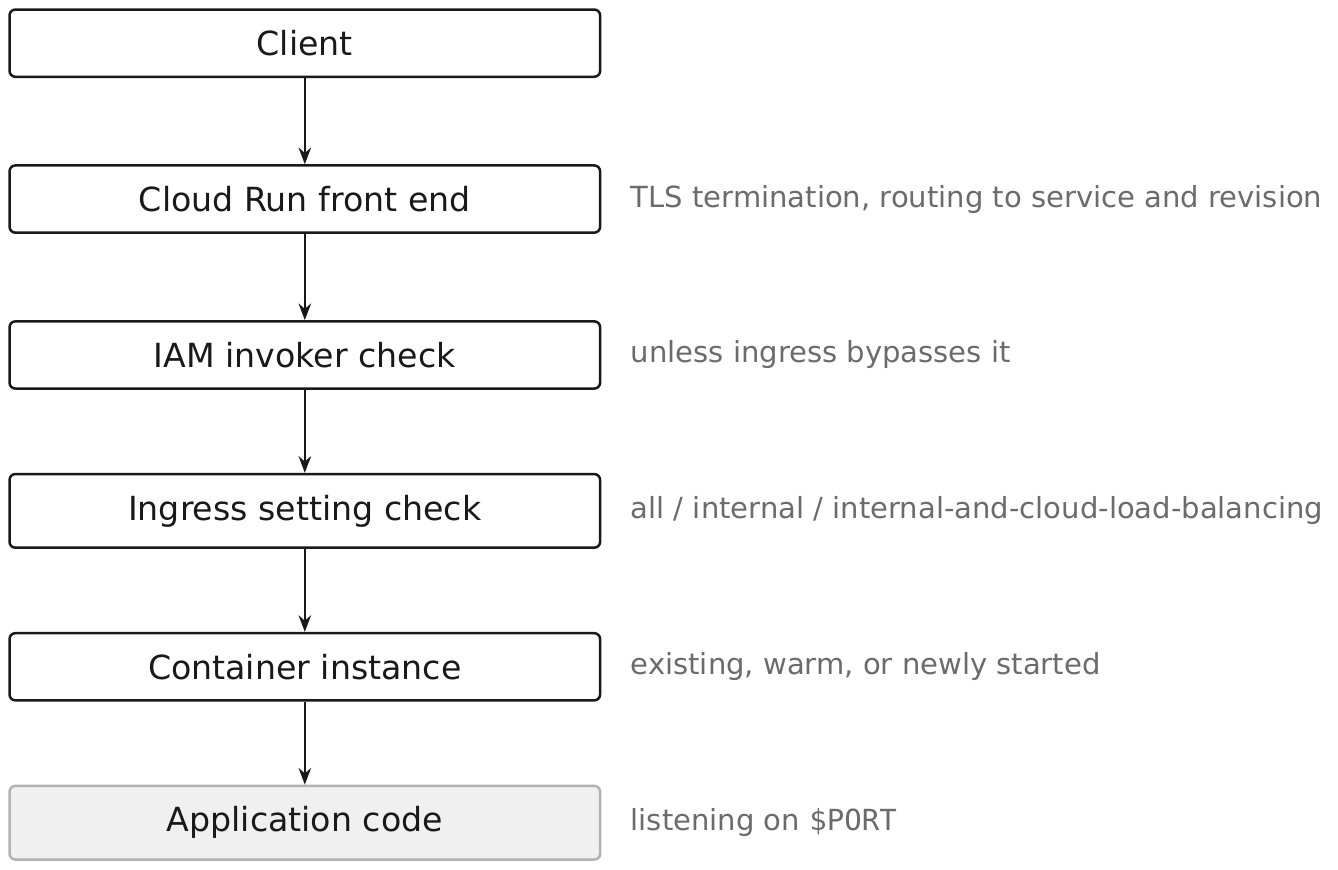
Every request to the *.run.app default URL passes through this front end regardless of
whether a load balancer also sits in front of the service — the default URL always exists unless
explicitly disabled, which is why ingress restriction (§10.11) and invoker IAM (§10.14) are the
two controls that actually determine reachability, not the presence of a load balancer alone.
Google's execution-model documentation makes the CPU allocation model an explicit choice with security and cost consequences (§10.8): "CPU is only allocated during request processing" under the default request-based billing setting, versus allocated "for the entire container instance lifecycle" under instance-based billing. That distinction is why a background thread — a queue poller, a metrics flusher — silently stalls under the default setting but runs continuously under the other, and it is the first thing to check when a service behaves correctly under load but not at idle.
IAM permissions. Deploying and managing services requires roles/run.developer (deploy,
update, delete) or roles/run.admin (all of that plus IAM policy management on the service
itself); invoking a service requires roles/run.invoker, granted separately and covered in
§10.14. roles/run.viewer is read-only. None of these roles are basic roles — no example in this
book grants Owner or Editor to a Cloud Run principal.
Pitfall. Treating "deployed" as "reachable only as intended." A service deployed with no
--ingress flag defaults to all and no --allow-unauthenticated flag defaults to requiring
IAM — but a single later gcloud run services add-iam-policy-binding granting the invoker role
to a public principal, run once during testing and never reverted, silently makes a supposedly
private service public. Audit invoker bindings as part of routine review, not only at deploy
time.
10.2 Services §
A Cloud Run service is the resource type for request-driven workloads: it has a stable name, a
default *.run.app URL, an IAM policy controlling both administration and invocation, and one
or more revisions splitting traffic. This book names services <app>-<env> — checkout-prod,
billing-api-prod — so the environment is visible in the name without a separate lookup.
IMAGE="us-central1-docker.pkg.dev/rc-saas-shared-art-01/checkout/checkout:1.4.0"
gcloud run deploy checkout-prod \
  --project=rc-saas-prod-app-01 \
  --region=us-central1 \
  --image="${IMAGE}" \
  --service-account=sa-run-checkout-prod@rc-saas-prod-app-01.iam.gserviceaccount.com \
  --no-allow-unauthenticated \
  --ingress=internal-and-cloud-load-balancing \
  --min-instances=1 \
  --max-instances=20
Console path: Console → Cloud Run → Create service, selecting an existing Artifact Registry image, then under Authentication choosing "Require authentication" and under Container(s), Volumes, Networking, Security → Networking restricting ingress. Every field the CLI flags above set has a corresponding console field; there is no service configuration that requires the CLI or API exclusively.
IaC. The Terraform v2 resource is google_cloud_run_v2_service:
terraform {
  required_providers {
    google = {
      source  = "hashicorp/google"
      version = "~> 8.0"
    }
  }
}

resource "google_cloud_run_v2_service" "checkout_prod" {
  name     = "checkout-prod"
  location = "us-central1"
  project  = "rc-saas-prod-app-01"
  ingress  = "INGRESS_TRAFFIC_INTERNAL_LOAD_BALANCER"

  template {
    service_account = google_service_account.run_checkout_prod.email
    scaling {
      min_instance_count = 1
      max_instance_count = 20
    }
    containers {
      image = "us-central1-docker.pkg.dev/rc-saas-shared-art-01/checkout/checkout:1.4.0"
    }
  }
}

resource "google_service_account" "run_checkout_prod" {
  project      = "rc-saas-prod-app-01"
  account_id   = "sa-run-checkout-prod"
  display_name = "Cloud Run service account for checkout-prod"
}
Pitfall. Applying a Terraform plan that omits ingress recreates the field at its
provider default, which is unrestricted — a change with no visible diff in the container image
or environment variables can still widen the service's exposure. Pin ingress explicitly in
every service resource.
10.3 Jobs §
A Cloud Run job runs a container image to completion across a fixed number of tasks instead of
answering requests, and has no invoker IAM surface or ingress setting because nothing calls it
over HTTP — it is started by gcloud run jobs execute, a Cloud Scheduler target, or a
Workflows/Eventarc trigger. This book names jobs <app>-<task> — billing-nightly-close,
checkout-report-export.
IMAGE="us-central1-docker.pkg.dev/rc-saas-shared-art-01/billing/nightly-close:2.1.0"
gcloud run jobs create billing-nightly-close \
  --project=rc-saas-prod-app-01 \
  --region=us-central1 \
  --image="${IMAGE}" \
  --service-account=sa-run-billing-nightly-close@rc-saas-prod-app-01.iam.gserviceaccount.com \
  --tasks=4 \
  --parallelism=4 \
  --max-retries=2 \
  --task-timeout=15m
Execution requires roles/run.jobsExecutor (or roles/run.jobsExecutorWithOverrides for a
principal that must override task count or environment variables at execution time), separate
from the roles/run.developer needed to create or update the job definition. A scheduled
invoker — Cloud Scheduler's own service account — should hold only jobsExecutor, never
run.admin.
gcloud run worker-pools also exists in the current SDK as a resource type for continuously
running, pull-based background processing (queue and topic consumers) with no HTTP endpoint at
all, splitting instances between revisions rather than traffic percentages.
The Cloud Run release notes record the transition: "April 14, 2026 — Support for worker pools
is in General Availability (GA)." This chapter still builds its background-processing examples on
jobs (§10.28), because jobs are what the rest of the estate's tooling already targets, not because
worker pools carry a launch-stage caveat.
Pitfall. --parallelism greater than the downstream system's connection budget. Four
parallel tasks each opening a Cloud SQL connection pool can exhaust max_connections on a
modest Cloud SQL tier faster than the equivalent request load ever would, because a job has no
per-instance concurrency throttle the way a service does.
10.4 Revisions §
Every configuration change to a service — new image, new environment variable, new resource
limit — creates a new, immutable revision; the running container of an existing revision is
never mutated in place. Revisions are retained automatically, up to a documented cap per
service, with the oldest pruned once traffic has moved off them. gcloud run revisions list --service=checkout-prod --region=us-central1 shows the revision history and current traffic
share; gcloud run revisions describe REVISION shows the resolved configuration.
Because a revision is immutable, rollback is a traffic operation, not a redeploy: shifting 100%
of traffic back to a prior revision with gcloud run services update-traffic (§10.25) is
faster and safer than rebuilding and redeploying the old image, and it works even if the
Artifact Registry image the old revision used has since been deleted, because the revision
already holds its own resolved digest reference.
Pitfall. Assuming a revision name is meaningful; Cloud Run generates a suffix automatically
unless --revision-suffix is set. Automating around revision names (for alerting, dashboards)
without pinning a suffix produces brittle automation that breaks on the next deploy.
10.5 Containers §
A Cloud Run container is subject to a documented contract, not general container semantics.
Google's container-contract documentation states it directly: "The ingress container within an
instance must listen for requests on 0.0.0.0 on the port to which requests are sent," and Cloud
Run injects a PORT environment variable — 8080 by default — telling the container which port
that is; hardcoding a different port without also setting --port to match makes the container
unreachable. The filesystem is writable but not durable: "Data written to the file system doesn't
persist when the instance stops," and writing to it "uses the instance's memory," so treating
/tmp as scratch space for small, short-lived files is fine, and treating it as a cache or a
place to buffer uploads at scale is a memory-exhaustion risk with no persistence benefit in
return.
A container can define multiple containers in one revision (a sidecar pattern) using
--container and --add-volume-mount, useful for a proxy or an adapter process that shares the
instance's lifecycle with the main application container, but exactly one container is
designated as the ingress container that receives traffic.
Pitfall. Building images FROM a base that runs as root with no USER directive. Cloud Run
does not enforce a non-root user, so a container escape or a dependency vulnerability with local
privilege implications has more to work with than it needs to; set a non-root USER in the
Dockerfile as a baseline control independent of anything Cloud Run configures.
10.6 Autoscaling §
Cloud Run scales the number of container instances for a revision up and down based on incoming request volume, and can scale to zero instances when there is no traffic and no configured minimum. Google's autoscaling documentation frames the trade-off precisely: the system balances "cold start latency (the time to start a new instance) and pending queue latency (the time a request waits for a slot to open on an existing instance)," and states plainly that "on-demand scaling is the only driver for scaling from zero" — nothing else brings an instance up from nothing.
To reduce how often a cold start happens without eliminating it, Cloud Run "might keep instances
idle for a period of time after they finish handling requests (up to 15 minutes, or 10 minutes
for GPUs)" before reclaiming them, independent of any --min-instances setting. --min-instances
(§10.9) is the only setting that keeps instances "permanently available," per the same
documentation, rather than merely retained opportunistically.
Security posture. Autoscaling has no upper bound unless --max-instances (§10.10) is set,
so an unauthenticated or under-throttled ingress path combined with unbounded autoscaling turns
a traffic spike, a retry storm, or a deliberate flood into first a cost incident and then, once
a shared downstream resource like a Cloud SQL connection pool saturates, an availability
incident for every other consumer of that resource.
10.7 Concurrency §
--concurrency sets the maximum number of simultaneous requests a single container instance
will accept before Cloud Run routes the next request to a different (or new) instance; the
default is 80 and the maximum is 1,000. Concurrency is a capacity-planning setting with a
security dimension: a container that is not thread-safe, or that stores per-request state in a
process-global variable, will leak data between concurrent requests on the same instance if
concurrency is left above 1 for code that was never designed to be reentrant.
gcloud run services update checkout-prod \
  --project=rc-saas-prod-app-01 \
  --region=us-central1 \
  --concurrency=40
Pitfall. Raising concurrency to reduce cost without load-testing the actual per-instance memory footprint at that concurrency. Cloud Run enforces the memory limit (§10.8) per instance, not per request, so N concurrent requests each holding a moderate amount of working memory can OOM-kill the instance well before request volume alone would suggest a problem.
10.8 CPU and Memory §
--cpu and --memory set the resource allocation per container instance (for example --cpu=1 --memory=512Mi), and the combination determines both cost and which CPU allocation model
applies. Under the default, request-based billing setting, documented behavior is that "CPU is
only allocated during request processing" — background work outside an active request may be
throttled to near zero, which is what --cpu-throttling (default enabled) controls explicitly.
Switching to instance-based billing allocates CPU "for the entire container instance lifecycle,"
enabling genuine background work — a queue consumer loop, a periodic flush — at the cost of
paying for idle CPU the whole time an instance is warm. --cpu-boost (default enabled on new
services) temporarily raises CPU during startup specifically to reduce cold-start latency for
CPU-bound initialization.
gcloud run services update checkout-prod \
  --project=rc-saas-prod-app-01 \
  --region=us-central1 \
  --cpu=2 --memory=1Gi --no-cpu-throttling
Pitfall. Disabling CPU throttling to enable background work without also reviewing whether
that raises the effective cost per instance-hour enough to make --max-instances (§10.10) the
binding cost control rather than request volume.
10.9 Minimum Instances §
--min-instances (service-wide) or the revision-scoped --min-instances keeps a floor of warm
instances running even with no traffic, trading cost for reduced cold-start latency; it does not
guarantee the elimination of cold starts, because a burst above the minimum still starts new
instances on demand the same as scaling from zero would.
gcloud run services update checkout-prod \
  --project=rc-saas-prod-app-01 --region=us-central1 --min=2
It does not eliminate cold starts, and treating it as though it does is the usual mistake. A burst above the floor starts new instances exactly as scaling from zero would; the floor only removes the cold start on the first request after idle.
Pitfall. Warm instances are billed whether or not they serve anything, so a minimum applied across every service in a large estate is a permanent cost with no traffic behind it. Set it on the latency-sensitive public entry points, not as an estate-wide default.
10.10 Maximum Instances §
--max-instances bounds the highest number of concurrent instances a revision (or, set on the
service, the service as a whole) will run, and functions as both a cost control and a blast-radius
control, not merely a scaling knob.
gcloud run services update checkout-prod \
  --project=rc-saas-prod-app-01 --region=us-central1 --max=20
Its absence converts an availability attack into a cost attack, and then into an outage somewhere else. Every instance typically opens its own database connections, so an unbounded scale-out exhausts the downstream connection pool (§12.16) and takes down the database for every consumer, not just the service that scaled.
Set --max-instances on every service and job in the estate, sized against the downstream
capacity each instance consumes rather than against expected traffic. The number that matters is
how many connections the database can survive, not how many requests you expect.
Pitfall. A maximum set too low is a self-inflicted outage under legitimate load, and Cloud Run's behavior at the ceiling is to queue and then fail rather than to degrade gracefully. Set it deliberately from the downstream limit, alert on approaching it, and treat hitting it as a capacity signal.
10.11 Ingress Controls §
--ingress restricts which network paths may reach a Cloud Run service at all, independent of
IAM invoker checks (§10.14). The GA enum, confirmed against the installed SDK, has three values:
all (default — any source, including the public internet), internal (only VPC networks in
the same project or VPC Service Controls perimeter, plus same-project Pub/Sub and Eventarc), and
internal-and-cloud-load-balancing (adds Google Cloud Load Balancing as a permitted source on
top of everything internal allows).
gcloud run services update checkout-prod \
  --project=rc-saas-prod-app-01 \
  --region=us-central1 \
  --ingress=internal-and-cloud-load-balancing
Ingress and invoker IAM are independent controls, and both must be right: --ingress=all
with --no-allow-unauthenticated still requires a valid identity token but accepts the attempt
from anywhere on the internet, while --ingress=internal with --allow-unauthenticated accepts
any caller reachable on the permitted network paths with no identity check at all. §10.17 covers
why internal-and-cloud-load-balancing specifically is the setting that makes a load balancer's
Cloud Armor policy non-bypassable.
Organization policy constraints/run.allowedIngress restricts which ingress values a project may
set at all, letting a platform team forbid all estate-wide rather than relying on every service
owner to choose correctly; see §2.30 for how a constraint like this is evaluated and inherited.
10.12 Public Services §
A Cloud Run service is made public by binding roles/run.invoker to the special principal
allUsers, which removes the identity-token requirement entirely. This is one of the very few
places in this book where allUsers appears, because most services should never accept
unauthenticated traffic directly — a public HTTP surface normally belongs behind the load
balancer and Cloud Armor policy built in Chapter 7, with Cloud Run's own ingress restricted to
internal-and-cloud-load-balancing (§10.17).
gcloud run services add-iam-policy-binding checkout-prod \
  --project=rc-saas-prod-app-01 \
  --region=us-central1 \
  --member=allUsers \
  --role=roles/run.invoker
Warning. Binding allUsers removes Cloud Run's own authentication layer entirely; from that
point, the application itself is the only thing standing between the internet and the container,
unless the load balancer path in §10.17–§10.18 is also in place and the direct *.run.app URL is
independently restricted. Organization policy constraints/run.managed.requireInvokerIam exists
specifically to make this binding impossible estate-wide, and a platform team running a mixed
estate of genuinely public APIs and internal services should apply it at the folder or project
level for every project that has no legitimate public Cloud Run service, rather than trusting
service-level review alone (§2.30).
10.13 Private Services §
The secure default for a Cloud Run service is no allUsers binding at all: invocation requires
roles/run.invoker granted to specific service accounts or groups, and the caller presents a
Google-issued identity token that Cloud Run itself verifies before the request reaches the
container.
gcloud run services add-iam-policy-binding billing-api-prod \
  --project=rc-saas-prod-app-01 \
  --region=us-central1 \
  --member="serviceAccount:sa-run-checkout-prod@rc-saas-prod-app-01.iam.gserviceaccount.com" \
  --role=roles/run.invoker
Combined with --ingress=internal or internal-and-cloud-load-balancing, a private service
has two independent layers: a network-reachability boundary and an identity boundary. Losing
either one still leaves the other in place, which is the point of defense in depth here — an
ingress misconfiguration does not by itself make the service anonymously callable, and an IAM
misconfiguration does not by itself make it reachable from the public internet.
10.14 IAM Authentication §
Cloud Run's IAM invoker check is enabled by default (--allow-unauthenticated must be
explicitly set to disable it) and evaluates independently of ingress: every request must carry a
valid Google-issued identity token identifying a principal holding roles/run.invoker on that
specific service, checked before the request is handed to the container. --no-invoker-iam-check
exists to disable this check entirely for a service and should be treated the same as a public
allUsers binding from a security standpoint — it removes authentication, not merely relaxes it.
gcloud run services get-iam-policy checkout-prod \
  --project=rc-saas-prod-app-01 --region=us-central1
reviews the current invoker bindings; gcloud run services remove-iam-policy-binding reverses
one. Organization policy constraints/run.managed.requireInvokerIam forces this check on for
every service in scope, which is the estate-wide way to prevent --no-invoker-iam-check or an
allUsers binding from ever taking effect, rather than relying on catching it in review (§2.30).
Pitfall. Confusing "requires authentication" with "is authorized." A caller holding any valid
Google identity but not the invoker role on this specific service is rejected by Cloud Run before
the request reaches the application — but a caller holding roles/run.invoker is authenticated
and authorized to invoke, with no further application-level authorization implied. Application
code still needs its own authorization logic for what an authenticated caller may do.
10.15 Service-to-Service Authentication §
When one Cloud Run service calls another privately (§10.13), the calling service's attached service account requests a Google-signed identity token from the metadata server, scoped to the receiving service's URL as the audience, and presents that token as a bearer credential on the outbound request. The confirmed request against the metadata server is:
curl "http://metadata.google.internal/computeMetadata/v1/instance/service-accounts/\
default/identity?audience=AUDIENCE" -H "Metadata-Flavor: Google"
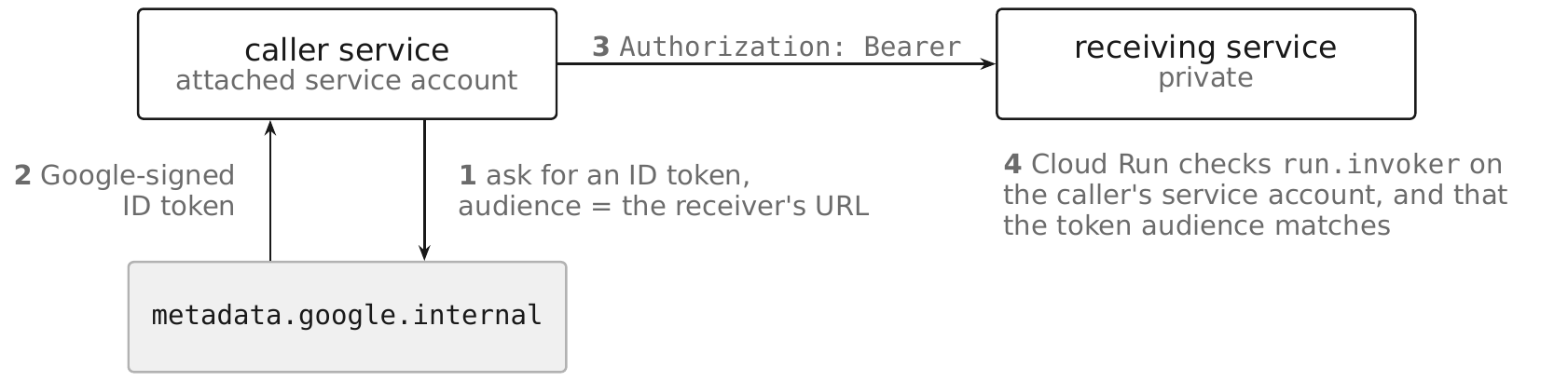
with AUDIENCE set to the full URL of the service being called. Client libraries in every
supported language wrap this call; application code should use the library's ID-token helper
rather than shelling out to curl against the metadata server directly, but the underlying
mechanism is the one shown above, and it never involves downloading or storing a service account
key.
gcloud run services add-iam-policy-binding billing-api-prod \
  --project=rc-saas-prod-app-01 \
  --region=us-central1 \
  --member="serviceAccount:sa-run-checkout-prod@rc-saas-prod-app-01.iam.gserviceaccount.com" \
  --role=roles/run.invoker
grants the calling service's identity the right to invoke the receiving service; the calling
service's own sa-run-checkout-prod account needs no additional permission to fetch its own
identity token, since the metadata server serves it to any process running as that attached
identity by construction.
10.16 Custom Domains §
Cloud Run domain mappings let a service answer on a custom hostname directly, but the feature has
real limits that make it unsuitable as the estate's production path. Domain mapping is only
available in a fixed list of regions and Google's own documentation states domain mappings "are
not production-ready and are not supported at General Availability." The installed SDK confirms
the same posture operationally: gcloud run domain-mappings create is documented as being for
"Cloud Run for Anthos," and fully managed domain mappings require the beta command surface,
which is not installed and, per this book's rule for Preview/Beta features, must not be a
production dependency.
The recommended production path is a global external Application Load Balancer (Chapter 7) with a serverless NEG backend pointing at the Cloud Run service, which gives full control over TLS certificates, URL routing, Cloud CDN, and Cloud Armor — none of which a bare domain mapping provides. §10.17 covers the Cloud Run side of that binding.
Pitfall. Reaching for gcloud run domain-mappings because it looks like the fastest path to
a custom domain. It is the least capable and least supported option for a production service in
this estate; the load balancer path in §10.17 is one extra resource, not a materially larger
effort, and it is the only path that also gets Cloud Armor in front of the service.
10.17 Load Balancer Integration §
Cloud Run attaches to a global external Application Load Balancer as a serverless NEG backend (§7.6), pointing the backend service at the Cloud Run service by name and region rather than at a NEG of individual endpoints. Load balancer object assembly, backend service configuration, and NEG types generally are §7.x territory; the Cloud Run side of the binding is narrow.
gcloud compute network-endpoint-groups create neg-checkout-prod \
  --project=rc-saas-prod-app-01 \
  --region=us-central1 \
  --network-endpoint-type=serverless \
  --cloud-run-service=checkout-prod
The security-relevant fact, and the reason §10.11's ingress setting matters here specifically: a
Cloud Run service's *.run.app default URL exists independently of any load balancer pointed at
it, so setting --ingress=internal-and-cloud-load-balancing (§10.11) is what makes the load
balancer's Cloud Armor policy (§10.18) non-bypassable — with ingress left at all, the direct
*.run.app URL is a working, unprotected path around every control the load balancer enforces.
This is the same failure mode §7.19 documents for serverless backends generally; this section
states only that Cloud Run's own ingress setting is the half of the fix that lives on this
resource.
10.18 Cloud Armor Integration §
Cloud Armor policies attach to the backend service in front of the serverless NEG (§10.17), not
to the Cloud Run service itself — Cloud Run has no native WAF or rate-limiting surface of its
own. Policy authoring, preconfigured WAF rules, and rate-limiting configuration are §7.13's
subject; the only Cloud Run-specific fact is that the policy protects nothing unless the
*.run.app direct path is also closed off.
gcloud compute backend-services update be-checkout-prod \
  --project=rc-saas-prod-app-01 \
  --global \
  --security-policy=armor-checkout-prod
Verify the pairing is actually effective by confirming both sides independently: the backend
service reports the attached policy (gcloud compute backend-services describe be-checkout-prod --global --format="value(securityPolicy)"), and the Cloud Run service reports
internal-and-cloud-load-balancing ingress (gcloud run services describe checkout-prod --region=us-central1 --format="value(status.observedGeneration)" plus a direct request to the
*.run.app URL, which should return a rejection once ingress is restricted). Checking only one
side gives false confidence.
10.19 VPC Connectivity §
A Cloud Run service reaches resources with only internal IP addresses — a Cloud SQL private IP, an internal load balancer, a peered network — through one of two mechanisms: Serverless VPC Access connectors (§10.20) or Direct VPC egress (§10.21). Neither is required for a service that only calls public Google APIs or other Cloud Run services over their public/private-service paths; VPC connectivity is specifically for reaching workloads that live inside a VPC network with no public endpoint.
--vpc-egress controls how much outbound traffic is routed through whichever mechanism is
configured: private-ranges-only (the default) sends only RFC 1918 and Private Google Access
destinations through the VPC path and everything else out to the public internet directly, while
all-traffic routes every outbound connection through the VPC path, letting Cloud NAT or a
firewall policy on that network govern all egress uniformly. The legacy value all is deprecated
in favor of all-traffic and should not appear in new configuration.
gcloud run services update checkout-prod \
  --project=rc-saas-prod-app-01 \
  --region=us-central1 \
  --vpc-egress=private-ranges-only
Security posture. all-traffic egress is the correct choice when the estate needs every
outbound connection — including calls to public internet APIs — to originate from a known,
NAT'd address range that firewall policy and Cloud NAT logging can account for; private-ranges- only is the lower-friction default for services that mostly call public Google APIs and only
occasionally need an internal destination.
10.20 Serverless VPC Access §
A Serverless VPC Access connector is a small managed set of VM instances (or a user-provided subnet) in the target VPC network that proxies traffic between Cloud Run and that network, addressed by name rather than by network and subnet directly.
gcloud compute networks vpc-access connectors create conn-app-us-central1 \
  --project=rc-saas-shared-net-01 \
  --region=us-central1 \
  --network=vpc-shared-net \
  --range=10.132.0.0/28 \
  --min-instances=2 \
  --max-instances=10

gcloud run services update checkout-prod \
  --project=rc-saas-prod-app-01 \
  --region=us-central1 \
  --vpc-connector=projects/rc-saas-shared-net-01/locations/us-central1/connectors/\
conn-app-us-central1 \
  --vpc-egress=private-ranges-only
The connector's own subnet (10.132.0.0/28 above) is a distinct allocation from the workload
subnet and must not overlap it — plan it explicitly rather than letting it collide with the
10.128.0.0/20 app subnet. Connectors incur their own always-on cost even when idle at the
minimum instance count, and add a network hop the traffic must traverse.
When to use it over Direct VPC egress (§10.21). Google's own guidance is specific on one point: when the egress path also goes through Cloud NAT, a connector avoids a cold-start penalty that Direct VPC egress can incur in that configuration — "you might experience cold start delays of 30s or more on instance startup when using Direct VPC egress" with Cloud NAT, and the documented recommendation for that case is "using Serverless VPC Access connectors with Cloud NAT" instead.
10.21 Direct VPC Egress §
Direct VPC egress attaches a Cloud Run revision's network interface straight to a subnet in the
target VPC network, with no intermediate connector resource, using --network and --subnet
instead of --vpc-connector.
gcloud run services update checkout-prod \
  --project=rc-saas-prod-app-01 \
  --region=us-central1 \
  --network=vpc-shared-net \
  --subnet=subnet-app-us-central1 \
  --vpc-egress=private-ranges-only \
  --clear-vpc-connector
The subnet used for Direct VPC egress must be /26 or larger — Cloud Run reserves addresses in
blocks of 16 per instance, so a smaller subnet runs out of capacity under a traffic surge well
before instance-count limits would otherwise bind. --network and --subnet are present in the
GA (non-beta) gcloud run deploy command tree in this SDK, alongside --vpc-connector in the
same command group, which is the operational signal this book relies on for calling Direct VPC
egress the current, non-Preview networking path for new services.
The release notes state it directly: "April 24, 2024 — Support for Direct VPC egress, which lets
you send traffic directly to a VPC network with no Serverless VPC Access connector required, is now
at general availability (GA)."
Direct VPC egress removes the connector's standing cost and the extra network hop, and is the default choice for a new service in this estate unless the specific Cloud NAT cold-start behavior in §10.20 rules it out for that service.
10.22 Secrets §
Cloud Run consumes secrets stored in Secret Manager, whose resource model — secrets, versions,
rotation, replication, and IAM — is owned by Chapter 13 (§13.2, §13.3) and not restated here. On
the Cloud Run side, a secret can be exposed two ways: as an environment variable via
--set-secrets=KEY=SECRET:VERSION, or as a mounted volume via --add-volume with a
secret-typed source, which is preferable for a value an application would otherwise need to
reread on rotation, since a mounted volume can reflect an updated version without a restart in a
way an environment variable cannot.
gcloud run services update checkout-prod \
  --project=rc-saas-prod-app-01 \
  --region=us-central1 \
  --update-secrets=DB_PASSWORD=checkout-db-password:3

gcloud secrets add-iam-policy-binding checkout-db-password \
  --project=rc-saas-prod-app-01 \
  --member="serviceAccount:sa-run-checkout-prod@rc-saas-prod-app-01.iam.gserviceaccount.com" \
  --role=roles/secretmanager.secretAccessor
The service's own service account needs roles/secretmanager.secretAccessor on each secret it
reads — granted once per secret, not once per project — and that grant is the entire IAM surface
this section adds beyond what Chapter 13 already covers.
Pitfall. Referencing a secret as latest in --set-secrets. The version is resolved once,
when the revision starts, and held for the life of that revision; rotating the secret's value in
Secret Manager does not change what an already-running revision sees, so a compromised credential
referenced as latest keeps working in every running instance until a new revision is explicitly
deployed. Pin an explicit version number in production (DB_PASSWORD=checkout-db-password:3, not
:latest) so a rotation is only complete, and only takes effect, when you deploy the revision
that references the new version — making rotation an auditable deploy event rather than a change
that silently either does or does not propagate depending on instance restart timing.
10.23 Cloud SQL Connectivity §
Cloud Run connects to Cloud SQL through the same Cloud SQL Auth Proxy mechanism Chapter 12 documents at §12.17 — mutual TLS and IAM-based authorization to the instance, with no need to manage certificates or allowlist IP ranges by hand — built into the platform rather than run as a separate process you deploy.
gcloud run services update checkout-prod \
  --project=rc-saas-prod-app-01 \
  --region=us-central1 \
  --add-cloudsql-instances=rc-saas-prod-app-01:us-central1:rc-saas-prod-sql-01

gcloud projects add-iam-policy-binding rc-saas-prod-app-01 \
  --member="serviceAccount:sa-run-checkout-prod@rc-saas-prod-app-01.iam.gserviceaccount.com" \
  --role=roles/cloudsql.client
--add-cloudsql-instances provisions a Unix socket inside the container at
/cloudsql/INSTANCE_CONNECTION_NAME (here,
/cloudsql/rc-saas-prod-app-01:us-central1:rc-saas-prod-sql-01); the application connects to that
socket path instead of a TCP host and port. The service's account needs roles/cloudsql.client
in addition to the database-level grant a database user would otherwise need.
For a production service already on Direct VPC egress (§10.21), connecting over the instance's
private IP directly is the better path: it avoids the built-in connector's per-instance
connection overhead, keeps all database traffic on the VPC network where firewall policy and
flow logs already apply, and needs no --add-cloudsql-instances binding at all — only network
reachability to the Cloud SQL private IP and the same roles/cloudsql.client-adjacent database
IAM authentication path §12.17 describes.
10.24 Observability §
Cloud Run services and jobs emit structured request and container logs to Cloud Logging and
metrics to Cloud Monitoring automatically, with no agent to install. Request logs capture the
path, status code, latency, and the calling identity when IAM authentication is in effect;
container stdout/stderr output is captured as log entries without any logging library
configuration required, though writing structured JSON to stdout lets Cloud Logging parse
fields automatically.
gcloud logging read \
  'resource.type="cloud_run_revision" AND resource.labels.service_name="checkout-prod"' \
  --project=rc-saas-prod-app-01 \
  --limit=50
Security relevance. Request logs are the primary forensic record for who invoked a service and when, particularly for a private service where the caller's service account identity is recorded on every request — retain them for at least the estate's incident-response window and route them to the centralized logging project rather than leaving them only in the per-service project's default log bucket, consistent with the logging-project pattern in §2.22.
Pitfall. Logging request or response bodies containing customer data at INFO level by
default. Cloud Run does not redact application-level log content, so the application itself is
responsible for not writing sensitive fields to stdout; Sensitive Data Protection (Chapter 15)
can scan exported logs but does not prevent the write in the first place.
10.25 Deployment Strategies §
Because every configuration change produces a new immutable revision (§10.4) and traffic is
assigned to revisions independently of deployment, Cloud Run supports canary, blue/green, and
instant-rollback strategies natively through gcloud run services update-traffic, without any
external traffic-management layer.
# Deploy a new revision with no traffic yet, tagged for direct testing.
gcloud run deploy checkout-prod \
  --project=rc-saas-prod-app-01 --region=us-central1 \
  --image="${IMAGE}" --no-traffic --tag=canary

# Shift 10% of live traffic to the tagged revision.
gcloud run services update-traffic checkout-prod \
  --project=rc-saas-prod-app-01 --region=us-central1 \
  --to-tags=canary=10

# Once verified, promote to 100% and retire the split.
gcloud run services update-traffic checkout-prod \
  --project=rc-saas-prod-app-01 --region=us-central1 \
  --to-latest
A tagged revision also receives its own stable URL (canary---checkout-prod-HASH.a.run.app in
the default domain), which lets automated smoke tests or a small internal audience reach the new
revision directly before any percentage of live traffic is shifted to it — useful for testing an
IAM or ingress change in isolation before it affects the whole service.
Pitfall. Rolling back by redeploying the previous image tag rather than shifting traffic back
to the previous revision. A redeploy creates yet another new revision — reintroducing whatever
race or cold-start behavior a fresh revision has — where --to-revisions or --to-latest against
an already-warm prior revision is both faster and avoids that risk entirely.
10.26 Cloud Run Security §
Cloud Run's security posture rests on five independent layers. Each fails closed on its own, and the estate is only protected when all five are configured together:
| Layer | Question it answers | Owned by |
|---|---|---|
| Container image | Is this code trustworthy? | Minimal non-root base, scanned in Artifact Registry (Chapter 24, Chapter 37) |
| Service account | What may this code do? | sa-run-<service>, dedicated, never the default compute account |
| Ingress | What may reach it? | §10.11 |
| Invoker IAM | Who may call it? | §10.14 |
| Egress | What may it reach outbound? | §10.19–§10.21 |
The layers are independent, which is the design. An ingress misconfiguration does not by itself make a service anonymously callable, and an IAM mistake does not by itself expose it to the internet. A posture review that checks one and assumes the rest is checking nothing.
Binary Authorization integrates at deploy time: --binary-authorization=default requires every
image deployed to a service to satisfy the project's attestation policy before Cloud Run will run
it, refusing an unsigned or unverified image regardless of who has run.developer and however
much they are otherwise authorized to deploy.
gcloud run services update checkout-prod \
  --project=rc-saas-prod-app-01 \
  --region=us-central1 \
  --binary-authorization=default
Organization policy constraints/run.allowedBinaryAuthorizationPolicies lets a platform team
require this estate-wide rather than trusting each service owner to enable it, and
constraints/run.allowedVPCEgress similarly restricts which --vpc-egress values a project may
choose, forbidding all-traffic where it is not justified. §2.30 covers how these constraints are
evaluated and inherited; both are always written with the constraints/ prefix.
Customer-managed encryption of a Cloud Run service's data at rest is a per-service wiring of the
--key flag against a Cloud KMS key in rc-saas-shared-sec-01, with the grant of
roles/cloudkms.cryptoKeyEncrypterDecrypter to the Cloud Run service agent; the key ring, key
protection level, and rotation policy are Chapter 14's subject (§14.8), not restated here.
Pitfall. The default compute service account is attached to a Cloud Run service whenever
--service-account is omitted, and it is omitted by default. A service deployed without that
flag runs with broad project-level permissions that nobody chose and no review surfaced, because
nothing in the deploy command mentions an identity at all.
Least-privilege attestation for this book's reference deployment: sa-run-checkout-prod holds
roles/secretmanager.secretAccessor on exactly the secrets it reads, roles/cloudsql.client if
it connects to Cloud SQL, and nothing project-wide — no roles/run.admin, no basic role, and no
role granted "just in case."
10.27 Cloud Run for APIs §
An internal or partner-facing API on Cloud Run in this estate is deployed private by default:
--ingress=internal-and-cloud-load-balancing, no allUsers invoker binding, and a global
external Application Load Balancer in front with a serverless NEG (§10.17) terminating TLS and
carrying the Cloud Armor policy (§10.18). Per-consumer authentication, API keys for quota
attribution, and OpenAPI-driven request validation belong to Chapter 21's API Gateway and Apigee
material (§21.1, §21.9), not to Cloud Run itself — Cloud Run's own IAM invoker check is a
service-to-service and administrative control, not a per-external-consumer one.
gcloud run deploy billing-api-prod \
  --project=rc-saas-prod-app-01 \
  --region=us-central1 \
  --image="us-central1-docker.pkg.dev/rc-saas-shared-art-01/billing/api:3.2.0" \
  --service-account=sa-run-billing-api-prod@rc-saas-prod-app-01.iam.gserviceaccount.com \
  --no-allow-unauthenticated \
  --ingress=internal-and-cloud-load-balancing \
  --binary-authorization=default \
  --min-instances=1 \
  --max-instances=30 \
  --concurrency=60
The service account for an API service typically holds roles/secretmanager.secretAccessor for
its signing keys or upstream credentials and roles/cloudsql.client for its data store, and
invocation of other internal services is granted per-caller with roles/run.invoker (§10.15)
rather than left open within the project.
10.28 Cloud Run for Background Jobs §
The estate's background processing — nightly reconciliation, report generation, batch data export — runs as Cloud Run jobs (§10.3) rather than as an always-on worker, because a job's cost and blast radius are both bounded by its task count and timeout rather than by ambient traffic.
gcloud run jobs create billing-nightly-close \
  --project=rc-saas-prod-app-01 \
  --region=us-central1 \
  --image="us-central1-docker.pkg.dev/rc-saas-shared-art-01/billing/nightly-close:2.1.0" \
  --service-account=sa-run-billing-nightly-close@rc-saas-prod-app-01.iam.gserviceaccount.com \
  --set-secrets=DB_PASSWORD=checkout-db-password:3 \
  --set-cloudsql-instances=rc-saas-prod-app-01:us-central1:rc-saas-prod-sql-01 \
  --tasks=1 \
  --max-retries=1 \
  --task-timeout=30m
Cloud Scheduler triggers execution on a cron schedule using an OIDC token scoped to
roles/run.jobsExecutor on this job only, which is the entire IAM surface the scheduler's own
service account needs — it does not need run.developer, and it never needs to be able to alter
the job's own image or configuration.
gcloud scheduler jobs create http billing-nightly-close-trigger \
  --project=rc-saas-prod-app-01 \
  --location=us-central1 \
  --schedule="0 2 * * *" \
  --uri="https://us-central1-run.googleapis.com/apis/run.googleapis.com/v1/namespaces/\
rc-saas-prod-app-01/jobs/billing-nightly-close:run" \
  --oauth-service-account-email=sa-scheduler-billing@rc-saas-prod-app-01.iam.gserviceaccount.com
Pitfall. Granting the scheduler's service account run.developer "to simplify setup." That
account only ever needs to trigger one job's execution, and jobsExecutor scoped to that job is
the entire permission a compromised scheduler credential should be able to exercise.
10.29 Cloud Run for SaaS §
A multi-tenant SaaS surface on Cloud Run separates tenant-facing services from internal,
platform-only services along the same ingress and invoker boundary the rest of this chapter uses,
rather than inventing a separate tenancy mechanism at the Cloud Run layer. Tenant-facing services
(checkout-prod, billing-api-prod) sit behind the load balancer with Cloud Armor and per-tenant
rate limiting (§7.15); platform-internal services (a tenant-provisioning worker, an internal admin
API) are deployed with --ingress=internal and no load balancer at all, callable only by other
services in the same project holding the appropriate roles/run.invoker grant.
gcloud run deploy tenant-provisioner-prod \
  --project=rc-saas-prod-app-01 \
  --region=us-central1 \
  --image="us-central1-docker.pkg.dev/rc-saas-shared-art-01/platform/tenant-provisioner:1.0.2" \
  --service-account=sa-run-tenant-provisioner-prod@rc-saas-prod-app-01.iam.gserviceaccount.com \
  --no-allow-unauthenticated \
  --ingress=internal \
  --max-instances=5
Tenant data isolation itself — separate databases, separate schemas, or row-level security — is a data-layer decision (Chapter 12) independent of Cloud Run; the platform's role here is to ensure that only the services authorized to cross tenant boundaries (the provisioning worker, a migration job) hold the invoker grants and database credentials that let them, and that every tenant-facing service runs under a service account scoped tightly enough that a vulnerability in one tenant-facing service cannot reach another tenant's data through an over-broad IAM grant.
Chapter Summary §
- Cloud Run runs stateless containers as services (request-driven, autoscaling to zero) or jobs (run-to-completion); both are regional, and every configuration change produces a new immutable revision.
- The container contract requires listening on
0.0.0.0:$PORT; the local filesystem is writable but backed by instance memory and never persists across instance stop. - CPU is only allocated during request processing under the default billing setting; instance- based billing allocates CPU for the whole instance lifecycle, which is what genuine background work inside a container requires.
--min-instancesreduces cold starts but does not eliminate them;--max-instancesbounds cost and blast radius and its absence turns a traffic spike into an unbounded bill and a saturated downstream connection pool.- Ingress (
all/internal/internal-and-cloud-load-balancing) and invoker IAM (roles/run.invoker) are independent controls; both must be set correctly, and neither implies the other. allUsersbound toroles/run.invokeris the only way to make a service public in this book, andconstraints/run.managed.requireInvokerIamis the estate-wide control against it.- A serverless NEG backend plus
--ingress=internal-and-cloud-load-balancingis what makes a load balancer's Cloud Armor policy non-bypassable; otherwise the*.run.appURL is a direct path around it. - Cloud Run domain mappings are not production-ready at General Availability and are region- limited; the production path for a custom domain is a global external Application Load Balancer.
- Direct VPC egress needs a
/26or larger subnet and removes connector cost and an extra hop; Serverless VPC Access connectors remain the documented choice when the egress path also traverses Cloud NAT, due to a documented cold-start penalty. - Secrets referenced as
latestresolve at revision start; rotating the secret does not change a running revision, so production should pin an explicit version and roll a new revision to rotate. - Cloud Run's built-in Cloud SQL connectivity mounts a Unix socket at
/cloudsql/INSTANCE_CONNECTION_NAME; private IP over Direct VPC egress is the better path for a production service already off the connector. - Service-to-service calls fetch a Google-signed ID token from the metadata server, scoped by audience to the receiving service's URL, with no service account key involved.
- The default compute service account is never attached to a Cloud Run resource in this book; a
dedicated
sa-run-<service>account holding only the roles that service needs is the standard.
Security Checklist §
| Control | Why it matters | How to verify |
|---|---|---|
No allUsers binding on roles/run.invoker outside a service explicitly meant to be public | Removes authentication for the entire service | gcloud run services get-iam-policy SERVICE --region=REGION |
constraints/run.managed.requireInvokerIam applied where no service should ever be public | Prevents allUsers and --no-invoker-iam-check estate-wide | gcloud org-policies describe constraints/run.managed.requireInvokerIam --project=PROJECT |
Ingress restricted to internal-and-cloud-load-balancing for every load-balanced service | Otherwise the *.run.app URL bypasses the load balancer and Cloud Armor entirely | gcloud run services describe SERVICE --region=REGION --format="value(spec.template.metadata.annotations)"; test the direct URL |
Dedicated sa-run-<service> account per service, never the default compute service account | Limits blast radius of a compromised container to that service's own permissions | gcloud run services describe SERVICE --region=REGION --format="value(spec.template.spec.serviceAccountName)" |
Secrets referenced by pinned version, never :latest, in production | A rotation does not reach a running revision until redeployed; pinning makes rotation an explicit, auditable step | gcloud run services describe SERVICE --region=REGION --format="value(spec.template.spec.containers[].env)" |
--max-instances set on every service and job | Bounds cost and downstream connection-pool exhaustion during a spike or retry storm | gcloud run services describe SERVICE --region=REGION --format="value(spec.template.metadata.annotations)" |
--binary-authorization=default enabled where the estate requires attestation | Refuses an unsigned or unverified image regardless of deployer permissions | gcloud run services describe SERVICE --region=REGION --format="value(spec.template.spec.template.metadata.annotations)" |
constraints/run.allowedIngress restricts all where not justified | Prevents a service owner from widening ingress without platform review | gcloud org-policies describe constraints/run.allowedIngress --project=PROJECT |
Cloud SQL connections use roles/cloudsql.client scoped to the service account, not a broader IAM grant | Limits which identities can open a proxied database connection | gcloud projects get-iam-policy PROJECT --flatten="bindings[].members" --filter="bindings.role:roles/cloudsql.client" |
Scheduler and other automation accounts hold only roles/run.jobsExecutor on the specific job, not roles/run.developer | A compromised trigger credential cannot alter the job it triggers | gcloud projects get-iam-policy PROJECT --flatten="bindings[].members" --filter="bindings.role:roles/run.jobsExecutor" |
Sources §
- Cloud Run overview — https://cloud.google.com/run/docs/overview/what-is-cloud-run (last validated 2026-09-03)
- Cloud Run container contract — https://cloud.google.com/run/docs/container-contract (last validated 2026-09-03)
- Cloud Run instance autoscaling — https://cloud.google.com/run/docs/about-instance-autoscaling (last validated 2026-09-03)
- Cloud Run CPU allocation — https://cloud.google.com/run/docs/configuring/cpu-allocation (last validated 2026-09-03)
- Cloud Run ingress settings — https://cloud.google.com/run/docs/securing/ingress (last validated 2026-09-03)
- Cloud Run managing access / IAM invoker — https://cloud.google.com/run/docs/securing/managing-access (last validated 2026-09-03)
- Cloud Run service-to-service authentication — https://cloud.google.com/run/docs/authenticating/service-to-service (last validated 2026-09-03)
- Cloud Run custom domain mapping — https://cloud.google.com/run/docs/mapping-custom-domains (last validated 2026-09-03)
- Cloud Run connecting to a VPC network (Direct VPC egress) — https://cloud.google.com/run/docs/configuring/vpc-direct-vpc (last validated 2026-09-03)
- Cloud Run connecting to Cloud SQL — https://cloud.google.com/run/docs/connecting/cloud-sql (last validated 2026-09-03)
- Cloud Run using secrets — https://cloud.google.com/run/docs/configuring/services/secrets (last validated 2026-09-03)
- Serverless VPC Access connectors — https://cloud.google.com/run/docs/connecting/vpc-connectors (last validated 2026-09-03)
- Terraform hashicorp/google provider,
google_cloud_run_v2_serviceandgoogle_cloud_run_v2_jobresources — https://raw.githubusercontent.com/hashicorp/terraform-provider-google/main/website/docs/r/cloud_run_v2_service.html.markdown (last validated 2026-09-03) - Google Cloud SDK command surface resolved offline against Google Cloud SDK 583.0.0, 2026-09-03 (last validated 2026-09-03)