Chapter 5
GCP Networking Fundamentals
Scope. This chapter covers the VPC and everything inside it: address planning, subnets, routing, firewall policies, private access to Google APIs and managed services, NAT, DNS, Shared VPC, and the segmentation patterns the rest of the book assumes. Hybrid connectivity to on-premises and other clouds is Chapter 6; load balancing and edge delivery are Chapter 7; VPC Service Controls perimeters are Chapter 20. Prerequisites. Chapter 1 (§1.4 resource scope, §1.9 service endpoints), Chapter 2 (§2.23 networking projects, §2.30 organization policy), Chapter 3 (§3.14 resource-level IAM). Verified against. Google Cloud console and API surface as of 2026-09, Cloud SDK 583.0.0,
hashicorp/googleprovider 8.x; see sources at end.
The single fact that reorganizes an AWS or Azure engineer's mental model is this: a VPC network in Google Cloud is global. One network spans every region. Subnets are regional and carve address space out of it, but the network object, its routes, and its firewall rules are global resources. A VM in us-central1 and a VM in europe-west1 on the same VPC reach each other over Google's backbone with no peering, no transit gateway, and no configuration — which is a productivity gift and a blast-radius problem in equal measure.
The consequence for design is that you need far fewer networks than an AWS habit would produce, and that the isolation you do want has to come from somewhere other than the network boundary. In this book that somewhere is: separate projects for blast radius (§1.5), firewall policies for east-west control, Shared VPC to centralize who may create a path at all, and VPC Service Controls for the data perimeter.
The second fact is that Google Cloud's firewall story has moved. Legacy VPC firewall rules still work and still appear in every older tutorial, but network firewall policies — hierarchical, global, and regional — are where the current capability lives: rule ordering across the hierarchy, secure tags, FQDN and geo and threat-intelligence matching, and L7 inspection through security profile groups. This book's default is firewall policies; legacy rules appear where they are what you will find in an existing estate.
Everything here assumes the reference estates from §2.32 and §2.33: a Shared VPC per environment hosted in rc-saas-shared-net-01, workload projects attached as service projects, and no external IPs on workload VMs.
5.1 Google’s Global Network §
Google Cloud runs on a private global backbone: owned and leased fiber connecting data centers and points of presence, with traffic entering Google's network at an edge PoP close to the user rather than traversing the public internet to the region.
The properties that change designs:
- Regions are connected privately. Traffic between two subnets of the same VPC in different regions crosses Google's backbone, not the internet, and is encrypted in transit between data centers by default.
- The edge terminates connections. A global external Application Load Balancer accepts the client's TCP and TLS at the nearest PoP and carries the request onward over the backbone (§7.1), which is why global load balancing on GCP behaves differently from DNS-based traffic steering elsewhere.
- Published performance figures (observed 2026-09) put inter-zone latency under 55 µs at P50 and cross-region packet loss below 0.01%. Treat these as design inputs for whether a cross-region synchronous dependency is viable, not as an SLA.
Network Service Tiers. Premium Tier carries traffic on Google's backbone from the edge PoP nearest the user; Standard Tier carries it over the public internet to the region and is cheaper. Standard Tier is regional only and has a different availability profile. For anything user-facing, Premium is the default and Standard is a deliberate cost decision.
Security consequence. Because the backbone is private and encrypted, the threat model for inter-region traffic is not eavesdropping — it is reachability. The relevant question is never "is this link encrypted" but "who can create a path here," which is what the rest of this chapter is about.
5.2 VPC Networks §
A VPC network is a global resource that contains subnets, routes, and firewall rules and provides connectivity for VMs, GKE clusters, and other resources placed in its subnets.
Key attributes set at creation:
| Attribute | Values | Guidance |
|---|---|---|
--subnet-mode | auto, custom | always custom in production |
--bgp-routing-mode | regional, global | global for multi-region hybrid (§5.12) |
--mtu | 1460 default, up to 8896 | raise only with a measured need and end-to-end support |
--network-firewall-policy-enforcement-order | AFTER_CLASSIC_FIREWALL, BEFORE_CLASSIC_FIREWALL | BEFORE_CLASSIC_FIREWALL when migrating off legacy rules |
gcloud compute networks create vpc-prod-global \
  --project=rc-saas-shared-net-01 \
  --subnet-mode=custom \
  --bgp-routing-mode=global \
  --network-firewall-policy-enforcement-order=BEFORE_CLASSIC_FIREWALL \
  --description="Production Shared VPC; subnets in us-central1 and europe-west1."
resource "google_compute_network" "prod" {
  name                                      = "vpc-prod-global"
  project                                   = var.host_project_id
  auto_create_subnetworks                   = false
  routing_mode                              = "GLOBAL"
  network_firewall_policy_enforcement_order = "BEFORE_CLASSIC_FIREWALL"
  delete_default_routes_on_create           = false
}
API/IAM. compute.googleapis.com networks.insert; permission compute.networks.create, in roles/compute.networkAdmin.
Security posture. A VPC network is deny-by-default for ingress and allow-by-default for egress (§5.13). The network itself is not a security boundary between the workloads inside it — everything on the same VPC can reach everything else unless a firewall rule says otherwise. Design the firewall policy at the same time as the network, not afterward.
Pitfall. IPv4/IPv6 unicast only: no broadcast, no multicast. Software that relies on broadcast discovery — some clustering products, some license servers — does not work unmodified.
5.3 Global VPC Architecture §
Because one VPC spans every region, the design question is not "how many networks per region" but "what does a network boundary mean here."
The pattern this book uses: one VPC per environment, in the environment's Shared VPC host project.
rc-saas-shared-net-01
├── vpc-dev-global    ← service projects: rc-saas-dev-*
├── vpc-stg-global    ← service projects: rc-saas-stg-*
└── vpc-prod-global   ← service projects: rc-saas-prod-*
Why one network per environment and not fewer:
- The VPC is where routing and firewall policy live; a production-only network means a production-only route table and no chance of a development route reaching production.
- A single network shared across environments makes every east-west firewall rule a cross-environment decision.
- Peering and hybrid attachment are per-network; separate networks let production have Interconnect while development does not.
Why one network per environment and not more:
- Additional networks require peering or Network Connectivity Center to interconnect, and VPC peering is not transitive — the classic trap that produces a full mesh (§5.26).
- Each network duplicates the firewall policy surface.
- Global reach is free within a network and costly between them.
Where a second network per environment is justified: an inspection or DMZ network fronting the workload network (§5.36), a network for a regulated subtree with its own perimeter, and a network dedicated to a third-party appliance.
Anti-pattern. A VPC per project. It produces peering meshes, duplicated address planning, and a firewall policy nobody can reason about — and it discards the main structural advantage GCP offers over the alternatives.
5.4 Subnets §
A subnet is a regional resource carving an IPv4 CIDR out of the VPC, optionally with secondary ranges and IPv6.
gcloud compute networks subnets create snet-prod-usc1-app \
  --project=rc-saas-shared-net-01 \
  --network=vpc-prod-global \
  --region=us-central1 \
  --range=10.128.0.0/20 \
  --secondary-range=pods=10.144.0.0/14,services=10.148.0.0/20 \
  --enable-private-ip-google-access \
  --enable-flow-logs \
  --logging-aggregation-interval=interval-5-sec \
  --logging-flow-sampling=0.5 \
  --logging-metadata=include-all
Four addresses per primary IPv4 range are unusable (observed 2026-09): the first two and last two addresses of the range — the network address, the default gateway, a reserved second-to-last address, and the broadcast address. A /29 therefore yields four usable addresses, not eight — which matters when sizing small management subnets.
Secondary ranges exist for alias IP: GKE pods and services get their own ranges so that pod addresses are routable within the VPC and visible to firewall policy (§5.31). Secondary ranges can be added and removed after creation, but a range in use by a cluster cannot be removed.
Subnet purpose is set at creation and is not always mutable. Beyond the default private subnet, purposes exist for regional and global managed proxies (REGIONAL_MANAGED_PROXY and GLOBAL_MANAGED_PROXY, required by Envoy-based load balancers — §7.4), Private Service Connect NAT subnets, and private NAT.
Security posture. Enable Private Google Access on every subnet that hosts workloads without external IPs (§5.17), and enable VPC Flow Logs on every subnet carrying production traffic. Flow logs are the only record of who talked to whom; sample at a rate you can afford and raise it for sensitive subnets.
Pitfall. Subnet ranges can be expanded but never shrunk, and never overlapped with another subnet in the same VPC. Plan the range before creating it (§5.6).
5.5 Regional Subnets §
Every subnet belongs to exactly one region, and a resource can only use a subnet in its own region. This is the point where the global network becomes concrete.
Consequences for design:
- Regional failure isolation is a subnet decision. A workload that must survive a region failure needs a subnet, and resources, in a second region (§1.21).
- The address plan is regional. Give each region a distinct, non-overlapping block so that routes, firewall rules, and on-premises route summarization stay simple (§5.6).
- A regional load balancer's proxy-only subnet is per region. Every region that terminates an Internal Application Load Balancer needs its own
REGIONAL_MANAGED_PROXYsubnet (§7.4). - Egress cost and latency are regional. Cross-region traffic within a VPC is charged and adds latency; put chatty components in the same region.
The reference layout:
| Region | Purpose | App subnet | GKE pods | GKE services | Proxy-only |
|---|---|---|---|---|---|
us-central1 | primary | 10.128.0.0/20 | 10.144.0.0/14 | 10.148.0.0/20 | 10.170.0.0/24 |
europe-west1 | secondary | 10.129.0.0/20 | — | — | 10.170.1.0/24 |
Pitfall. Zone-to-cluster mapping is per organization (§1.4), but subnets are regional and shared identically across every zone in the region. Do not attempt zonal subnetting; it does not exist.
5.6 IP Address Planning §
Address planning is the decision that is hardest to change and easiest to get wrong. Subnet ranges expand but never shrink, and overlapping ranges make future peering, Interconnect, and acquisitions painful or impossible.
The rules this book applies:
- Allocate a large, contiguous supernet per environment, from a block reserved organization-wide. The SaaS estate uses
10.128.0.0/12for production, with development and staging drawn from adjacent /12s. - Give each region a /16 or larger inside that supernet, so on-premises route summarization is one entry per region.
- Reserve for growth deliberately — leave gaps between allocations rather than packing them, because the next subnet you need will be adjacent to the one you already have.
- Never reuse a range that on-premises or another cloud already uses. Overlap with
172.16.0.0/12on-premises means no Interconnect and no VPN route for that range. - Size GKE ranges from pod density, not VM count. A
/14secondary range for pods is not extravagant; GKE allocates a/24per node by default, so a/20pod range caps the cluster at 16 nodes. - Record the plan in code, as a single source module that emits every subnet, so a human never picks a range by hand.
The reference plan:
| Purpose | Range |
|---|---|
| Production supernet | 10.128.0.0/12 |
us-central1 app subnet | 10.128.0.0/20 |
europe-west1 app subnet | 10.129.0.0/20 |
| GKE nodes | 10.140.0.0/20 |
| GKE pods (secondary) | 10.144.0.0/14 |
| GKE services (secondary) | 10.148.0.0/20 |
| Private Service Access allocation | 10.160.0.0/24 |
| Proxy-only subnets | 10.170.0.0/23 |
| On-premises (enterprise estate) | 172.16.0.0/12 |
Pitfall. Google-managed services consume address space you did not allocate: Private Service Access takes a range you hand it (§5.18), GKE control planes take a /28, and Private Service Connect endpoints take individual addresses. Budget for them at plan time.
5.7 RFC1918 Addressing §
RFC 1918 defines the private IPv4 ranges — 10.0.0.0/8, 172.16.0.0/12, 192.168.0.0/16 — and Google Cloud subnets normally use them.
What is actually allowed is wider than RFC 1918 (observed 2026-09). Subnet primary and secondary ranges accept 10.0.0.0/8, 172.16.0.0/12, 192.168.0.0/16, RFC 6598 shared address space 100.64.0.0/10, 192.0.0.0/24, the documentation ranges 192.0.2.0/24, 198.51.100.0/24, and 203.0.113.0/24, 192.88.99.0/24, the benchmarking range 198.18.0.0/15, and 240.0.0.0/4. Publicly routable addresses can also be used privately, at the cost that the VPC can then no longer reach those addresses on the internet.
What is forbidden, and worth knowing because the error messages are terse: 169.254.0.0/16 (link-local), 127.0.0.0/8, 0.0.0.0/8, 224.0.0.0/4 (multicast), 255.255.255.255/32, Google's own public addresses, and — notably — 199.36.153.4/30 and 199.36.153.8/30, the Private Google Access VIP ranges (§5.17).
Practical guidance:
- Use
10.0.0.0/8for cloud, and leave172.16.0.0/12and192.168.0.0/16to on-premises and to appliances that hard-code them. This alone prevents most overlap incidents. - RFC 6598
100.64.0.0/10is the pressure valve when10.0.0.0/8is exhausted or already claimed on-premises — useful for GKE pod ranges, which are large and rarely need to be reachable from on-premises. - Never use
169.254.0.0/16. Link-local space is reserved:169.254.169.254is the metadata server, and Cloud VPN and Interconnect BGP sessions use link-local addresses.
Security posture. Private addressing is not a security control. A VM on 10.128.0.5 with an external IP is on the internet; a VM with no external IP but a permissive Cloud NAT can still reach anything outbound. Reachability is decided by external IPs, NAT configuration, routes, and firewall policy — not by the address family.
Pitfall. Overlapping RFC 1918 space between an acquired company and your estate is the most common blocker to network integration, and it is resolved only by renumbering or by NAT. Reserve an unused block in your organization-wide plan specifically for absorbing acquisitions.
5.8 IPv6 §
Google Cloud supports IPv6 on subnets in two forms: external IPv6 (globally routable addresses assigned by Google) and internal IPv6 using unique local addresses from a ULA range assigned to the network.
gcloud compute networks create vpc-prod-global \
  --project=rc-saas-shared-net-01 \
  --subnet-mode=custom \
  --enable-ula-internal-ipv6 \
  --internal-ipv6-range=fd20:1234:5678::/48
Subnets choose a stack type and, for external IPv6, an access type:
gcloud compute networks subnets create snet-prod-usc1-app \
  --project=rc-saas-shared-net-01 \
  --network=vpc-prod-global \
  --region=us-central1 \
  --range=10.128.0.0/20 \
  --stack-type=IPV4_IPV6 \
  --ipv6-access-type=INTERNAL
Security posture — the point that causes incidents. An IPv6 address with --ipv6-access-type=EXTERNAL is globally routable and has no NAT in front of it. The habit built by IPv4, where a private address is incidentally unreachable, does not transfer. Every dual-stack subnet with external IPv6 needs explicit IPv6 ingress rules, and firewall policies must specify IPv6 ranges — an IPv4-only rule set leaves IPv6 governed only by the implied deny, which is correct but fragile if anyone adds a permissive rule.
Pitfall. Not every product supports IPv6, and support varies by load balancer type, by GKE configuration, and by managed service. Enabling dual-stack on a subnet whose workloads cannot use it adds attack surface for no benefit. Enable it where you have a requirement, and write the IPv6 firewall rules at the same time.
5.9 Routes §
A route tells the VPC where to send packets for a destination range. Every VPC has a routing table composed of system-generated routes and any custom routes you add, and routes are global network resources even when their next hop is regional.
Route selection is by longest prefix match, then by priority (lower number wins), then by next-hop type.
gcloud compute routes list \
  --project=rc-saas-shared-net-01 \
  --filter="network:vpc-prod-global" \
  --format="table(name,destRange,priority,nextHopGateway,nextHopIlb,nextHopVpnTunnel)"
Security posture. Routes are an unglamorous and complete bypass of most people's mental security model. A custom route sending 0.0.0.0/0 to an internal load balancer redirects all egress through an appliance — which is exactly how you build inspection (§5.36), and exactly how an attacker with compute.routes.create would redirect your traffic. compute.routes.create is in roles/compute.networkAdmin; it does not belong in a workload team's grant.
Pitfall. Routes apply to the whole VPC unless they carry instance tags. A tagged route applies only to VMs with that network tag, which is the mechanism for per-workload egress paths — and a source of confusion, because a route that "exists" may not apply to the VM you are debugging. Check the tags.
5.10 System Routes §
Every VPC is created with system-generated routes you did not ask for:
| Route | Destination | Next hop | Removable |
|---|---|---|---|
| Default internet gateway route | 0.0.0.0/0 | default internet gateway | yes, at creation or later |
| Subnet routes | each subnet's ranges | the subnet | no, generated per subnet |
| Default IPv6 route | ::/0 | default internet gateway | yes |
Subnet routes are created and destroyed with the subnet and cannot be deleted independently. They are why every subnet in a VPC can reach every other subnet by default, in every region — the routing is done; only firewall policy stands between them.
The default internet gateway route is the one worth a decision. Deleting it makes the VPC have no path to the internet at all, which is the correct posture for a network whose workloads should reach only Google APIs and on-premises:
gcloud compute networks create vpc-prod-isolated \
  --project=rc-saas-shared-net-01 \
  --subnet-mode=custom \
  --bgp-routing-mode=global
resource "google_compute_network" "isolated" {
  name                            = "vpc-prod-isolated"
  project                         = var.host_project_id
  auto_create_subnetworks         = false
  delete_default_routes_on_create = true
}
Pitfall. Deleting the default route also removes the path to 199.36.153.4/30 and 199.36.153.8/30 used by Private Google Access (§5.17). If you delete it, add explicit routes to those ranges with the default internet gateway as next hop, or Private Google Access stops working with no obvious cause.
5.11 Custom Routes §
Custom static routes are the manual entries you create. Their next hop determines what they can do:
| Next hop | Use |
|---|---|
--next-hop-gateway=default-internet-gateway | restore or scope internet egress |
--next-hop-instance | send traffic through a single appliance VM |
--next-hop-ilb | send traffic through an internal passthrough Network Load Balancer fronting an appliance pool |
--next-hop-address | an address inside the VPC |
--next-hop-vpn-tunnel | a classic VPN tunnel |
gcloud compute routes create route-egress-via-inspection \
  --project=rc-saas-shared-net-01 \
  --network=vpc-prod-global \
  --destination-range=0.0.0.0/0 \
  --next-hop-ilb=ilb-inspection-usc1 \
  --next-hop-ilb-region=us-central1 \
  --priority=100 \
  --tags=inspect-egress
--next-hop-ilb is the pattern that matters, and only one load balancer type qualifies. The target must be a forwarding rule of an internal passthrough Network Load Balancer in the route's VPC network or a peered one; an internal Application Load Balancer is not a valid route next hop. A single appliance VM as next hop is a single point of failure with no health checking, whereas a passthrough load balancer in front of an appliance group gives you health checks, failover, and horizontal scale — which is why it is the supported way to build an inspection path (§5.36).
Security posture. Custom routes are how traffic is forced through inspection and how it is diverted away from it. Two controls: keep compute.routes.create out of workload grants, and alert on route creation in Admin Activity logs. A new 0.0.0.0/0 route in a production VPC is an incident until proven otherwise.
Pitfall. A custom route with a more specific prefix beats the subnet route for that range and will black-hole intra-VPC traffic. Never write a route whose destination overlaps a subnet range unless that is precisely the intent.
5.12 Dynamic Routing §
Dynamic routing is BGP learned from Cloud Router, and the VPC's dynamic routing mode decides how far those learned routes propagate.
| Mode | Behavior |
|---|---|
regional (default) | a Cloud Router advertises only its own region's subnets, and routes it learns apply only to its region |
global | Cloud Routers advertise all subnets in the VPC, and learned routes apply network-wide |
gcloud compute networks update vpc-prod-global \
  --project=rc-saas-shared-net-01 \
  --bgp-routing-mode=global
Choose global when any hybrid connection must serve workloads in more than one region — which is nearly always true for an enterprise with a single Interconnect location, and is the reason §6.15 assumes it.
Choose regional when you deliberately want a region's hybrid path to fail independently, so that an Interconnect outage in one region does not draw traffic from another.
Security consequence. global mode means an on-premises route learned at one region is installed network-wide. A route leak from a partner or an acquired network reaches every region at once. Constrain what Cloud Router accepts and advertises rather than relying on the mode (§6.8, §6.9).
Pitfall. Switching a production network from regional to global reprograms routes network-wide and can shift traffic paths immediately. Do it in a maintenance window, and check for prefix overlaps between regions first.
5.13 Firewall Rules §
Legacy VPC firewall rules are the original mechanism: stateful rules attached directly to a network, matched on direction, source, destination, protocol, port, and target.
Every VPC has two implied rules that cannot be deleted:
- Implied deny ingress — all incoming connections to VM instances are denied. (For load balancer forwarding rules, the implied action is allow; the rules that matter there are the ones on the backends.)
- Implied allow egress — all outgoing connections are permitted.
That asymmetry is the single most important default in the chapter. Egress is open by default, so a compromised workload can reach the internet, exfiltrate to any endpoint, and fetch a second stage — unless you write egress rules. Most estates have carefully curated ingress rules and no egress rules at all.
gcloud compute firewall-rules create fw-deny-egress-all \
  --project=rc-saas-shared-net-01 \
  --network=vpc-prod-global \
  --direction=EGRESS \
  --action=DENY \
  --rules=all \
  --destination-ranges=0.0.0.0/0 \
  --priority=65000 \
  --enable-logging

gcloud compute firewall-rules create fw-allow-egress-google-apis \
  --project=rc-saas-shared-net-01 \
  --network=vpc-prod-global \
  --direction=EGRESS \
  --action=ALLOW \
  --rules=tcp:443 \
  --destination-ranges=199.36.153.4/30 \
  --priority=1000 \
  --enable-logging
Priorities are 0–65535 for legacy rules, lower wins.
This book's default is firewall policies, not legacy rules (§5.14). Legacy rules remain relevant because every existing estate has them and because the enforcement order between the two systems is configurable (§5.2).
Pitfall. The default network's pre-populated rules include default-allow-internal (all protocols between all instances in the network) and default-allow-ssh from 0.0.0.0/0. If a project has a default network, it has these. constraints/compute.skipDefaultNetworkCreation (§2.30) is the fix.
5.14 Hierarchical Firewall Policies §
A hierarchical firewall policy attaches to the organization or a folder and applies to every VPC network in every project beneath it. It is the mechanism for rules that must hold regardless of what a project team configures.
The four policy types and their evaluation order. With the default AFTER_CLASSIC_FIREWALL enforcement order, a packet is evaluated:
- Hierarchical firewall policies — organization first, then folders top-to-bottom
- Regional system firewall policies — Google-managed, read-only except for logging
- VPC firewall rules — the legacy rules of §5.13
- Global network firewall policy
- Regional network firewall policies
- Implied actions — ingress deny for VMs, egress allow
With BEFORE_CLASSIC_FIREWALL, steps 3 and 4–5 swap: network firewall policies are evaluated before legacy VPC rules.
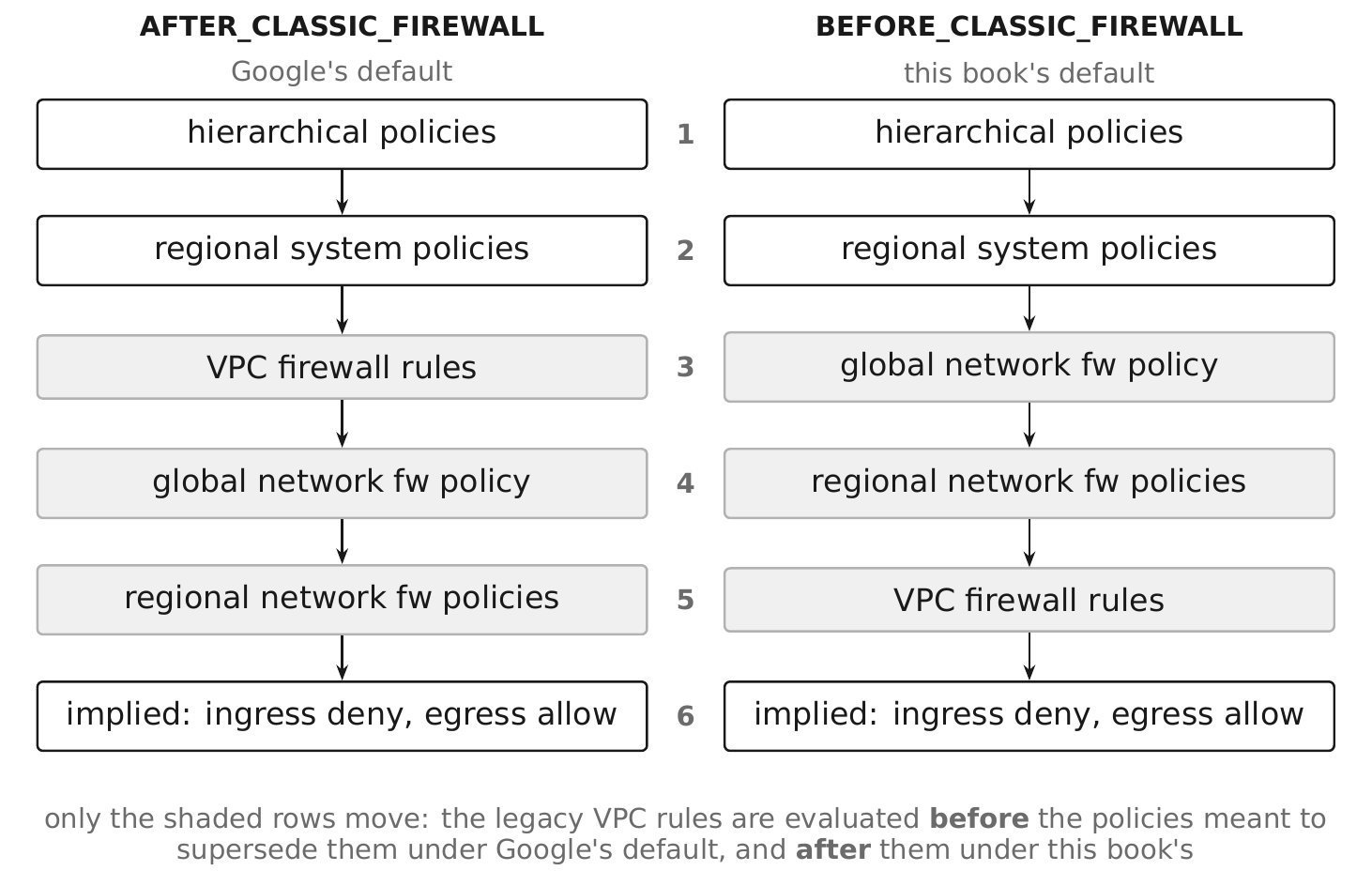
The swap is the whole reason the enforcement order is a network-creation decision: under the default, a legacy rule left behind in a project is evaluated before the policy meant to supersede it.
Rule actions are allow, deny, goto_next, and apply_security_profile_group (which sends the connection to a firewall endpoint for L7 inspection). Priorities run 0 to 2,147,483,547, lower wins.
goto_next is what makes the hierarchy usable. An organization-level policy denies what must never happen, explicitly allows what must always happen, and ends with goto_next so that folders and projects can make their own decisions about everything else.
Hierarchical policies use a different command group from network firewall policies: gcloud compute firewall-policies (organization and folder scope) rather than gcloud compute network-firewall-policies (VPC scope).
gcloud compute firewall-policies create \
  --organization=123456789012 \
  --short-name=fp-org-baseline \
  --description="Organization-wide non-negotiable network rules."

gcloud compute firewall-policies rules create 1000 \
  --firewall-policy=FIREWALL_POLICY_ID \
  --organization=123456789012 \
  --direction=INGRESS \
  --action=allow \
  --layer4-configs=tcp:22,tcp:3389 \
  --src-ip-ranges=35.235.240.0/20 \
  --enable-logging \
  --description="IAP TCP forwarding for administrative access (see 4.16)."
The policy is then associated with the organization or a folder:
gcloud compute firewall-policies associations create \
  --firewall-policy=FIREWALL_POLICY_ID \
  --organization=123456789012 \
  --name=assoc-org-baseline
The organization baseline this book applies: allow IAP forwarding from 35.235.240.0/20 to 22 and 3389; allow Google health check ranges 35.191.0.0/16 and 130.211.0.0/22 to backend ports (§7.7); deny inbound SSH and RDP from 0.0.0.0/0 at a lower priority number than any project rule can override; then goto_next.
Pitfall. A hierarchical allow cannot be overridden lower down — it is evaluated first and stops evaluation. Use allow at the organization only for paths that must always work (health checks, IAP), and express everything else as deny plus goto_next.
5.15 Firewall Tags §
Two different tagging systems select firewall targets, and mixing them up is a common source of rules that do not apply.
| Network tags (legacy) | Secure tags | |
|---|---|---|
| What they are | free-form strings on a VM | Resource Manager tag values (§2.13) with network purpose |
| Governed by IAM | no — anyone who can edit the VM can add one | yes — roles/resourcemanager.tagUser on the value |
| Used by | legacy VPC firewall rules, routes | firewall policies |
| Inherited | no | yes, through the hierarchy |
The security difference is decisive. A network tag is a string a developer types. If a legacy rule allows ingress to VMs tagged db, anyone with compute.instances.setTags can add db to their own VM and inherit that access. Secure tags require a separate IAM permission on the tag value, so classification is a governed act.
gcloud resource-manager tags keys create network-tier \
  --parent=organizations/123456789012 \
  --purpose=GCE_FIREWALL \
  --purpose-data=network=rc-saas-shared-net-01/vpc-prod-global \
  --description="Firewall target classification for the production VPC."
gcloud compute network-firewall-policies rules create 2000 \
  --firewall-policy=fp-prod-global \
  --global-firewall-policy \
  --project=rc-saas-shared-net-01 \
  --direction=INGRESS \
  --action=allow \
  --layer4-configs=tcp:5432 \
  --src-secure-tags=tagValues/281476476229830 \
  --target-secure-tags=tagValues/281476476229831 \
  --enable-logging
Migration guidance. Where legacy network tags exist, treat them as a finding rather than a configuration. Replace them with secure tags or with service account targets (§5.16), both of which are IAM-governed.
Pitfall. A firewall tag key must be created with --purpose=GCE_FIREWALL and bound to a specific network via --purpose-data. A general-purpose tag key from §2.13 cannot be used as a firewall target.
5.16 Service Accounts as Firewall Targets §
Firewall rules and policies can target VMs by the service account attached to them rather than by tag.
gcloud compute firewall-rules create fw-allow-app-to-db \
  --project=rc-saas-shared-net-01 \
  --network=vpc-prod-global \
  --direction=INGRESS \
  --action=ALLOW \
  --rules=tcp:5432 \
  --source-service-accounts=sa-app-api-runtime@rc-saas-prod-app-01.iam.gserviceaccount.com \
  --target-service-accounts=sa-data-postgres@rc-saas-prod-data-01.iam.gserviceaccount.com \
  --priority=1000 \
  --enable-logging
Why this is often the best option. Changing a VM's service account requires iam.serviceAccounts.actAs on that account (§3.24) — a permission you already control tightly. So a rule targeting a service account cannot be inherited by a VM its owner is not authorized to run. It also ties the network path to the identity, so the firewall rule and the IAM policy tell the same story.
Limitations to know:
- A VM has at most one service account, so a VM cannot be in two service-account-defined groups.
- Service account targeting and network tag targeting cannot be combined in the same rule.
- Changing a VM's service account requires stopping it.
The decision rule: prefer service accounts where the workload already has a distinct identity — which, following §3.5, it always should. Fall back to secure tags for grouping across identities, and never to network tags.
Pitfall. Deleting and recreating a service account with the same email produces a different unique ID (§3.5); firewall rules referencing it by email continue to parse but stop matching the recreated account until the rule is updated.
5.17 Private Google Access §
Private Google Access is a subnet setting that lets VMs without external IP addresses reach Google APIs and services over internal paths.
gcloud compute networks subnets update snet-prod-usc1-app \
  --project=rc-saas-shared-net-01 \
  --region=us-central1 \
  --enable-private-ip-google-access
The four things that must all be true (§1.9):
- Private Google Access enabled on the subnet.
- A private Cloud DNS zone overriding
googleapis.comto the chosen VIP range. - A route to that range with the default internet gateway as next hop — present by default unless you deleted the default route (§5.10).
- Egress firewall permitting the range.
The choice of VIP is a security decision:
| Domain | Range | Reaches |
|---|---|---|
private.googleapis.com | 199.36.153.8/30 | most Google APIs, including Workspace APIs |
restricted.googleapis.com | 199.36.153.4/30 | only APIs supported by VPC Service Controls; everything else is refused |
Inside a VPC Service Controls perimeter, use restricted.googleapis.com. It fails closed: a workload that tries to reach an unsupported API — including consumer Google services — gets nothing, which is precisely the exfiltration path you want closed (Chapter 20).
gcloud dns managed-zones create zone-restricted-googleapis \
  --project=rc-saas-shared-net-01 \
  --dns-name="googleapis.com." \
  --visibility=private \
  --networks=vpc-prod-global \
  --description="Override Google API resolution to the restricted VIP."
Pitfall. Private Google Access is per subnet, not per network. A new subnet added later without the flag produces workloads that mysteriously cannot reach Cloud Storage. Set it in the Terraform module that creates every subnet, so it cannot be forgotten.
5.18 Private Service Access §
Private Service Access is how Google-managed services with VM-backed instances — Cloud SQL, Memorystore, Filestore, Vertex AI, AlloyDB, Apigee, Cloud TPU — get private addresses inside your VPC.
The mechanism. You allocate an IP range in your VPC exclusively for the service producer; a VPC Network Peering connection is established to the producer's network; the producer creates subnets inside your allocated range for your instances. Traffic stays on Google's network.
gcloud compute addresses create psa-range-prod \
  --project=rc-saas-shared-net-01 \
  --global \
  --purpose=VPC_PEERING \
  --addresses=10.160.0.0 \
  --prefix-length=24 \
  --network=vpc-prod-global \
  --description="Reserved for Private Service Access peering."
resource "google_compute_global_address" "psa_range" {
  name          = "psa-range-prod"
  project       = var.host_project_id
  purpose       = "VPC_PEERING"
  address_type  = "INTERNAL"
  address       = "10.160.0.0"
  prefix_length = 24
  network       = google_compute_network.prod.id
}

resource "google_service_networking_connection" "psa" {
  network                 = google_compute_network.prod.id
  service                 = "servicenetworking.googleapis.com"
  reserved_peering_ranges = [google_compute_global_address.psa_range.name]
}
Two limitations that shape architecture (observed 2026-09):
- It is not transitive. A network peered to yours — or reaching you over Interconnect in some configurations — cannot reach the Private Service Access range. On-premises access to a Cloud SQL instance therefore needs custom route advertisement from Cloud Router (§6.9), not just the peering.
- No IPv6. The allocated range is IPv4 only.
Pitfall. The allocated range cannot be used by subnets or as a static route destination, and it must be large enough for every instance of every service you will ever create through it. Producers allocate subnets inside it opaquely; a /24 fills faster than you expect. Allocate a /16 if you can spare it.
5.19 Private Service Connect §
Private Service Connect is the current, more general mechanism for reaching a service privately: consumer-side internal addresses that map to a producer's service, with independent address spaces on both sides.
Two consumer-side shapes:
- Endpoints — an internal IP created by a forwarding rule that reaches a published service or a Google API bundle directly.
- Backends — a network endpoint group behind your own load balancer, giving custom domains, failover, and centralized security policy at the cost of more configuration.
PSC for Google APIs is an alternative to Private Google Access with more control: you create an endpoint with an address you choose, and reach the global API bundle through it.
gcloud compute addresses create psc-googleapis-endpoint \
  --project=rc-saas-shared-net-01 \
  --global \
  --purpose=PRIVATE_SERVICE_CONNECT \
  --addresses=10.161.0.5 \
  --network=vpc-prod-global

gcloud compute forwarding-rules create fr-psc-googleapis \
  --project=rc-saas-shared-net-01 \
  --global \
  --network=vpc-prod-global \
  --address=psc-googleapis-endpoint \
  --target-google-apis-bundle=all-apis
PSC for published services. A producer creates a service attachment targeting its load balancer, carrying an explicit consumer accept list and a NAT subnet. Consumer traffic is translated into the NAT subnet inside the producer's VPC, which is what makes the two address spaces independent — no overlap negotiation, no peering, no route exchange.
Why PSC over Private Service Access where both are available: no peering means no transitivity problem and no shared route table; the accept list is explicit; the producer's addressing is invisible to you and yours to them; and it scales to third-party SaaS and to your own cross-VPC services.
Pitfall. A PSC endpoint is an address in your subnet, so it consumes an address and is governed by your firewall policy. Egress rules that deny everything must explicitly allow the endpoint address, or the connection fails with no useful error.
5.20 Cloud NAT §
Cloud NAT provides outbound connectivity for resources with no external IP address. It is a distributed, software-defined service configured on a Cloud Router, not a VM in the path — so there is no NAT instance to size, patch, or fail.
gcloud compute routers create rtr-prod-usc1 \
  --project=rc-saas-shared-net-01 \
  --network=vpc-prod-global \
  --region=us-central1 \
  --asn=64514

gcloud compute routers nats create nat-prod-usc1 \
  --project=rc-saas-shared-net-01 \
  --router=rtr-prod-usc1 \
  --region=us-central1 \
  --nat-custom-subnet-ip-ranges=snet-prod-usc1-app \
  --nat-external-ip-pool=nat-ip-usc1-01,nat-ip-usc1-02 \
  --enable-logging \
  --log-filter=ERRORS_ONLY \
  --min-ports-per-vm=64 \
  --enable-dynamic-port-allocation \
  --max-ports-per-vm=1024
Security posture — three decisions:
- Scope it to specific subnets with
--nat-custom-subnet-ip-ranges, never--nat-all-subnet-ip-ranges. A NAT that covers the whole VPC gives every future subnet internet egress by default. - Use reserved static external IPs, not
--auto-allocate-nat-external-ips. A stable NAT egress address is what lets a partner or a SaaS provider allowlist you, and what makes egress attributable in someone else's logs. - Cloud NAT is not an egress control. It permits everything the firewall permits. Pair it with egress firewall rules (§5.13) or FQDN-based policy rules; without them, Cloud NAT is an unrestricted exfiltration path with a tidy source address.
Port allocation matters operationally. Each VM gets a fixed number of source ports per NAT IP; a workload making many concurrent outbound connections exhausts them and fails in ways that look like packet loss. Enable dynamic port allocation and monitor NAT allocation errors with --log-filter=ERRORS_ONLY, which logs only failures rather than every connection.
Pitfall. Cloud NAT does not provide inbound connectivity, and it does not apply to traffic destined for Google APIs when Private Google Access is enabled — that traffic takes the private path instead. Debugging "why is my API call not in NAT logs" usually ends here.
5.21 Cloud Router §
Cloud Router is the managed BGP speaker for a VPC in a region. It exchanges routes with on-premises devices over Cloud VPN or Interconnect, and it is also the configuration anchor for Cloud NAT.
gcloud compute routers create rtr-prod-usc1 \
  --project=rc-saas-shared-net-01 \
  --network=vpc-prod-global \
  --region=us-central1 \
  --asn=64514 \
  --advertisement-mode=custom \
  --set-advertisement-groups=all_subnets \
  --set-advertisement-ranges=10.160.0.0/24
What it does:
- Advertises your VPC's subnet ranges to the peer. In
defaultadvertisement mode it advertises subnets automatically; incustommode you control the list — which is how a Private Service Access range reaches on-premises despite peering being non-transitive (§5.18, §6.9). - Learns the peer's routes and installs them in the VPC, scoped regionally or globally by the network's dynamic routing mode (§5.12).
- Anchors Cloud NAT configuration for its region.
Security posture. Custom advertisement is a control: advertise the minimum set of ranges the peer needs. Every range you advertise is a range the peer can reach and can attempt to route to. Equally, what you learn determines what your VPC will send outward — route filtering on the peer side is part of your security posture even though you do not own the device (§6.8).
Pitfall. A Cloud Router is regional and its ASN is per router. Two routers in the same VPC in different regions with the same ASN is normal and correct for a single-AS design; two routers with different ASNs peering to the same on-premises device produces confusing AS-path behavior. Decide the ASN plan once (§6.8).
5.22 Cloud DNS §
Cloud DNS is Google's managed authoritative DNS, offering public zones (internet-resolvable), private zones (resolvable only from specified VPC networks), forwarding zones, and peering zones.
gcloud dns managed-zones create zone-internal-prod \
  --project=rc-saas-shared-net-01 \
  --dns-name="prod.internal.rickcollette.domain." \
  --visibility=private \
  --networks=vpc-prod-global \
  --log-dns-queries \
  --description="Internal service names for the production VPC."
resource "google_dns_managed_zone" "internal_prod" {
  name        = "zone-internal-prod"
  project     = var.host_project_id
  dns_name    = "prod.internal.rickcollette.domain."
  description = "Internal service names for the production VPC."

  visibility = "private"

  private_visibility_config {
    networks {
      network_url = google_compute_network.prod.id
    }
  }

  cloud_logging_config {
    enable_logging = true
  }
}
Enable DNS query logging. --log-dns-queries on private zones and a DNS policy with --enable-logging for the network produce the query record that is often the only evidence of a compromised workload's command-and-control attempts. It is cheap relative to flow logs and higher signal.
DNSSEC is available on public zones with --dnssec-state=on, and should be on for any public zone whose records matter — which is all of them, given that DNS hijacking is a route to certificate issuance.
Pitfall. A private zone attached to a network is visible to every resource in that network, including workloads in every service project attached to a Shared VPC. Internal DNS names are reconnaissance; do not put anything in them you would not want an attacker on any VM to enumerate.
5.23 DNS Policies §
A DNS policy is a network-level object controlling resolution behavior, distinct from the zones themselves.
gcloud dns policies create policy-prod-resolution \
  --project=rc-saas-shared-net-01 \
  --networks=vpc-prod-global \
  --enable-inbound-forwarding \
  --alternative-name-servers=172.16.10.10,172.16.10.11 \
  --enable-logging \
  --description="Inbound forwarding from on-premises; on-premises resolvers as alternates."
Three capabilities:
- Inbound forwarding (
--enable-inbound-forwarding) allocates inbound forwarder addresses in each subnet so on-premises resolvers can query Cloud DNS private zones. This is one half of hybrid DNS (§6.17). - Alternative name servers send queries that Cloud DNS cannot answer to servers you specify — typically on-premises resolvers.
--private-alternative-name-serversrequires those servers to be reachable over private connectivity, which is the safer form. - Query logging (
--enable-logging) records every DNS query from the network, including queries for names with no zone.
Security posture. Alternative name servers are a significant trust delegation: every unresolved query in the VPC goes to those servers, so a compromised on-premises resolver can direct your workloads anywhere. Use --private-alternative-name-servers so the path is private, and monitor the query log for names that should not be resolving.
Pitfall. A DNS policy's alternative name servers override the default Google resolution for names not covered by a private zone — including googleapis.com if you have not created the private zone of §5.17. Sequence matters: create the private override zone before pointing resolution elsewhere.
5.24 Internal DNS §
Every VPC provides automatic internal DNS for Compute Engine instances, resolvable only from within the network. Instances receive names in a Google-managed internal zone, and the metadata server at 169.254.169.254 is the resolver.
Two naming forms exist, and the difference matters:
- Zonal DNS —
INSTANCE.ZONE.c.PROJECT_ID.internal, unique per zone. - Global (legacy) DNS —
INSTANCE.c.PROJECT_ID.internal, unique per project.
Zonal is the current default and the correct choice: it is more resilient because resolution does not depend on a global service, and it makes the zone explicit in the name.
For anything other than ad-hoc VM-to-VM connectivity, do not use internal DNS. Instance names are not stable identities in an autoscaled world. Use a private Cloud DNS zone with records you control (§5.22), or service discovery appropriate to the platform — Kubernetes DNS inside a cluster, Service Directory for cross-platform.
Security posture. Internal DNS makes instance names enumerable from any VM in the network. Combined with a permissive default-allow-internal rule (§5.13), that is a complete internal reconnaissance surface. The mitigations are the firewall policy of §5.14 and not encoding anything meaningful in instance names.
Pitfall. Internal DNS resolution is VPC-scoped. Two service projects attached to the same Shared VPC resolve each other's instances; two projects on different VPCs do not, even with peering, unless you configure DNS peering (§5.25).
5.25 Public DNS §
Public DNS in this context means Cloud DNS public zones — the authoritative records for names the internet can resolve — not Google's 8.8.8.8 resolver service.
gcloud dns managed-zones create zone-public-rickcollette \
  --project=rc-saas-shared-net-01 \
  --dns-name="rickcollette.domain." \
  --visibility=public \
  --dnssec-state=on \
  --description="Public authoritative zone."
Security posture — DNS is a certificate authority input. Domain validation for TLS certificates is performed against DNS or HTTP. Anyone who can create a record in your public zone can obtain a valid certificate for your domain. That makes roles/dns.admin on a public zone a high-privilege grant, comparable to a certificate authority role.
The controls:
- DNSSEC on, so responses are signed and cannot be spoofed in transit.
roles/dns.adminrestricted to a small group; day-to-day record changes come from Terraform, not from people.- Alert on record changes in Admin Activity logs, particularly
TXT,CAA,NS, andMX. - CAA records naming the certificate authorities permitted to issue for your domain, which limits mis-issuance.
- No dangling records. A
CNAMEpointing at a deleted cloud resource is a subdomain takeover: someone re-creates the resource with that name and controls your subdomain. Reconcile records against live resources on a schedule.
Pitfall. Split-horizon done accidentally. A public zone and a private zone for the same name, with different records, resolves differently inside and outside the VPC. That is a legitimate pattern when intended and a debugging nightmare when it happens because two teams each created a zone.
5.26 Network Connectivity Center §
Network Connectivity Center is Google's hub-and-spoke connectivity model. A hub is a global resource; spokes attach VPC networks, VPN tunnels, Interconnect attachments, and router appliance instances to it, and the hub handles route exchange between them.
gcloud network-connectivity hubs create hub-rc-global \
  --project=rc-saas-shared-net-01 \
  --description="Global connectivity hub for VPC and hybrid spokes." \
  --preset-topology=mesh
The problem it solves. VPC Network Peering is not transitive: if A peers with B and B peers with C, A cannot reach C. Building any-to-any connectivity with peering alone requires a full mesh, which grows quadratically and hits peering limits. NCC gives you a hub that exchanges routes among its spokes.
When to use which:
| Need | Mechanism |
|---|---|
| Two VPCs, direct, no transit | VPC Network Peering |
| Many VPCs needing any-to-any | Network Connectivity Center hub |
| On-premises reaching several VPCs | NCC with hybrid spokes (§6.13) |
| Consumer reaching one producer service | Private Service Connect (§5.19) |
Security posture. A hub is a transit fabric, and transit is exactly what network segmentation is meant to prevent. Every spoke you add is a set of routes exposed to every other spoke. Use the hub's policy mode and spoke grouping deliberately, keep the number of spokes small, and enforce east-west policy with hierarchical firewall policies (§5.14) — routing reachability is not authorization.
Pitfall. NCC route exchange requires non-overlapping address space across all spokes. A hub is where an address plan violation from three years ago finally becomes a blocker (§5.6).
5.27 Shared VPC §
Shared VPC lets one project — the host project — own a VPC network and share its subnets with other projects, the service projects. Resources in service projects attach directly to the host's subnets while remaining in their own project for IAM, billing, and quota.
This is the pattern the entire book assumes, because it separates two concerns that otherwise collide: who owns the network (a central team) and who owns the workload (a product team).
gcloud compute shared-vpc enable rc-saas-shared-net-01

gcloud compute shared-vpc associated-projects add rc-saas-prod-app-01 \
  --host-project=rc-saas-shared-net-01
resource "google_compute_shared_vpc_host_project" "host" {
  project = var.host_project_id
}

resource "google_compute_shared_vpc_service_project" "app" {
  host_project    = google_compute_shared_vpc_host_project.host.project
  service_project = google_project.prod_app.project_id
}
What the service project team can and cannot do:
| Can | Cannot |
|---|---|
| Create VMs, GKE clusters, load balancers in granted subnets | Create or modify subnets |
| Use internal addresses from those subnets | Create or modify firewall rules or policies |
| Create instance-level configuration | Create routes |
| See the subnets they were granted | See subnets they were not granted |
Security posture. This is the strongest structural network control available on GCP short of separate networks: a workload team simply cannot open a firewall hole, create a route to an appliance, or attach to a subnet they were not given. Combine it with constraints/compute.restrictSharedVpcHostProjects (§2.30) so a project cannot attach to an unapproved host.
Pitfall. Some services need a role granted to a service agent in the host project — for example GKE requires the service project's GKE service agent to hold roles/compute.networkUser on the subnet. Cluster creation failing with a permission error on the host project is almost always this.
5.28 Host Projects §
The host project owns the network and everything that defines paths through it: VPC networks, subnets, routes, firewall rules and policies, Cloud Router, Cloud NAT, Cloud DNS zones, and reserved internal addresses.
Design rules:
- One host project per environment, under the
commonfolder (§2.20, §2.23). - No workloads in it. Its attack surface should be IAM and configuration only.
- Stricter change control than the workloads it serves. A firewall policy change affects every attached project.
deletion_policy = "PREVENT", and note that a host project cannot be deleted while service projects are attached.
IAM in the host project:
| Principal | Role | Scope |
|---|---|---|
gcp-network-admins@rickcollette.domain | roles/compute.networkAdmin | host project |
gcp-network-admins@rickcollette.domain | roles/compute.securityAdmin | host project |
| Service project teams | roles/compute.networkUser | specific subnets only |
| Service project GKE service agent | roles/compute.networkUser | specific subnet |
| Security team | roles/compute.networkViewer | host project |
roles/compute.securityAdmin is what grants firewall management; splitting it from roles/compute.networkAdmin lets a security team own firewall policy while a network team owns topology (§3.22).
Pitfall. Granting roles/compute.networkUser at the project level rather than on individual subnets gives the service project access to every subnet including any created later. The subnet-scoped grant is the entire control; make it in Terraform so nobody takes the shortcut.
5.29 Service Projects §
A service project is an ordinary project attached to a Shared VPC host. Its resources use the host's subnets while remaining independent for IAM, billing, quota, and API enablement.
gcloud compute instances create api-01 \
  --project=rc-saas-prod-app-01 \
  --zone=us-central1-a \
  --subnet=projects/rc-saas-shared-net-01/regions/us-central1/subnetworks/snet-prod-usc1-app \
  --no-address \
  --service-account=sa-app-api-runtime@rc-saas-prod-app-01.iam.gserviceaccount.com \
  --scopes=cloud-platform \
  --shielded-secure-boot \
  --shielded-vtpm \
  --shielded-integrity-monitoring
Note the fully qualified subnet path — the subnet lives in the host project — and --no-address, which is the default posture for every workload VM in this book (§4.19).
What "independent" actually means. The service project's IAM policy does not grant network permissions; those come from the host project's subnet-level bindings. So a project owner in a service project has full control of their workloads and no control of the network they sit on. That is the separation you wanted.
Quota is per project, so a service project cannot exhaust another's Compute Engine quota — but subnet addresses are shared. Two service projects on the same subnet compete for addresses, which is a real capacity dependency between otherwise independent teams. Size subnets accordingly, or give each service project its own subnet.
Pitfall. A service project cannot be attached to two host projects. A workload that needs to reach two environments' networks needs a different design — Private Service Connect (§5.19) or NCC (§5.26) — not dual attachment.
5.30 Cross-Project Networking §
Beyond Shared VPC, four mechanisms connect resources across project boundaries. Choosing among them is a recurring design decision.
| Mechanism | Transitive | Address independence | Granularity | Use when |
|---|---|---|---|---|
| Shared VPC | n/a — same network | no | subnet | one team owns the network, many own workloads |
| VPC Network Peering | no | no — ranges must not overlap | whole network | two networks, direct, permanently |
| Network Connectivity Center | yes, via hub | no | spoke | many networks needing any-to-any (§5.26) |
| Private Service Connect | n/a | yes | one service | consuming a specific service across a boundary (§5.19) |
The default answer is Shared VPC within an environment and Private Service Connect across environments or organizations. Peering is a reasonable choice for exactly two networks with a permanent relationship and compatible addressing; it becomes a liability the moment a third appears.
Security posture. Peering exchanges routes for the whole network in both directions, with the only control being firewall policy on each side. PSC exposes exactly one service, with an explicit accept list on the producer side. When the question is "how do I let team B use team A's service," PSC is almost always the right answer and peering is almost always the one proposed.
Pitfall. Peering is non-transitive but route exchange can surprise you: routes learned from a peer are not re-advertised, so an on-premises network reachable from A is not reachable from B through A. Teams discover this after building the dependency.
5.31 Network Segmentation §
Segmentation is the practice of dividing the network so that a compromise in one part does not reach another. On GCP the boundaries available, from strongest to weakest:
| Boundary | Enforced by | Strength |
|---|---|---|
| Separate organization | no shared anything | total, and rarely correct (§2.34) |
| Separate VPC network, no peering | absence of routes | very strong |
| VPC Service Controls perimeter | API-level, identity-independent | strong for data (Chapter 20) |
| Separate project on a Shared VPC | IAM plus firewall policy | strong for control plane, none for network |
| Firewall policy between subnets | Cloud NGFW | strong if written deny-default |
| Subnet | nothing by itself | none |
A subnet is not a security boundary. All subnets in a VPC route to each other by system routes (§5.10). The segmentation comes entirely from firewall policy.
The pattern this book applies within an environment:
- Deny east-west by default. A hierarchical or global network firewall policy with a low-priority
denyfor intra-VPC traffic, then explicitallowrules for the flows that must exist. - Express allows by identity, not by address. Target service accounts (§5.16) or secure tags (§5.15), so a rule survives re-addressing and cannot be inherited by an unauthorized VM.
- One tier per subnet so that flow logs and firewall rules read naturally, even though the subnet itself enforces nothing.
- Egress deny-default (§5.13), because the implied rule is allow.
Pitfall. Segmentation designed only for ingress. The lateral movement that matters usually happens over an allowed path — an app tier that can reach the whole database subnet on all ports rather than one instance on one port. Write allows as narrowly as the flow actually requires.
5.32 Network Isolation §
Isolation is the strong form of segmentation: no route exists at all.
Building a genuinely isolated network:
resource "google_compute_network" "isolated" {
  name                            = "vpc-prod-isolated"
  project                         = var.host_project_id
  auto_create_subnetworks         = false
  routing_mode                    = "REGIONAL"
  delete_default_routes_on_create = true
}
With the default internet gateway route removed, there is no path off the network except ones you create. Then:
- Private Google Access with
restricted.googleapis.comfor API access, with an explicit route to199.36.153.4/30since you deleted the default route (§5.10, §5.17). - No Cloud NAT, so no outbound internet.
- No peering, no NCC spoke, no VPN.
- VPC Service Controls perimeter around the projects, so even an authorized identity cannot move data out through the API (Chapter 20).
- IAP TCP forwarding as the only administrative path (§4.16), which works because IAP traffic arrives from
35.235.240.0/20through Google's infrastructure rather than over the internet.
What this is for. Regulated data processing, key management systems, and any workload where the correct outbound connection count is zero. It is a real posture, not an aspiration — and it is much easier to build this way from the start than to retrofit.
Pitfall. Isolated networks break tooling that assumes internet access: package installation, container image pulls from public registries, license activation, and agent telemetry. Plan for internal mirrors in Artifact Registry (§2.20) and a private path for every dependency before isolating.
5.33 Management Networks §
The management plane — jump hosts, configuration management, monitoring collectors, backup agents — historically lived on a separate management network reachable over VPN. In the design of this book, most of it does not exist.
What replaces it:
| Traditional | Replacement |
|---|---|
| Bastion host with a public IP | IAP TCP forwarding (§4.16) |
| Management VPN | IAP plus access levels (§4.15, §4.19) |
| Configuration management server | immutable images and rolling replacement (§1.15) |
| Monitoring collector VMs | Cloud Monitoring agents writing to the API over Private Google Access |
| Backup agents | Backup and DR Service |
What legitimately remains is a small management subnet for things that must run as VMs: a third-party appliance's management interface, a legacy agent with no managed equivalent, a jump host for a system that only speaks a proprietary protocol.
Posture for that subnet:
- Its own subnet with a distinct range, so firewall policy can name it.
- No external IPs; reachable only via IAP.
- Egress deny-default, with allows only to the specific systems it manages.
- Its own service account, used as a firewall target (§5.16).
- Flow logs at 100% sampling — it is low volume and high value.
Pitfall. A management network that can reach every other subnet on every port, because "it's management." That makes it the highest-value target in the estate with the weakest justification for its access. Enumerate the flows and write them.
5.34 Application Networks §
The application tier is where most workloads live and where the segmentation rules of §5.31 are actually applied.
Layout:
- One subnet per region per environment for VM and Cloud Run direct-VPC-egress workloads (
snet-prod-usc1-app). - Separate subnets, or separate secondary ranges, for GKE nodes, pods, and services (§5.4).
- A regional proxy-only subnet per region that terminates an Internal Application Load Balancer (§7.4).
Firewall posture:
| Direction | Source | Destination | Ports | Rationale |
|---|---|---|---|---|
| Ingress | 130.211.0.0/22, 35.191.0.0/16 | app service account | backend ports | Google health checks and LB (§7.7) |
| Ingress | 35.235.240.0/20 | app service account | 22 | IAP administrative access |
| Ingress | proxy-only subnet range | app service account | backend ports | Internal ALB |
| Egress | app service account | data-tier service account | one port | the only data path |
| Egress | app service account | 199.36.153.4/30 | 443 | Google APIs (§5.17) |
| Egress | app service account | everything else | all | deny |
That last row is the one usually missing. An application tier with unrestricted egress can reach any internet endpoint through Cloud NAT.
Pitfall. Cloud Run and Cloud Functions with direct VPC egress consume subnet addresses at a rate driven by concurrency, not by instance count. Size the subnet with headroom, or use a dedicated subnet for serverless egress so an autoscaling event does not exhaust addresses the VM tier needs.
5.35 Data Networks §
The data tier — databases, caches, analytics endpoints — has a different reachability profile from the application tier, and it should have a different network position.
What lives where:
- Managed services via Private Service Access (Cloud SQL, Memorystore, Filestore) live in the producer's network, reachable through the peering, addressed from your allocated range (§5.18).
- Managed services via Private Service Connect are reached through an endpoint in your subnet (§5.19).
- Self-managed databases on VMs live in a dedicated data subnet with no external IPs.
- BigQuery, Spanner, and other API-only services have no network position at all; their control is IAM plus VPC Service Controls (Chapter 20).
The rules:
- Ingress only from the application tier's service account, on the service port only. Not the subnet range — the identity (§5.16).
- No egress except to Google APIs. A database has no business initiating outbound connections; this is one of the highest-signal egress denies you can write.
- No administrative access except through IAP, and for managed services, none at all — administration is an API operation governed by IAM.
- Flow logs at full sampling.
Pitfall. Private Service Access is non-transitive (§5.18), so an on-premises system cannot reach a Cloud SQL instance without custom route advertisement from Cloud Router (§6.9). Teams discover this after the database is provisioned, and the fix touches the hybrid connectivity design.
5.36 Security Inspection Networks §
Where a requirement demands L7 inspection, TLS interception, or IDS/IPS beyond what firewall policy provides, traffic must be steered through an inspection point. GCP offers two shapes.
In-path inspection with a next-hop internal load balancer. Traffic is routed to an internal passthrough load balancer fronting a group of appliance VMs, which forward it onward:
gcloud compute routes create route-egress-inspect \
  --project=rc-saas-shared-net-01 \
  --network=vpc-prod-global \
  --destination-range=0.0.0.0/0 \
  --next-hop-ilb=ilb-inspection-usc1 \
  --next-hop-ilb-region=us-central1 \
  --priority=100 \
  --tags=inspect-egress
The appliances live in their own VPC or their own subnet with multiple interfaces, and the load balancer provides health checking and failover — which a single next-hop instance does not (§5.11).
Native L7 inspection with Cloud NGFW. The apply_security_profile_group firewall policy action sends a connection to a Google-managed firewall endpoint for intrusion detection, with optional TLS inspection:
gcloud compute network-firewall-policies rules create 3000 \
  --firewall-policy=fp-prod-global \
  --global-firewall-policy \
  --project=rc-saas-shared-net-01 \
  --direction=EGRESS \
  --action=apply_security_profile_group \
  --security-profile-group="//networksecurity.googleapis.com/organizations/\
123456789012/locations/global/securityProfileGroups/spg-prod-ids" \
  --layer4-configs=tcp:443 \
  --dest-ip-ranges=0.0.0.0/0 \
  --tls-inspect \
  --enable-logging
Prefer the native path. It has no appliance to size, patch, or fail, no route manipulation, and no asymmetric-routing failure mode. Reserve appliance-based inspection for a specific vendor capability you actually require.
Pitfall — TLS inspection is a data-handling decision, not a network one. Intercepting TLS means the inspection point sees plaintext, holds a private key trusted by every client, and becomes a regulated data processor. Scope it to the traffic that genuinely requires it, exclude health and authentication endpoints, and document it — several jurisdictions and several compliance regimes have opinions about it.
Chapter Summary §
- A VPC network, its routes, and its firewall rules are global; subnets are regional. One network spans every region with no peering or transit gateway.
- Use
--subnet-mode=customin production; auto mode assigns subnets from10.128.0.0/9and adds them for new regions automatically. - The first two and last two addresses of every primary IPv4 subnet range are unusable, so a
/29yields four usable addresses;169.254.0.0/16and the Private Google Access VIP ranges are forbidden outright. - Subnet ranges expand but never shrink and must not overlap; plan the address space once, allocate a supernet per environment, and leave gaps for growth.
- Managed services consume address space you must allocate for them: Private Service Access takes a range you hand it, GKE control planes take a
/28, PSC endpoints take individual addresses. - Every VPC has an implied deny for ingress to VMs and an implied allow for egress — egress rules are the ones most estates are missing.
- Firewall evaluation order with
AFTER_CLASSIC_FIREWALLis hierarchical policies (org, then folders), regional system policies, VPC firewall rules, global network policy, regional network policies, then implied actions;BEFORE_CLASSIC_FIREWALLmoves network policies ahead of legacy rules. - Firewall policy priorities run 0 to 2,147,483,547; actions are
allow,deny,goto_next, andapply_security_profile_group. - A hierarchical
allowcannot be overridden below it; useallowat the organization only for paths that must always work, anddenyplusgoto_nextfor everything else. - Network tags are ungoverned strings; secure tags require
roles/resourcemanager.tagUseron the value, and service account targets requireiam.serviceAccounts.actAs— prefer either over network tags. - Private Google Access is a per-subnet setting requiring a private DNS override, a route to the VIP range, and permitting egress;
restricted.googleapis.comfails closed for anything outside VPC Service Controls support. - Private Service Access is VPC peering to the producer, is not transitive, and does not support IPv6; Private Service Connect gives independent address spaces and an explicit consumer accept list.
- Cloud NAT is not an egress control — it permits everything the firewall permits. Scope it to named subnets and use reserved static IPs.
- Deleting the default internet gateway route also removes the path to the Private Google Access VIPs unless you add explicit routes.
- VPC Network Peering is non-transitive; Network Connectivity Center is the hub that makes any-to-any work, and every spoke exposes routes to every other spoke.
- Shared VPC separates network ownership from workload ownership: service project teams cannot create subnets, routes, or firewall rules, and are granted
roles/compute.networkUseron individual subnets only. - A subnet is not a security boundary — all subnets in a VPC route to each other by system routes; segmentation comes entirely from firewall policy.
- Cloud DNS private zones are visible to every resource in the attached networks, and public zone write access is effectively certificate-issuance authority.
- Prefer Cloud NGFW's
apply_security_profile_groupover appliance-based inspection; TLS interception is a data-handling decision with compliance consequences.
Security Checklist §
| Control | Why it matters | How to verify (CLI + Console) |
|---|---|---|
No default network in any project | It ships default-allow-internal and default-allow-ssh from 0.0.0.0/0 | gcloud compute networks list --project=PROJECT_ID --format="value(name)"; org policy constraints/compute.skipDefaultNetworkCreation (§2.30) |
| All production networks are custom subnet mode | Auto mode adds subnets for new regions without review | gcloud compute networks describe NETWORK --format="value(autoCreateSubnetworks)" |
| Egress deny-default rule exists on every production VPC | The implied egress rule is allow, so exfiltration is open by default | gcloud compute firewall-rules list --filter="direction=EGRESS AND denied:*" --format="table(name,priority,destinationRanges.list())" |
No firewall rule allows 22 or 3389 from 0.0.0.0/0 | Direct administrative exposure to the internet | gcloud compute firewall-rules list --filter="allowed.ports:22 AND sourceRanges:0.0.0.0/0" |
Hierarchical policy allows IAP 35.235.240.0/20 and health checks 130.211.0.0/22, 35.191.0.0/16 | These paths must work regardless of project configuration | gcloud compute firewall-policies describe FIREWALL_POLICY_ID --organization=ORG_ID |
| Firewall targets use secure tags or service accounts, not network tags | Network tags are ungoverned strings any VM editor can add | gcloud compute firewall-rules list --format="table(name,targetTags.list(),targetServiceAccounts.list())" |
| Private Google Access enabled on every workload subnet | VMs without external IPs otherwise cannot reach Google APIs | gcloud compute networks subnets list --filter="privateIpGoogleAccess=false" --format="table(name,region,network)" |
restricted.googleapis.com used inside VPC Service Controls perimeters | It refuses APIs outside perimeter support, closing an exfiltration path | inspect the private googleapis.com zone records with gcloud dns record-sets list |
| Cloud NAT scoped to named subnets with reserved static IPs | A VPC-wide NAT grants future subnets egress by default | gcloud compute routers nats describe NAT --router=ROUTER --region=REGION --format="value(sourceSubnetworkIpRangesToNat,natIps)" |
| VPC Flow Logs enabled on production subnets | The only record of who talked to whom | gcloud compute networks subnets list --filter="enableFlowLogs=false" |
| DNS query logging enabled on private zones and DNS policy | Highest-signal evidence of command-and-control attempts | gcloud dns managed-zones describe ZONE --format="value(cloudLoggingConfig.enableLogging)" |
| DNSSEC enabled on public zones and CAA records present | DNS control is certificate-issuance control | gcloud dns managed-zones describe ZONE --format="value(dnssecConfig.state)" |
roles/compute.networkUser granted on subnets, never at the host project | A project-level grant covers every future subnet | gcloud projects get-iam-policy HOST_PROJECT --format=json and per-subnet gcloud compute networks subnets get-iam-policy |
roles/compute.securityAdmin separated from roles/compute.networkAdmin | Splits firewall ownership from topology ownership | gcloud projects get-iam-policy HOST_PROJECT |
No custom 0.0.0.0/0 route in production without review | A route is a complete, quiet traffic redirect | gcloud compute routes list --filter="destRange=0.0.0.0/0" --format="table(name,network,nextHopIlb,nextHopInstance,priority)" |
| Shared VPC host projects constrained by org policy | Stops a project attaching to an unapproved network | gcloud org-policies describe compute.restrictSharedVpcHostProjects --organization=ORG_ID --effective |
| No public DNS record points at a deleted resource | Dangling records enable subdomain takeover | reconcile gcloud dns record-sets list --zone=ZONE against live resources |
Sources §
- VPC networks overview — https://cloud.google.com/vpc/docs/vpc (last validated 2026-09-03)
- Proxy-only subnets — https://cloud.google.com/load-balancing/docs/proxy-only-subnets (last validated 2026-09-03)
- Subnets: valid and forbidden IPv4 ranges — https://cloud.google.com/vpc/docs/subnets (last validated 2026-09-03)
- Routes and next hop types — https://cloud.google.com/vpc/docs/routes (last validated 2026-09-03)
- Cloud NGFW firewall policies overview — https://cloud.google.com/firewall/docs/firewall-policies-overview (last validated 2026-09-03)
- Firewall policy rule components — https://cloud.google.com/firewall/docs/firewall-policies-rule-details (last validated 2026-09-03)
- Firewall rule evaluation order — https://cloud.google.com/firewall/docs/firewall-policies-rule-eval-order (last validated 2026-09-03)
- Configure Private Google Access — https://cloud.google.com/vpc/docs/configure-private-google-access (last validated 2026-09-03)
- Private services access — https://cloud.google.com/vpc/docs/private-services-access (last validated 2026-09-03)
- Private Service Connect — https://cloud.google.com/vpc/docs/private-service-connect (last validated 2026-09-03)
- Cloud SDK command surface resolved offline against Google Cloud SDK 583.0.0 (core 2026.08.31), 2026-09-03
hashicorp/googleprovider resource schemas forgoogle_compute_network,google_compute_subnetwork,google_compute_global_address,google_service_networking_connection,google_dns_managed_zone,google_compute_shared_vpc_host_project,google_compute_shared_vpc_service_project— https://registry.terraform.io/providers/hashicorp/google/latest/docs (provider 8.x) (last validated 2026-09-03)